[Desktop] OpenVPN 通过控制中心导入配置文件后连接超时
Tofloor
poster avatar
186******66
deepin
2022-07-06 02:15
Author

版本20.6

OpenVPN通过命令行sudo提升权限可以链接,但是通过控制中心导入配置文件后连接超时

sudo openvpn vpn.ovpn

成功的日志:

Tue Jul 5 18:11:07 2022 WARNING: file '/etc/openvpn/auth.txt' is group or others accessible
Tue Jul 5 18:11:07 2022 OpenVPN 2.4.8 x86_64-pc-linux-gnu [SSL (OpenSSL)] [LZO] [LZ4] [EPOLL] [PKCS11] [MH/PKTINFO] [AEAD] built on Oct 30 2019
Tue Jul 5 18:11:07 2022 library versions: OpenSSL 1.1.1d 10 Sep 2019, LZO 2.10
Tue Jul 5 18:11:07 2022 WARNING: --ns-cert-type is DEPRECATED. Use --remote-cert-tls instead.
Tue Jul 5 18:11:07 2022 Outgoing Control Channel Authentication: Using 256 bit message hash 'SHA256' for HMAC authentication
Tue Jul 5 18:11:07 2022 Incoming Control Channel Authentication: Using 256 bit message hash 'SHA256' for HMAC authentication
Tue Jul 5 18:11:07 2022 WARNING: normally if you use --mssfix and/or --fragment, you should also set --tun-mtu 1500 (currently it is 1400)
Tue Jul 5 18:11:07 2022 TCP/UDP: Preserving recently used remote address: [AF_INET]103.175.51.189:1195
Tue Jul 5 18:11:07 2022 Socket Buffers: R=[131072->131072] S=[16384->16384]
Tue Jul 5 18:11:07 2022 Attempting to establish TCP connection with [AF_INET]103.175.51.189:1195 [nonblock]
Tue Jul 5 18:11:08 2022 TCP connection established with [AF_INET]103.175.51.189:1195
Tue Jul 5 18:11:08 2022 TCP_CLIENT link local: (not bound)
Tue Jul 5 18:11:08 2022 TCP_CLIENT link remote: [AF_INET]103.175.51.189:1195
Tue Jul 5 18:11:09 2022 TLS: Initial packet from [AF_INET]103.175.51.189:1195, sid=dfe6f098 3595ec28
Tue Jul 5 18:11:09 2022 WARNING: this configuration may cache passwords in memory -- use the auth-nocache option to prevent this
Tue Jul 5 18:11:09 2022 VERIFY OK: depth=1, C=US, ST=TX, L=Dallas, O=strongtechnology.net, CN=strongtechnology.net CA, emailAddress=lecerts@strongtechnology.net
Tue Jul 5 18:11:09 2022 VERIFY OK: nsCertType=SERVER
Tue Jul 5 18:11:09 2022 VERIFY OK: depth=0, C=US, ST=TX, L=Dallas, O=strongtechnology.net, CN=openvpn, emailAddress=lecerts@strongtechnology.net
Tue Jul 5 18:11:10 2022 NOTE: --mute triggered...
Tue Jul 5 18:11:10 2022 1 variation(s) on previous 3 message(s) suppressed by --mute
Tue Jul 5 18:11:10 2022 [openvpn] Peer Connection Initiated with [AF_INET]103.175.51.189:1195
Tue Jul 5 18:11:11 2022 SENT CONTROL [openvpn]: 'PUSH_REQUEST' (status=1)
Tue Jul 5 18:11:12 2022 PUSH: Received control message: 'PUSH_REPLY,dhcp-option DNS 198.18.0.1,dhcp-option DNS 198.18.0.2,ping 1,ping-restart 60,comp-lzo no,route-gateway 100.64.34.1,topology subnet,socket-flags TCP_NODELAY,ifconfig 100.64.34.4 255.255.254.0,peer-id 0,cipher AES-256-GCM'
Tue Jul 5 18:11:12 2022 OPTIONS IMPORT: timers and/or timeouts modified
Tue Jul 5 18:11:12 2022 NOTE: --mute triggered...
Tue Jul 5 18:11:12 2022 2 variation(s) on previous 3 message(s) suppressed by --mute
Tue Jul 5 18:11:12 2022 Socket flags: TCP_NODELAY=1 succeeded
Tue Jul 5 18:11:12 2022 OPTIONS IMPORT: --ifconfig/up options modified
Tue Jul 5 18:11:12 2022 OPTIONS IMPORT: route-related options modified
Tue Jul 5 18:11:12 2022 OPTIONS IMPORT: --ip-win32 and/or --dhcp-option options modified
Tue Jul 5 18:11:12 2022 NOTE: --mute triggered...
Tue Jul 5 18:11:12 2022 3 variation(s) on previous 3 message(s) suppressed by --mute
Tue Jul 5 18:11:12 2022 Data Channel: using negotiated cipher 'AES-256-GCM'
Tue Jul 5 18:11:12 2022 Outgoing Data Channel: Cipher 'AES-256-GCM' initialized with 256 bit key
Tue Jul 5 18:11:12 2022 Incoming Data Channel: Cipher 'AES-256-GCM' initialized with 256 bit key
Tue Jul 5 18:11:12 2022 ROUTE_GATEWAY 172.16.68.1/255.255.252.0 IFACE=eno2 HWADDR=70:b5:e8:58:f7:30
Tue Jul 5 18:11:12 2022 TUN/TAP device tun0 opened
Tue Jul 5 18:11:12 2022 TUN/TAP TX queue length set to 100
Tue Jul 5 18:11:12 2022 /sbin/ip link set dev tun0 up mtu 1400
Tue Jul 5 18:11:12 2022 /sbin/ip addr add dev tun0 100.64.34.4/23 broadcast 100.64.35.255
Tue Jul 5 18:11:14 2022 /sbin/ip route add 103.175.51.189/32 via 172.16.68.1
Tue Jul 5 18:11:14 2022 /sbin/ip route add 0.0.0.0/1 via 100.64.34.1
Tue Jul 5 18:11:14 2022 /sbin/ip route add 128.0.0.0/1 via 100.64.34.1
Tue Jul 5 18:11:14 2022 Initialization Sequence Completed

相同的配置文件通过界面导入后,点击连接提示超时!

Reply Favorite View the author
All Replies
hotime
deepin
2022-07-06 02:54
#1

你可以把配置文件中比较重要的密钥、IP之类的隐藏掉发上来,方便大家看看都有些什么参数。

类似这样:

client
dev-type tun
dev tunx
proto udp
tun-mtu 1400
cipher BF-CBC
comp-lzo
remote 【隐藏了】 31194
resolv-retry infinite
nobind
persist-key
persist-tun
verb 3
key-direction 1

-----BEGIN OpenVPN Static key V1-----
【隐藏了】
-----END OpenVPN Static key V1-----


-----BEGIN CERTIFICATE-----
【隐藏了】
-----END CERTIFICATE-----


-----BEGIN RSA PRIVATE KEY-----
【隐藏了】
-----END RSA PRIVATE KEY-----

script-security 2

-----BEGIN CERTIFICATE-----
【隐藏了】
-----END CERTIFICATE-----


# redirect-gateway def1 bypass-dns  # uncomment to set as default gateway
# route-nopull  # uncomment to disable server route push
#
Reply View the author
186******66
deepin
2022-07-06 03:42
#2
hotime

你可以把配置文件中比较重要的密钥、IP之类的隐藏掉发上来,方便大家看看都有些什么参数。

类似这样:

client
dev-type tun
dev tunx
proto udp
tun-mtu 1400
cipher BF-CBC
comp-lzo
remote 【隐藏了】 31194
resolv-retry infinite
nobind
persist-key
persist-tun
verb 3
key-direction 1

-----BEGIN OpenVPN Static key V1-----
【隐藏了】
-----END OpenVPN Static key V1-----


-----BEGIN CERTIFICATE-----
【隐藏了】
-----END CERTIFICATE-----


-----BEGIN RSA PRIVATE KEY-----
【隐藏了】
-----END RSA PRIVATE KEY-----

script-security 2

-----BEGIN CERTIFICATE-----
【隐藏了】
-----END CERTIFICATE-----


# redirect-gateway def1 bypass-dns  # uncomment to set as default gateway
# route-nopull  # uncomment to disable server route push
#

auth sha256
auth-user-pass
cipher AES-256-CBC
client
comp-lzo adaptive
dev tun
hand-window 30
key-direction 1
mute 3
nobind
scramble obfuscate JcUFpGY3=LGUg97JL
ns-cert-type server
persist-key
proto tcp
redirect-gateway def1
remote ****** 1195 tcp
resolv-retry infinite
route-delay 2
route-method exe
route-metric 1
topology subnet
tun-mtu 1400
verb 3

-----BEGIN CERTIFICATE-----

-----END CERTIFICATE-----


-----BEGIN OpenVPN Static key V1-----

-----END OpenVPN Static key V1-----

Reply View the author
hotime
deepin
2022-07-06 04:09
#3
186******66

auth sha256
auth-user-pass
cipher AES-256-CBC
client
comp-lzo adaptive
dev tun
hand-window 30
key-direction 1
mute 3
nobind
scramble obfuscate JcUFpGY3=LGUg97JL
ns-cert-type server
persist-key
proto tcp
redirect-gateway def1
remote ****** 1195 tcp
resolv-retry infinite
route-delay 2
route-method exe
route-metric 1
topology subnet
tun-mtu 1400
verb 3

-----BEGIN CERTIFICATE-----

-----END CERTIFICATE-----


-----BEGIN OpenVPN Static key V1-----

-----END OpenVPN Static key V1-----

把配置文件第5行那个comp-lzo adaptive改成comp-lzo yes再导入到VPN试一试先。


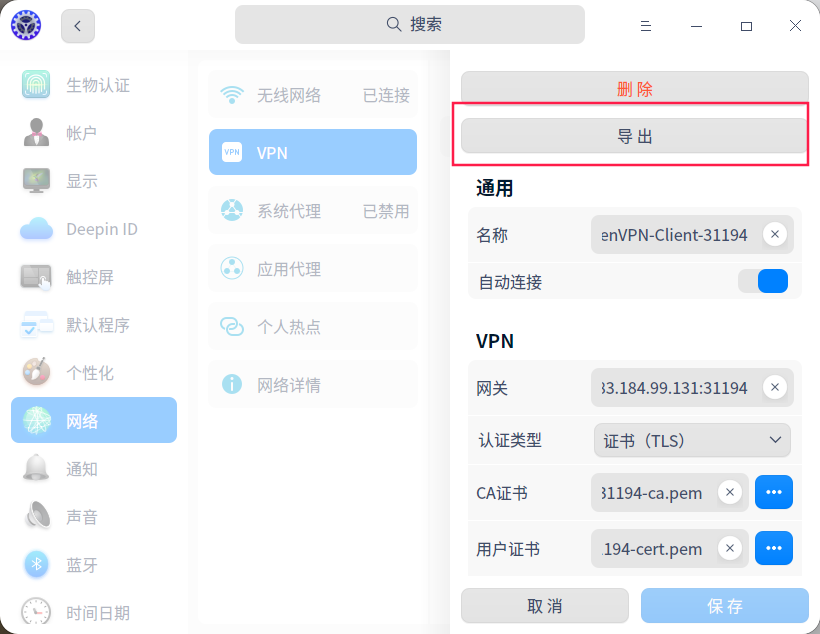
如果上述操作完还是不行,就把控制中心里成功添加的VPN导出成配置文件(可以隐藏了密钥、IP后发上来),然后和原配置文件对比一下有什么不同。

截图_dde-control-center_20220705201024.png

Reply View the author
186******66
deepin
2022-07-06 17:22
#4

非常感谢!

但是修改成yes之后还是不行

导入之后再导出的配置如下,请帮忙看看:

client
remote '*********' 1195 tcp
auth-user-pass
cipher AES-256-CBC
comp-lzo yes
tun-mtu 1400
dev tun
proto tcp
nobind
auth-nocache
script-security 2
persist-key
persist-tun
user nm-openvpn
group nm-openvpn

-----BEGIN CERTIFICATE-----

-----END CERTIFICATE-----

Reply View the author
150******77
deepin
2022-07-06 18:19
#5

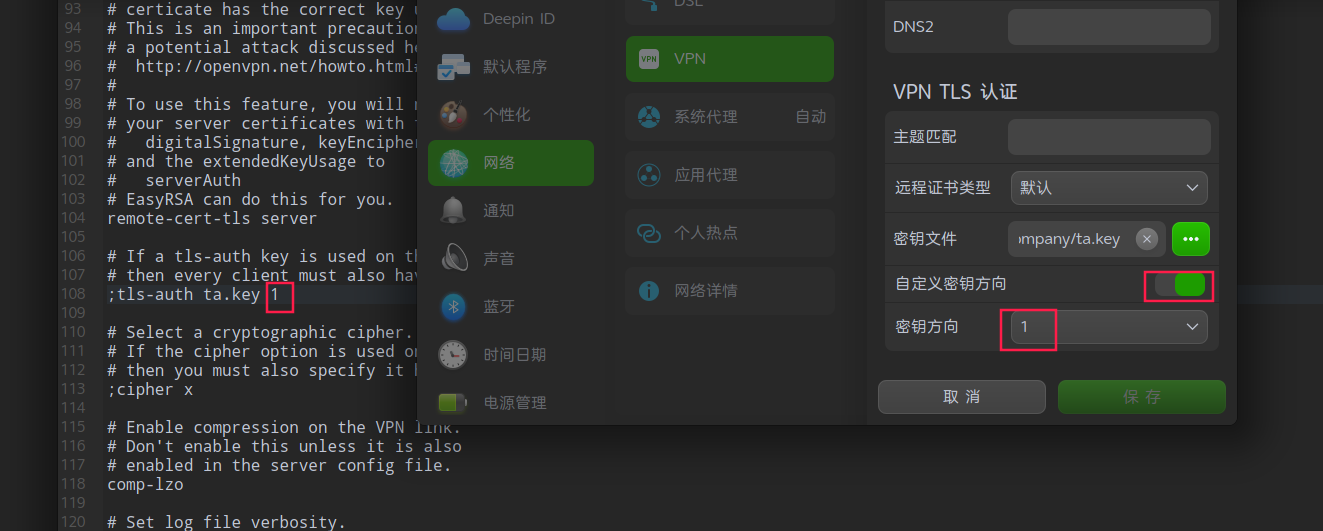
建议你对比下vpn.ovpn与深度vpn导出配置的差异,我之前遇过tls-auth没有配置秘钥方向导致连接不上。

image.png

Reply View the author
hotime
deepin
2022-07-06 21:22
#6
186******66

非常感谢!

但是修改成yes之后还是不行

导入之后再导出的配置如下,请帮忙看看:

client
remote '*********' 1195 tcp
auth-user-pass
cipher AES-256-CBC
comp-lzo yes
tun-mtu 1400
dev tun
proto tcp
nobind
auth-nocache
script-security 2
persist-key
persist-tun
user nm-openvpn
group nm-openvpn

-----BEGIN CERTIFICATE-----

-----END CERTIFICATE-----

之前提到的comp-lzo的修改先忽略吧,因为你原贴的终端中连接openvpn的运行记录其中一行内容中写着comp-lzo no,所以不确定你的服务器究竟是开启lzo压缩还是关闭lzo压缩的,就先按原来的comp-lzo adaptive(这个是自适应的意思)

Tue Jul  5 18:11:12 2022 PUSH: Received control message: 
'PUSH_REPLY,dhcp-option DNS 198.18.0.1,dhcp-option DNS 198.18.0.2,ping 
1,ping-restart 60,comp-lzo no,route-gateway 100.64.34.1,topology 
subnet,socket-flags TCP_NODELAY,ifconfig 100.64.34.4 
255.255.254.0,peer-id 0,cipher AES-256-GCM'

另外注意到更为重要的一点是配置文件中有一行配置为:scramble obfuscate JcUFpGY3=LGUg97JL,而scramble在deepin的openvpn设置中是没有这个选项的,看起来暂不支持。

StrongVPN官网关于在Ubuntu中使用的说明中也提到:
Please notice: No matter which server (old or new) you are using, Scramble option is not supported on Ubuntu 16.10 and 17.04 .

Ubuntu用到的是network-manager-openvpn,deepin也在用,综上,deepin这里应该同样是不支持的。


你需要找到支持scramble的带GUI的openvpn客户端,如果找不到那暂时只能在终端中用openvpn命令连接了。

Reply View the author
186******66
deepin
2022-07-06 22:21
#7

多谢大神!

Reply View the author