

 中文
中文 
SamLukeYes deepin
2022-04-15 00:20 deepin 系统级的包管理器原则上只有管理员能安装和卸载软件包,deepin 为了将其作为商店后端,可能在权限上做了一些特殊处理。我并不认同将 apt/dpkg 作为商店后端的做法,不过这估计一时半会儿也改不了。
Reply Like 1 View the author
 deepin
 系统级的包管理器原则上只有管理员能安装和卸载软件包,deepin 为了将其作为商店后端,可能在权限上做了一些特殊处理。我并不认同将 apt/dpkg 作为商店后端的做法,不过这估计一时半会儿也改不了。

 deepin
 系统级的包管理器原则上只有管理员能安装和卸载软件包,deepin 为了将其作为商店后端,可能在权限上做了一些特殊处理。我并不认同将 apt/dpkg 作为商店后端的做法,不过这估计一时半会儿也改不了。
可这会带来标准用户权限过大,影响管理员用户
deepin 可这会带来标准用户权限过大,影响管理员用户
估计是允许了普通用户通过特定手段(商店、右键卸载等)进行包管理的操作。这种逻辑本身就是个巨坑,dpkg 这种系统级的包管理本来就应该通过管理员验证才能进行操作。
deepin 可这会带来标准用户权限过大,影响管理员用户
如果用 flatpak 作为商店后端就不会有这个问题,管理员可以用 apt 部署普通用户不能卸载的软件,普通用户可以通过 flatpak 安装软件。
deepin 如果用 flatpak 作为商店后端就不会有这个问题,管理员可以用 apt 部署普通用户不能卸载的软件,普通用户可以通过 flatpak 安装软件。


 deepin
 这是feature不是bug

 deepin
  deepin
 试试给应用商店程序设置权限,使标准用户不能运行
deepin 有前瞻性,更有发展力
deepin 试试给应用商店程序设置权限,使标准用户不能运行
如设置呢,如下是不是可在这个里面设置,不太懂,请指教!
[Desktop Entry]
Categories=Qt;System;
Comment=A general Linux software manager
Exec=deepin-home-appstore-client %U
GenericName=App Store
Icon=deepin-app-store
MimeType=x-scheme-handler/appstore
Name=App Store
StartupNotify=false
Terminal=false
Type=Application
X-Deepin-Vendor=user-custom
X-MultipleArgs=false
X-Deepin-AppID=deepin-app-store
deepin 如设置呢,如下是不是可在这个里面设置,不太懂,请指教!
[Desktop Entry]
Categories=Qt;System;
Comment=A general Linux software manager
Exec=deepin-home-appstore-client %U
GenericName=App Store
Icon=deepin-app-store
MimeType=x-scheme-handler/appstore
Name=App Store
StartupNotify=false
Terminal=false
Type=Application
X-Deepin-Vendor=user-custom
X-MultipleArgs=false
X-Deepin-AppID=deepin-app-store
sudo chmod -x /usr/bin/deepin-home-appstore-client
试了一下,取消可执行属性后,点击应用商店没有反应,应该达到你的要求
deepin sudo chmod -x /usr/bin/deepin-home-appstore-client
试了一下,取消可执行属性后,点击应用商店没有反应,应该达到你的要求
你的意思是不是这个,但这样这个程序在管理员账户下也不不执行呀,这两个账户有什么区别呢?
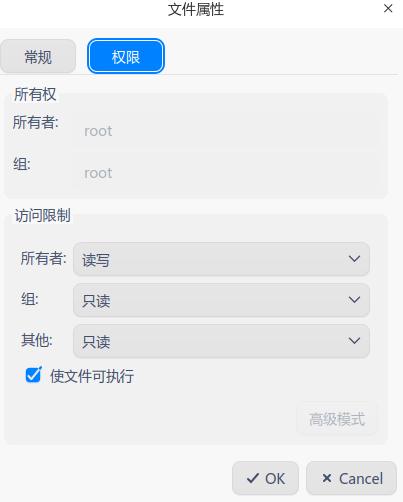
deepin 你的意思是不是这个,但这样这个程序在管理员账户下也不不执行呀,这两个账户有什么区别呢?
如果想让管理员能执行,就sudo chmod 744 /usr/bin/deepin-home-appstore-client
deepin 如果想让管理员能执行,就sudo chmod 744 /usr/bin/deepin-home-appstore-client
用这个命令,管理员 打不开。这可咋办?
deepin 777
deepin 将权限设置回777或755。如果不想让标准用户使用应用商店,可以删除该用户启动器中应用商店图标
deepin 将权限设置回777或755。如果不想让标准用户使用应用商店,可以删除该用户启动器中应用商店图标
可以了,谢谢
deepin 将权限设置回777或755。如果不想让标准用户使用应用商店,可以删除该用户启动器中应用商店图标
777是什么鬼
deepin 777是什么鬼
所有者、所在组、其他用户到有读、写、执行权限
deepin 所有者、所在组、其他用户到有读、写、执行权限
所以说你觉得 /usr/bin 里的文件应该 777 吗
Popular Ranking
ChangePopular Events
More


 A bug with the language select
如下图,20.5系统,两个用户,一个为管理员(1000),一个为标准用户(1001),管理员用户就是装系统过程中设置的,还有一个标准用户,是后来增加的
最近发现,标准用户在应用商店可以安装、缷载、更新软件,特别是管理员用户安装的软件,当然还有系统自带的软件,这个问题是不是有点大,标准用户和管理员用户的权限一样,这是会出问题的呀