

 中文
中文 
Tristan deepin
2021-07-13 17:51 deepin 好像木的办法 , 只能把所有的都隐藏掉 , 我尝试了去掉开机自动挂载 , 还是有显示
Reply Like 0 View the author
 deepin
 好像木的办法 , 只能把所有的都隐藏掉 , 我尝试了去掉开机自动挂载 , 还是有显示
 deepin
 用这个方法,
先查看下你要隐藏的分区的UUID
然后修改/etc/udev/rules.d/80-udisks2.rules这个文件,重启
https://blog.csdn.net/weixin_46517129/article/details/113687742

 deepin
 用这个方法,
先查看下你要隐藏的分区的UUID
然后修改/etc/udev/rules.d/80-udisks2.rules这个文件,重启
https://blog.csdn.net/weixin_46517129/article/details/113687742
 好难受,还是不行,UUID不行,指定类型跟名称也不行。(改完重启过)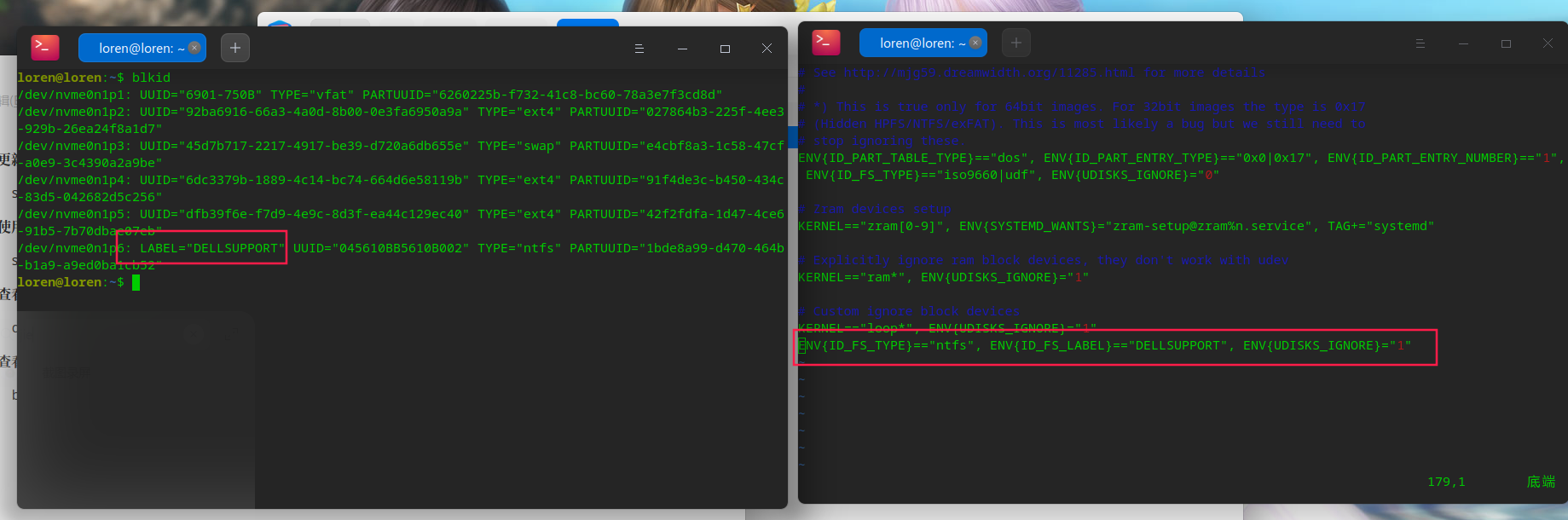
deepin 好像木的办法 , 只能把所有的都隐藏掉 , 我尝试了去掉开机自动挂载 , 还是有显示
唉,看着实在是太难受了。

 deepin
 https://bbs.deepin.org/zh/post/222791
实测可以成功,只不过隐藏了 EFI,/boot/efi 就没有读取权限了,有时候不方便
deepin https://bbs.deepin.org/zh/post/222791
实测可以成功,只不过隐藏了 EFI,/boot/efi 就没有读取权限了,有时候不方便
太感谢了,这个方法可行。
deepin # 查看UUID
blkid
# 编辑配置文件
vim /etc/udev/rules.d/90-hide_parts.rules
# 添加规则
ENV{ID_FS_UUID}=="***", ENV{UDISKS_IGNORE}="1"
Popular Events
More


 The settings menu needs to be translated into Russian.
不知道是做了什么多出来的这个1.5G的卷,要怎么隐藏它呢?强迫症看无法忍受这个东西。有没有大神知道怎么做的呢?