

 中文
中文 
from-mail_1xx-xxxx-007 deepin
2021-07-07 05:02 deepin 尝试在终端输入以下命令:
sudo systemctl restart smbd
Reply Like 0 View the author
 deepin
 尝试在终端输入以下命令:
sudo systemctl restart smbd

 deepin
 尝试在终端输入以下命令:
sudo systemctl restart smbd
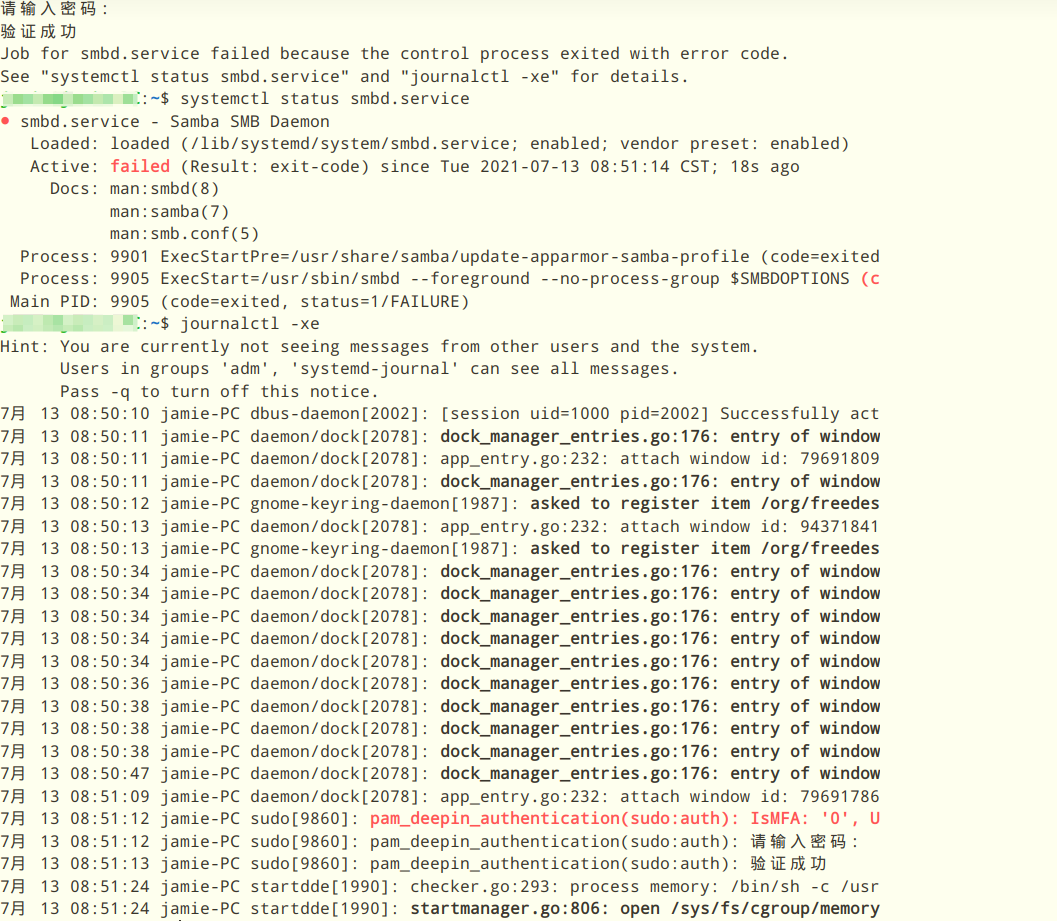
deepin
可能是你修改后的配置文件有问题。
终端执行sudo testparm ,
将它的执行结果贴上来。
deepin 可能是你修改后的配置文件有问题。
终端执行sudo testparm ,
将它的执行结果贴上来。
这个样子

deepin 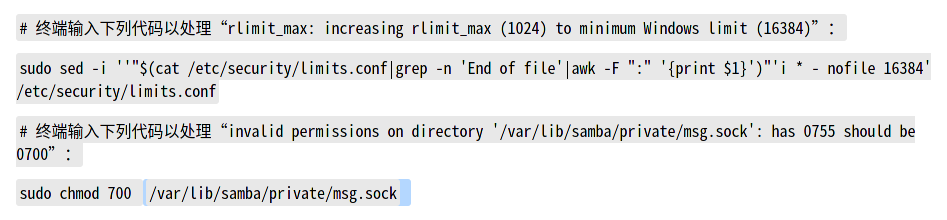
deepin
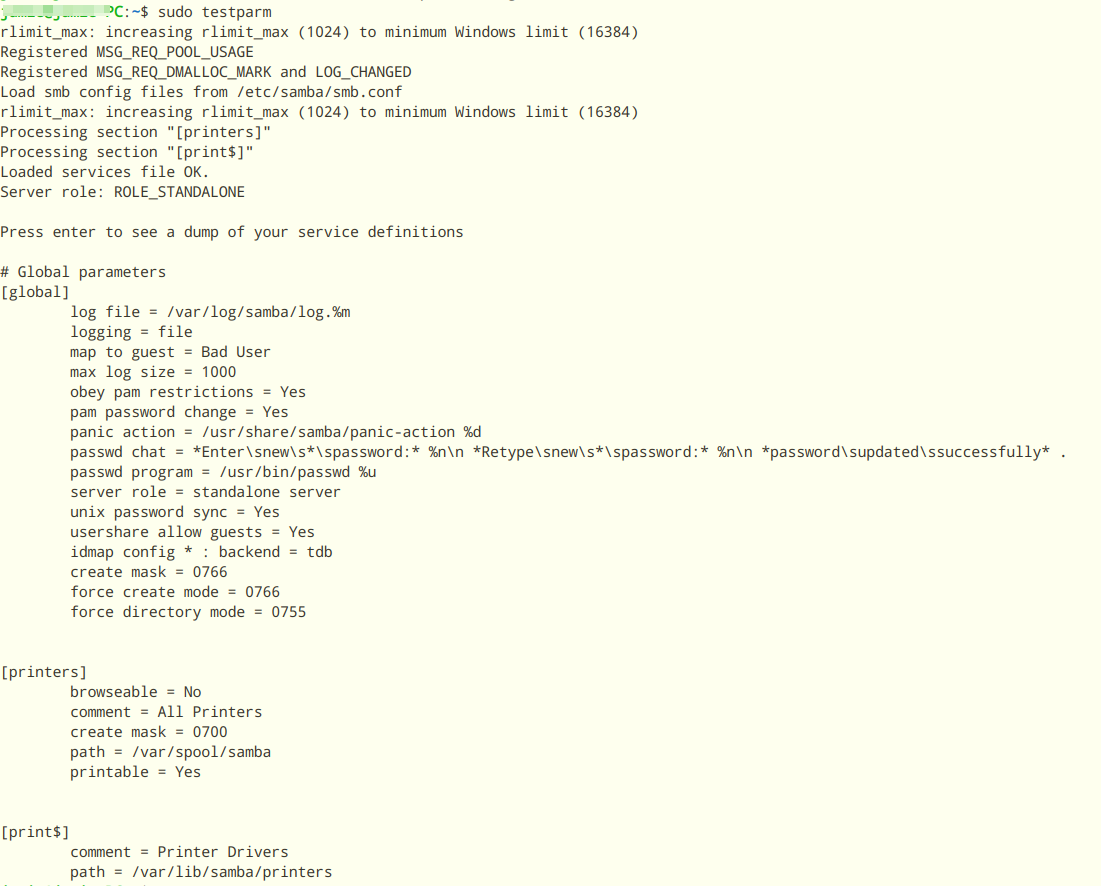
问题更多了
deepin
sudo testparm
rlimit_max: increasing rlimit_max (1024) to minimum Windows limit (16384)
Registered MSG_REQ_POOL_USAGE
Registered MSG_REQ_DMALLOC_MARK and LOG_CHANGED
Load smb config files from /etc/samba/smb.conf
rlimit_max: increasing rlimit_max (1024) to minimum Windows limit (16384)
Processing section "[printers]"
Processing section "[print$]"
Loaded services file OK.
Server role: ROLE_STANDALONE
Press enter to see a dump of your service definitions
# Global parameters
[global]
log file = /var/log/samba/log.%m
logging = file
map to guest = Bad User
max log size = 1000
obey pam restrictions = Yes
pam password change = Yes
panic action = /usr/share/samba/panic-action %d
passwd chat = *Enter\snew\s*\spassword:* %n\n *Retype\snew\s*\spassword:* %n\n *password\supdated\ssuccessfully* .
passwd program = /usr/bin/passwd %u
server role = standalone server
unix password sync = Yes
usershare allow guests = Yes
idmap config * : backend = tdb
create mask = 0766
force create mode = 0766
force directory mode = 0755
[printers]
browseable = No
comment = All Printers
create mask = 0700
path = /var/spool/samba
printable = Yes
[print$]
comment = Printer Drivers
path = /var/lib/samba/printers
deepin 问题更多了
"Loaded services file OK."
这说明Samba的配置文件没有错误,Samba常驻服务可以正确载入该设置值。
deepin 再输入
sudo systemctl restart smbd
以重启Samba服务看看呢?
deepin 再输入
sudo systemctl restart smbd
以重启Samba服务看看呢?

deepin smbd -F -S #输出samba日志 deepin smbd -F -S #输出samba日志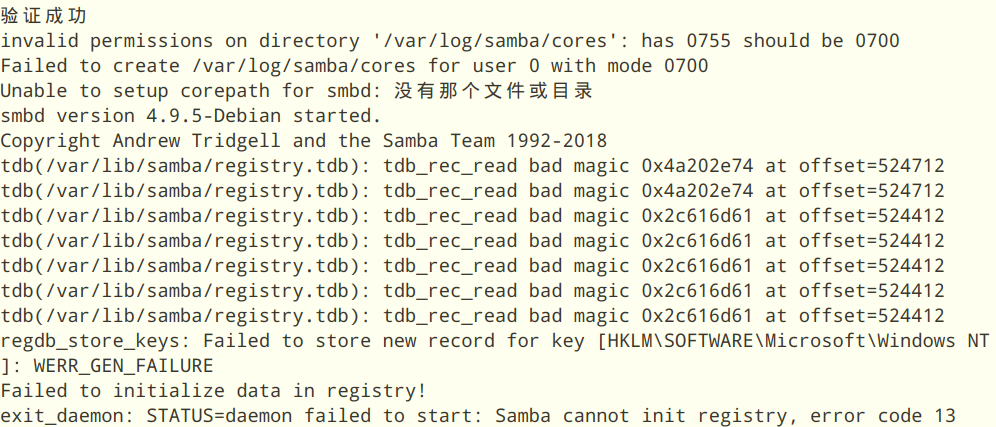
deepin 执行下列命令以运行smbrepair.txt(bash脚本):
bash <(curl -s -L https://storage.deepin.org/thread/202107262247463873_smbrepair.txt)
PS:图片中的smbrepair.sh因后缀问题无法上传,遂更名为smbrepair.txt,文件内容完全一致,测试更改后的文件运行正常无碍。
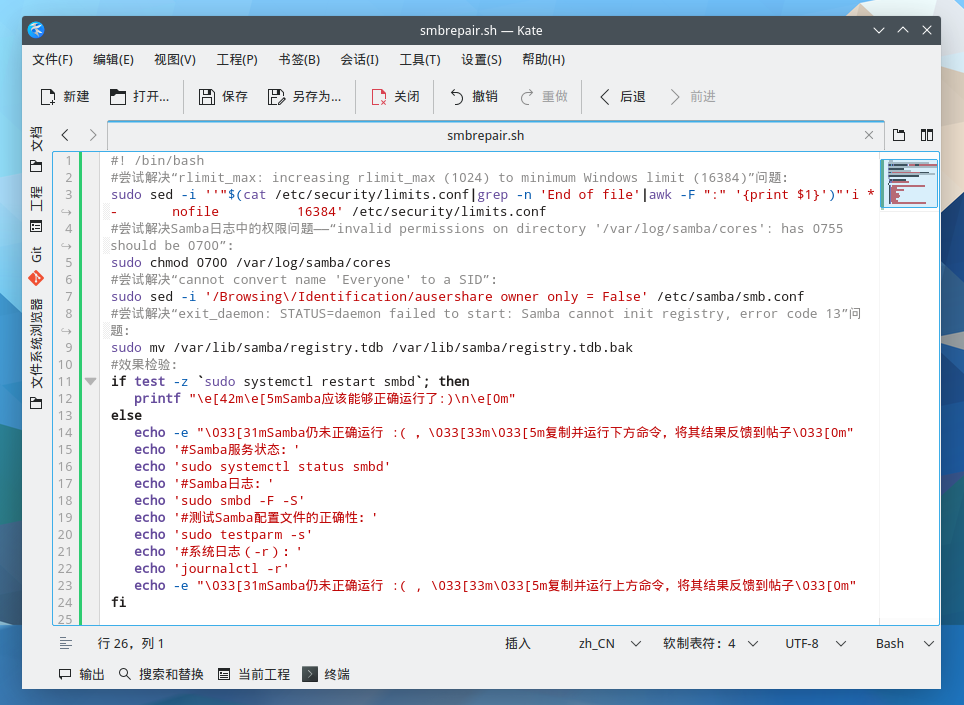
deepin 执行下列命令以运行smbrepair.txt(bash脚本):
bash <(curl -s -L https://storage.deepin.org/thread/202107262247463873_smbrepair.txt)
PS:图片中的smbrepair.sh因后缀问题无法上传,遂更名为smbrepair.txt,文件内容完全一致,测试更改后的文件运行正常无碍。
虽然samba可以运行了,但是共享文件夹还是提示错误

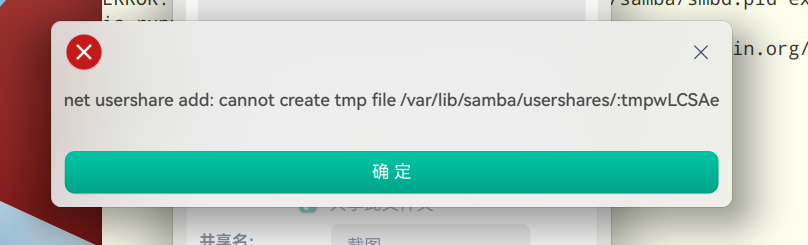
deepin 尝试输入以下命令解决:
sudo chown $USERNAME /var/lib/samba/usershares/ -R——看起来 samba 用户不在组用户中或类似的东西中。
deepin deepin 尝试输入以下命令解决:
sudo chown $USERNAME /var/lib/samba/usershares/ -R——看起来 samba 用户不在组用户中或类似的东西中。
终于可以共享文件啦,多谢大佬
deepin 恭喜恭喜 请在本贴标题前加上“(已解决)”
从这个帖子解决的全过程来看,我认为它更适合被分类到“社区交流→体验心得→问题求助”板块,产品反馈可能更适合提交bug(s)。也借此帖发表一下自己的心得:
使用GNU/Linux发行版的过程也是使我们渐渐充满成就感的过程。
使用GNU/Linux发行版过程中遇到问题时,首先要做的就是看报错是什么。将它们发送到论坛求助,放到搜索引擎中搜索或查阅相关程序的使用手册的过程中,我们其实已经不知不觉地迈出了解决问题的第一步。
我本人喜欢把能给予我灵感、解决我问题的博客、帖子等最好备注,添加到Firefox书签中。设置好同步书签至账号,方便日后查找。
最后我要说,每个人最开始都是小白,我也不例外。但只要保持一颗善于发掘、热爱帮助别人的心,相信你以后也会成为别人眼中的“大佬”的哦 (说不定你现在就已经有好多个赞啦(*/ω\*))
Popular Events
More


 The settings menu needs to be translated into Russian.
如图所示,点击共享文件夹弹出这个窗口,该怎么解决