

 中文
中文 
Ziggy deepin
2021-07-01 07:09 deepin 用dist-upgrade,全选Y
Reply Like 0 View the author
 deepin
 用dist-upgrade,全选Y

 deepin
 用dist-upgrade,全选Y
还是有问题,是我电脑的问题吗?
sudo apt dist-upgrade
正在读取软件包列表... 完成
正在分析软件包的依赖关系树
正在读取状态信息... 完成
正在计算更新... 完成
升级了 0 个软件包,新安装了 0 个软件包,要卸载 0 个软件包,有 0 个软件包未被升级。
有 3 个软件包没有被完全安装或卸载。
解压缩后会消耗 0 B 的额外空间。
您希望继续执行吗? [Y/n] y
正在设置 initramfs-tools (0.137.26-1+dde) ...
update-initramfs: deferring update (trigger activated)
正在设置 nvidia-kernel-dkms (460.73.01-1~bpo10+1) ...
Removing old nvidia-current-460.73.01 DKMS files...
------------------------------
Deleting module version: 460.73.01
completely from the DKMS tree.
------------------------------
Done.
Loading new nvidia-current-460.73.01 DKMS files...
Building for 5.11.13-amd64-desktop 5.12.9-amd64-desktop
Building initial module for 5.11.13-amd64-desktop
Error! Bad return status for module build on kernel: 5.11.13-amd64-desktop (x86_64)
Consult /var/lib/dkms/nvidia-current/460.73.01/build/make.log for more information.
dpkg: 处理软件包 nvidia-kernel-dkms (--configure)时出错:
已安装 nvidia-kernel-dkms 软件包 post-installation 脚本 子进程返回错误状态 10
dpkg: 依赖关系问题使得 nvidia-driver 的配置工作不能继续:
nvidia-driver 依赖于 nvidia-kernel-dkms (= 460.73.01-1~bpo10+1) | nvidia-kernel-460.73.01;然而:
软件包 nvidia-kernel-dkms 尚未配置。
未安装软件包 nvidia-kernel-460.73.01。
软件包 nvidia-kernel-dkms 提供了 nvidia-kernel-460.73.01,但它尚未被配置。
dpkg: 处理软件包 nvidia-driver (--configure)时出错:
依赖关系问题 - 仍未被配置
正在处理用于 initramfs-tools (0.137.26-1+dde) 的触发器 ...
update-initramfs: Generating /boot/initrd.img-5.12.9-amd64-desktop
/usr/sbin/mkinitramfs: 85: /usr/sbin/mkinitramfs: modinfo: Text file busy
cryptsetup: WARNING: The initramfs image may not contain cryptsetup binaries
nor crypto modules. If that's on purpose, you may want to uninstall the
'cryptsetup-initramfs' package in order to disable the cryptsetup initramfs
integration and avoid this warning.
setupcon is missing. Please install the 'console-setup' package.
W: plymouth: The plugin label.so is missing, the selected theme might not work as expected.
W: plymouth: You might want to install the plymouth-themes package to fix this.
I: The initramfs will attempt to resume from /dev/nvme0n1p6
I: (UUID=bdfd51a8-931a-4987-af08-b083ea8606c1)
I: Set the RESUME variable to override this.
live-boot: core filesystems/usr/share/initramfs-tools/hooks/live: 76: /usr/share/initramfs-tools/hooks/live: modprobe: Text file busy
devices/usr/share/initramfs-tools/hooks/live: 76: /usr/share/initramfs-tools/hooks/live: modprobe: Text file busy
/usr/share/initramfs-tools/hooks/live: 76: /usr/share/initramfs-tools/hooks/live: modprobe: Text file busy
utils udev blockdev dns.
在处理时有错误发生:
nvidia-kernel-dkms
nvidia-driver
E: Sub-process /usr/bin/dpkg returned an error code (1)

 deepin
 顶楼那个错误其实没啥影响,我也遇到了。要消除它,按出错信息的提示,安装 console-setup 和 plymouth-themes 两个包即可。我也不知道为啥系统默认没装。
deepin 二楼的错误,根据提示看一下 /var/lib/dkms/nvidia-current/460.73.01/build/make.log 里面的错误信息,如果看不懂就贴出来。
这是在编译 nvidia 驱动的内核模块,最常见的问题可能是 gcc 编译器的版本不合适,你看一下 gcc --version 的输出,我这里是 gcc (Uos 8.3.0.3-3+rebuild) 8.3.0 。
 deepin
 正在读取软件包列表... 完成
正在分析软件包的依赖关系树
正在读取状态信息... 完成
正在计算更新... 完成
升级了 0 个软件包,新安装了 0 个软件包,要卸载 0 个软件包,有 0 个软件包未被升级。
有 3 个软件包没有被完全安装或卸载。
解压缩后会消耗 0 B 的额外空间。
您希望继续执行吗? [Y/n] y
正在设置 grub-efi-amd64-signed (1.67.2+2.04+dde) ...
正在为 x86_64-efi 平台进行安装。
grub-install:警告: Cannot set EFI variable Boot0010.
grub-install:警告: efivarfs_set_variable: writing to fd 7 failed: 设备上没有空间.
grub-install:警告: _efi_set_variable_mode: ops->set_variable() failed: 设备上没有空间.
grub-install:错误: failed to register the EFI boot entry: 设备上没有空间.
dpkg: 处理软件包 grub-efi-amd64-signed (--configure)时出错:
已安装 grub-efi-amd64-signed 软件包 post-installation 脚本 子进程返回错误状态 1
正在设置 shim-helpers-amd64-signed (1+15.4+5) ...
正在为 x86_64-efi 平台进行安装。
grub-install:警告: Cannot set EFI variable Boot0010.
grub-install:警告: efivarfs_set_variable: writing to fd 8 failed: 设备上没有空间.
grub-install:警告: _efi_set_variable_mode: ops->set_variable() failed: 设备上没有空间.
grub-install:错误: failed to register the EFI boot entry: 设备上没有空间.
dpkg: 处理软件包 shim-helpers-amd64-signed (--configure)时出错:
已安装 shim-helpers-amd64-signed 软件包 post-installation 脚本 子进程返回错误状态 1
dpkg: 依赖关系问题使得 shim-signed:amd64 的配置工作不能继续:
shim-signed:amd64 依赖于 shim-helpers-amd64-signed (>= 1+15.4+2);然而:
软件包 shim-helpers-amd64-signed 尚未配置。
dpkg: 处理软件包 shim-signed:amd64 (--configure)时出错:
依赖关系问题 - 仍未被配置
在处理时有错误发生:
grub-efi-amd64-signed
shim-helpers-amd64-signed
shim-signed:amd64
E: Sub-process /usr/bin/dpkg returned an error code (1)
deepin 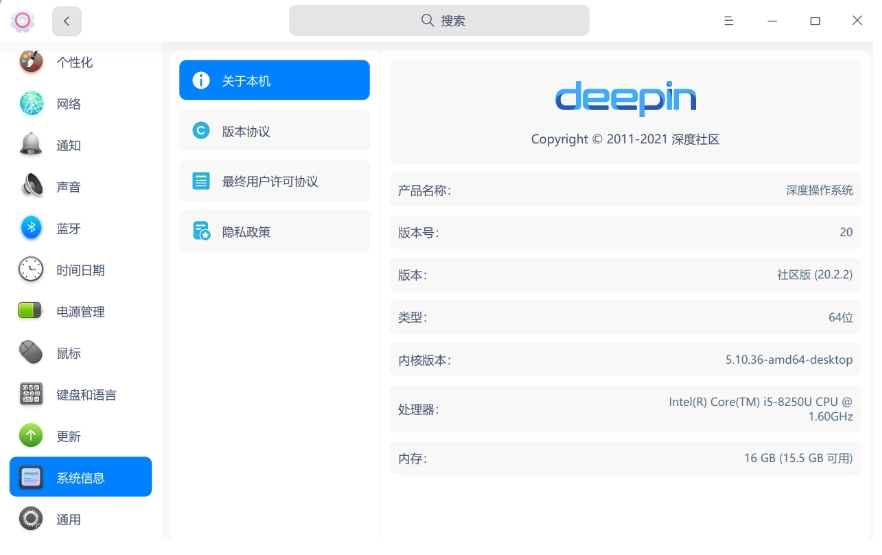
 deepin
 还是有问题,是我电脑的问题吗?
sudo apt dist-upgrade
正在读取软件包列表... 完成
正在分析软件包的依赖关系树
正在读取状态信息... 完成
正在计算更新... 完成
升级了 0 个软件包,新安装了 0 个软件包,要卸载 0 个软件包,有 0 个软件包未被升级。
有 3 个软件包没有被完全安装或卸载。
解压缩后会消耗 0 B 的额外空间。
您希望继续执行吗? [Y/n] y
正在设置 initramfs-tools (0.137.26-1+dde) ...
update-initramfs: deferring update (trigger activated)
正在设置 nvidia-kernel-dkms (460.73.01-1~bpo10+1) ...
Removing old nvidia-current-460.73.01 DKMS files...
------------------------------
Deleting module version: 460.73.01
completely from the DKMS tree.
------------------------------
Done.
Loading new nvidia-current-460.73.01 DKMS files...
Building for 5.11.13-amd64-desktop 5.12.9-amd64-desktop
Building initial module for 5.11.13-amd64-desktop
Error! Bad return status for module build on kernel: 5.11.13-amd64-desktop (x86_64)
Consult /var/lib/dkms/nvidia-current/460.73.01/build/make.log for more information.
dpkg: 处理软件包 nvidia-kernel-dkms (--configure)时出错:
已安装 nvidia-kernel-dkms 软件包 post-installation 脚本 子进程返回错误状态 10
dpkg: 依赖关系问题使得 nvidia-driver 的配置工作不能继续:
nvidia-driver 依赖于 nvidia-kernel-dkms (= 460.73.01-1~bpo10+1) | nvidia-kernel-460.73.01;然而:
软件包 nvidia-kernel-dkms 尚未配置。
未安装软件包 nvidia-kernel-460.73.01。
软件包 nvidia-kernel-dkms 提供了 nvidia-kernel-460.73.01,但它尚未被配置。
dpkg: 处理软件包 nvidia-driver (--configure)时出错:
依赖关系问题 - 仍未被配置
正在处理用于 initramfs-tools (0.137.26-1+dde) 的触发器 ...
update-initramfs: Generating /boot/initrd.img-5.12.9-amd64-desktop
/usr/sbin/mkinitramfs: 85: /usr/sbin/mkinitramfs: modinfo: Text file busy
cryptsetup: WARNING: The initramfs image may not contain cryptsetup binaries
nor crypto modules. If that's on purpose, you may want to uninstall the
'cryptsetup-initramfs' package in order to disable the cryptsetup initramfs
integration and avoid this warning.
setupcon is missing. Please install the 'console-setup' package.
W: plymouth: The plugin label.so is missing, the selected theme might not work as expected.
W: plymouth: You might want to install the plymouth-themes package to fix this.
I: The initramfs will attempt to resume from /dev/nvme0n1p6
I: (UUID=bdfd51a8-931a-4987-af08-b083ea8606c1)
I: Set the RESUME variable to override this.
live-boot: core filesystems/usr/share/initramfs-tools/hooks/live: 76: /usr/share/initramfs-tools/hooks/live: modprobe: Text file busy
devices/usr/share/initramfs-tools/hooks/live: 76: /usr/share/initramfs-tools/hooks/live: modprobe: Text file busy
/usr/share/initramfs-tools/hooks/live: 76: /usr/share/initramfs-tools/hooks/live: modprobe: Text file busy
utils udev blockdev dns.
在处理时有错误发生:
nvidia-kernel-dkms
nvidia-driver
E: Sub-process /usr/bin/dpkg returned an error code (1)
你用了英伟达闭源显卡驱动,所以匹配5.10.x比较合适,建议你把内核切换到5.10.x,然后再升级系统应该就没有问题了
Popular Events
More


 The settings menu needs to be translated into Russian.
报错如下:
sudo apt update && sudo apt upgrade
请输入密码:
验证成功
命中:1 https://d.store.deepinos.org.cn InRelease
命中:2 https://community-packages.deepin.com/deepin apricot InRelease
命中:3 https://community-packages.deepin.com/printer eagle InRelease
命中:4 https://home-store-img.uniontech.com/appstore eagle InRelease
命中:5 https://repo.steampowered.com/steam stable InRelease
sh: 1: /usr/bin/deepin-app-store-pkgcache: not found
正在读取软件包列表... 完成
正在分析软件包的依赖关系树
正在读取状态信息... 完成
有 30 个软件包可以升级。请执行 ‘apt list --upgradable’ 来查看它们。
正在读取软件包列表... 完成
正在分析软件包的依赖关系树
正在读取状态信息... 完成
正在计算更新... 完成
下列软件包的版本将保持不变:
libegl-nvidia0 libegl-nvidia0:i386 libgl1-nvidia-glvnd-glx libgl1-nvidia-glvnd-glx:i386
libgles-nvidia1:i386 libgles-nvidia2:i386 libglx-nvidia0 libglx-nvidia0:i386 libnvidia-eglcore
libnvidia-eglcore:i386 libnvidia-glcore libnvidia-glcore:i386 libnvidia-glvkspirv
libnvidia-glvkspirv:i386 libnvidia-ml1 nvidia-alternative nvidia-driver nvidia-driver-bin
nvidia-driver-libs nvidia-driver-libs:i386 nvidia-egl-icd nvidia-egl-icd:i386 nvidia-kernel-dkms
nvidia-kernel-support nvidia-smi nvidia-vdpau-driver nvidia-vulkan-icd nvidia-vulkan-icd:i386
shim-signed xserver-xorg-video-nvidia
升级了 0 个软件包,新安装了 0 个软件包,要卸载 0 个软件包,有 30 个软件包未被升级。
有 2 个软件包没有被完全安装或卸载。
解压缩后会消耗 0 B 的额外空间。
您希望继续执行吗? [Y/n] y
正在设置 initramfs-tools (0.137.26-1+dde) ...
update-initramfs: deferring update (trigger activated)
正在设置 linux-firmware (1.197.1-1+eagle) ...
update-initramfs: Generating /boot/initrd.img-5.12.9-amd64-desktop
/usr/sbin/mkinitramfs: 76: /usr/sbin/mkinitramfs: modprobe: Text file busy
/usr/sbin/mkinitramfs: 312: /usr/sbin/mkinitramfs: dirname: Text file busy
/usr/sbin/mkinitramfs: 309: /usr/sbin/mkinitramfs: dirname: Text file busy
/usr/sbin/mkinitramfs: 312: /usr/sbin/mkinitramfs: dirname: Text file busy
/usr/sbin/mkinitramfs: 311: /usr/sbin/mkinitramfs: cp: Text file busy
cryptsetup: WARNING: The initramfs image may not contain cryptsetup binaries
nor crypto modules. If that's on purpose, you may want to uninstall the
'cryptsetup-initramfs' package in order to disable the cryptsetup initramfs
integration and avoid this warning.
setupcon is missing. Please install the 'console-setup' package.
W: plymouth: The plugin label.so is missing, the selected theme might not work as expected.
W: plymouth: You might want to install the plymouth-themes package to fix this.
I: The initramfs will attempt to resume from /dev/nvme0n1p6
I: (UUID=bdfd51a8-931a-4987-af08-b083ea8606c1)
I: Set the RESUME variable to override this.
/usr/share/initramfs-tools/hooks/zz-busybox: 38: /usr/share/initramfs-tools/hooks/zz-busybox: ln: Text file busy
E: /usr/share/initramfs-tools/hooks/zz-busybox failed with return 2.
update-initramfs: failed for /boot/initrd.img-5.12.9-amd64-desktop with 2.
dpkg: 处理软件包 linux-firmware (--configure)时出错:
已安装 linux-firmware 软件包 post-installation 脚本 子进程返回错误状态 2
正在处理用于 initramfs-tools (0.137.26-1+dde) 的触发器 ...
update-initramfs: Generating /boot/initrd.img-5.12.9-amd64-desktop
/usr/share/initramfs-tools/hooks/live: 76: /usr/share/initramfs-tools/hooks/live: modprobe: Text file busy
cryptsetup: WARNING: The initramfs image may not contain cryptsetup binaries
nor crypto modules. If that's on purpose, you may want to uninstall the
'cryptsetup-initramfs' package in order to disable the cryptsetup initramfs
integration and avoid this warning.
setupcon is missing. Please install the 'console-setup' package.
/usr/share/initramfs-tools/hooks/kms: 177: /usr/share/initramfs-tools/hooks/kms: cp: Text file busy
E: /usr/share/initramfs-tools/hooks/kms failed with return 3.
update-initramfs: failed for /boot/initrd.img-5.12.9-amd64-desktop with 3.
dpkg: 处理软件包 initramfs-tools (--configure)时出错:
已安装 initramfs-tools 软件包 post-installation 脚本 子进程返回错误状态 3
在处理时有错误发生:
linux-firmware
initramfs-tools
E: Sub-process /usr/bin/dpkg returned an error code (1)