

 中文
中文 
Ziggy deepin
2021-07-01 01:17 deepin 以前是否正常?正常的内核是多少?
Reply Like 0 View the author
 deepin
 以前是否正常?正常的内核是多少?

 deepin
 以前是否正常?正常的内核是多少?
感谢版主回复,
Killer1675的网卡一直不行,AX210NGW的网卡一直可以
Linux Kernel 是 5.12, 不过按Intel网站描述5.10以上应该都可以
看了Intel的说明,Killer1675和AX210的Linux驱动通用
Deepin的 /lib/firmware下也已经有Intel的ucode文件
刚把这个问题提交给Intel了一下,据说2天给回复
deepin 不知道是Intel驱动的问题还是Deepin的问题
deepin sudo dmesg | grep wifi
[ 5.999953] iwlwifi 0000:03:00.0: enabling device (0000 -> 0002)
[ 6.007237] iwlwifi: No config found for PCI dev 2725/1674, rev=0x420, rfid=0x10d000
[ 6.007583] iwlwifi: probe of 0000:03:00.0 failed with error -22lspci -knn | grep Net -A3; rfkill list
03:00.0 Network controller [0280]: Intel Corporation Device [8086:2725] (rev 1a)
Subsystem: Bigfoot Networks, Inc. Device [1a56:1674]
Kernel modules: iwlwifi, wl
04:00.0 Non-Volatile memory controller [0108]: Sandisk Corp Device [15b7:5006]
Subsystem: Sandisk Corp Device [15b7:5006]
0: hci0: Bluetooth
Soft blocked: no
Hard blocked: nouname -r
5.12.9-amd64-desktop
uname -a
Linux xuezhi-PC 5.12.9-amd64-desktop #1 SMP Wed Jun 9 14:16:41 CST 2021 x86_64 GNU/Linuxsudo lshw -C network
*-network
description: Ethernet interface
product: RTL8111/8168/8411 PCI Express Gigabit Ethernet Controller
vendor: Realtek Semiconductor Co., Ltd.
physical id: 0.1
bus info: pci@0000:02:00.1
logical name: enp2s0f1
version: 12
serial: 80:fa:5b:40:6a:f8
capacity: 1Gbit/s
width: 64 bits
clock: 33MHz
capabilities: pm msi pciexpress msix vpd bus_master cap_list ethernet physical tp mii 10bt 10bt-fd 100bt 100bt-fd 1000bt-fd autonegotiation
configuration: autonegotiation=on broadcast=yes driver=r8169 driverversion=5.12.9-amd64-desktop firmware=rtl8411-2_0.0.1 07/08/13 latency=0 link=no multicast=yes port=twisted pair
resources: irq:18 ioport:d000(size=256) memory:df414000-df414fff memory:df410000-df413fff
*-network UNCLAIMED
description: Network controller
product: Intel Corporation
vendor: Intel Corporation
physical id: 0
bus info: pci@0000:03:00.0
version: 1a
width: 64 bits
clock: 33MHz
capabilities: pm msi pciexpress msix cap_list
configuration: latency=0
resources: memory:df300000-df303fff
deepin 安装了前天发布的驱动,问题已解决
deepin 发现每次更新系统后无线网卡都会掉驱动,都需要重新安装一下驱动,不知道是怎麽回事
deepin deepin 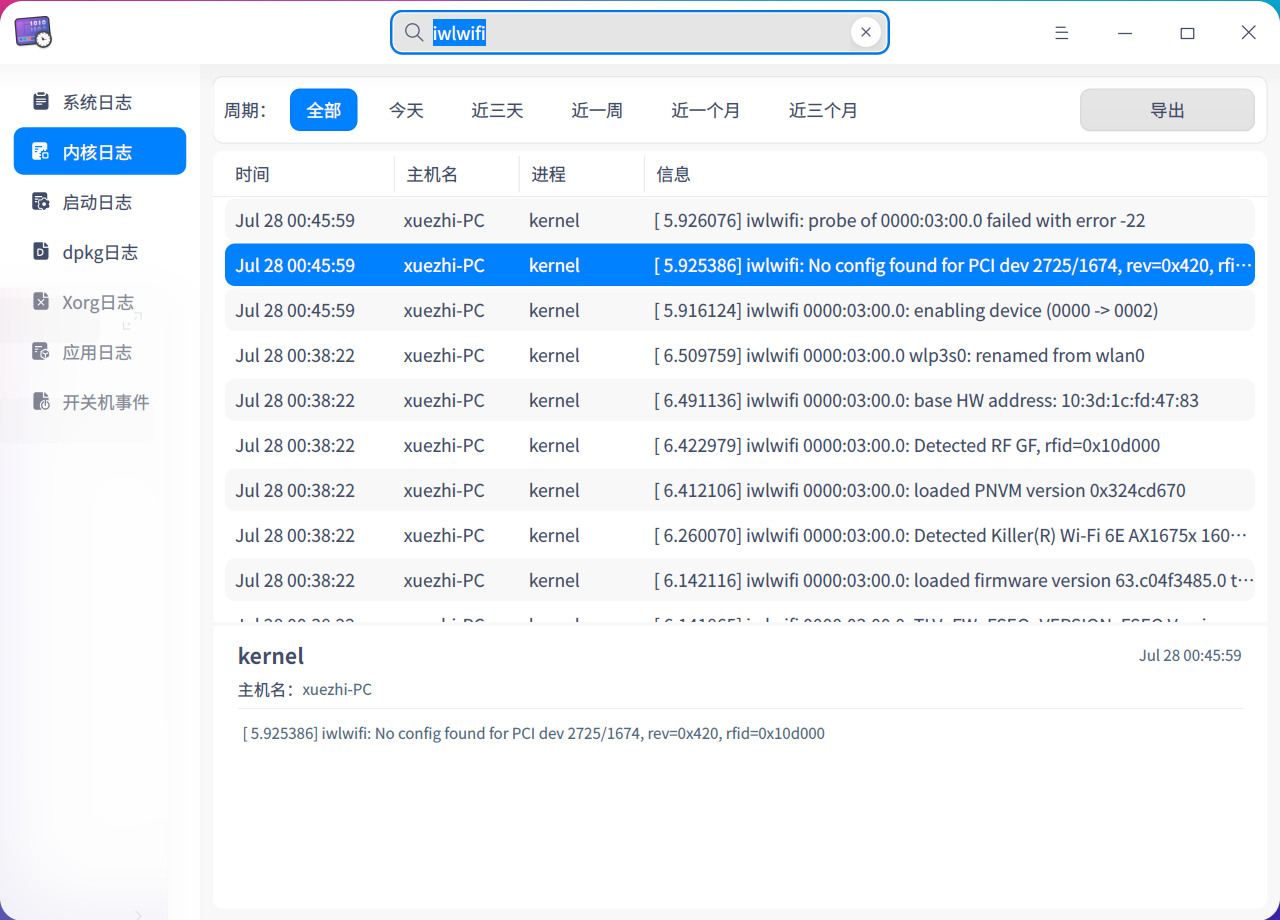
deepin 话说直接把新的ucode文件拷贝到firmware为什么就不好使,每次还需要自己编译安装呢?
 deepin
 话说直接把新的ucode文件拷贝到firmware为什么就不好使,每次还需要自己编译安装呢?
小白请教,请问怎么安装的驱动?
deepin 小白请教,请问怎么安装的驱动?
兜兜转转又换回了Deepin, 才看到消息
在上面的链接里下载解压好,然后直接复制过去就可以了
cp iwlwifi-*.{ucode,pnvm} /lib/firmware/
Intel网站也有说明
https://wireless.wiki.kernel.org/en/users/drivers/iwlwifi
Popular Events
More


 The settings menu needs to be translated into Russian.
刚从ax210ngw换成了killer 1675,也就是ax210ngw的马甲卡,发现无线网卡无法驱动,蓝牙正常
重装系统后问题依旧,20.2.2系统,5.12内核
求助各位大佬解决办法,