

 中文
中文 
uvz deepin
2021-06-11 20:42 deepin 太厉害了,手动点赞, flutter 写桌面坑多吗?
Reply Like 0 View the author
 deepin
 太厉害了,手动点赞, flutter 写桌面坑多吗?
 deepin
 支持flutter
这是把命令行做成了图形界面?
 deepin
 支持flutter
这是把命令行做成了图形界面?
不是的。是基于Dart的正则库写的。
deepin 太厉害了,手动点赞, flutter 写桌面坑多吗?
从这个项目看,还行,都能解决(不支持就换包,换思路)。我是在打包的时候时候碰到问题多。卡了好久。

 deepin
 以后有正则问题问你行吗?
deepin 以后有正则问题问你行吗?
每个语言的库都有点区别。但是如果支持PCRE都一样。欢迎问我。
 deepin
 建议添加根据Exif批量修改照片名称(格式查自定义,Win下有这种软件)
deepin 建议添加根据Exif批量修改照片名称(格式查自定义,Win下有这种软件)
能给个例子吗?或告知软件名称。谢谢
deepin 能给个例子吗?或告知软件名称。谢谢
RenameXif
https://www.appinn.com/renamexif/
这个是我一直使用的,当然还有其他类似软件,因为用着顺手,其他的就未做了解了。
 deepin
 支持
deepin RenameXif
https://www.appinn.com/renamexif/
这个是我一直使用的,当然还有其他类似软件,因为用着顺手,其他的就未做了解了。
https://gitee.com/colatea/renamexif 搞定了
deepin https://gitee.com/colatea/renamexif 搞定了
先点个赞 ,竟然还记着这件事!但因为没有gitee帐号,没法下载试用,希望给个其他的下载方式,谢谢!
deepin 先点个赞,竟然还记着这件事!但因为没有gitee帐号,没法下载试用,希望给个其他的下载方式,谢谢!
不需要账号,你直接进去下载对应版本就行,下载地址如下:
https://gitee.com/colatea/renamexif/releases/v1.0.0
忙了点别的事情,最近抽空写了一个。
deepin 不需要账号,你直接进去下载对应版本就行,下载地址如下:
https://gitee.com/colatea/renamexif/releases/v1.0.0
忙了点别的事情,最近抽空写了一个。
已下载Appimage,但是打不开,系统信息如下:
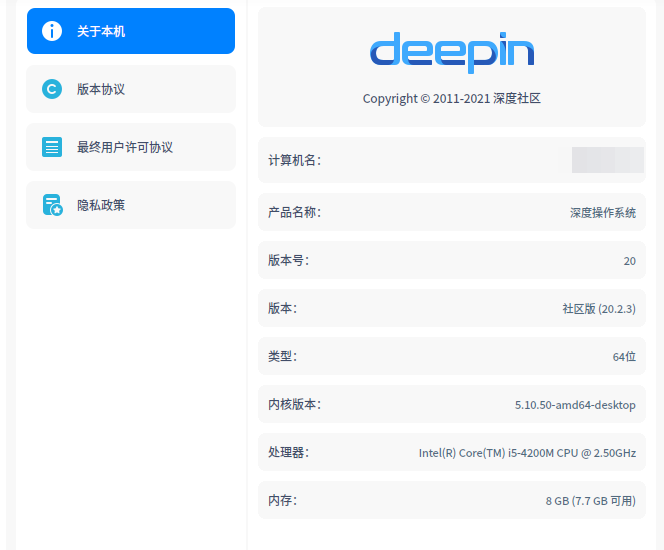
deepin 已下载Appimage,但是打不开,系统信息如下:
需要添加可执行权限。你到命令行模式, 直接chmod a+x renamexifxxxxx.appimage ,然后 ./reanmeexifxxxxxx.appimage 执行, 这么执行。
deepin 不是权限的问题,可能是你打包环境不一样,我其他的.appimage都能运行。按上面的方法试了一次,也不行。
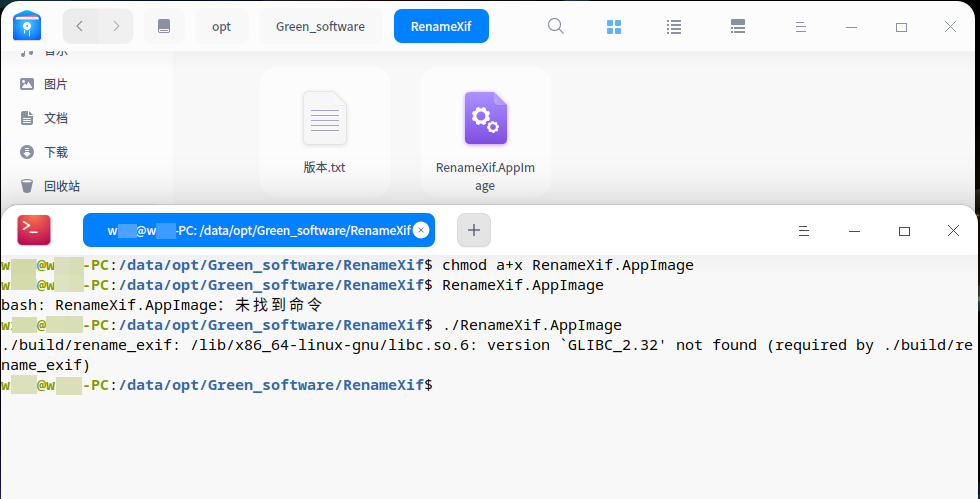
deepin 我打包的机器版本太高了。我想想怎么处理这个问题。
Popular Events
More


 The settings menu needs to be translated into Russian.
基于Flutter 2.0 发布win和linux版本,希望能大家能多试用
也发布源码,共同进步
## win linux 版本 运行截图如下
## 安装
#### 1. windows是绿色版本,直接解压就可以
下载:Colatea批量改名工具v0.10-win.7z
#### 2 . linux版本
下载:colatea_rename_0.1.0_appimage.tar.gz
```bash
# 包内容
ls colatea_rename/
colatea_rename/install.sh
colatea_rename/uninstall.sh
colatea_rename/colatea-rename.png
colatea_rename/colatea_rename-0.1.0-x86_64.AppImage
# 解压后直接运行colatea_rename-0.1.0-x86_64.AppImage就行,如果没有权限
chmod a+x colatea_rename-0.1.0-x86_64.AppImage
# 想要桌面快捷方式,会产生desktop文件
sh install.sh
# 图标不喜欢可以换png文件
```
最后附上整个项目源码地址