

 中文
中文 
xiongweixp deepin
2021-05-29 06:20 deepin 直接安装你的5.12内核,发现没有/dev/biner
Reply Like 0 View the author
 deepin
 直接安装你的5.12内核,发现没有/dev/biner
 deepin
 直接安装你的5.12内核,发现没有/dev/biner
安装完我打包的Uengine就有了
deepin 我今天自己修改下anbox-modules,可以在官方5.11内核加载起ashmem和binder了,但是安装uengine时会卡死,要强制关机那种
deepin 我今天自己修改下anbox-modules,可以在官方5.11内核加载起ashmem和binder了,但是安装uengine时会卡死,要强制关机那种
官方anbox也能运行,就是装不了软件,我这边adb不能用,没深入研究
deepin 官方anbox也能运行,就是装不了软件,我这边adb不能用,没深入研究
官方anbox可以装apk的,我用过,要先打上x86兼容arm的补丁,然后adb安装
 deepin
用你发的文件装完了运行提示这个
deepin 2K屏1.25倍放下的设置下,字体比较模糊,有什么好办法没?
deepin
用你发的文件装完了运行提示这个
我的内核也装了吗?官方内核不支持的
deepin 2K屏1.25倍放下的设置下,字体比较模糊,有什么好办法没?
目前还只是测试版
deepin 我的内核也装了吗?官方内核不支持的
装了啊,你发的几个文件都装了
deepin 装了啊,你发的几个文件都装了
你装的哪个版本?截个图
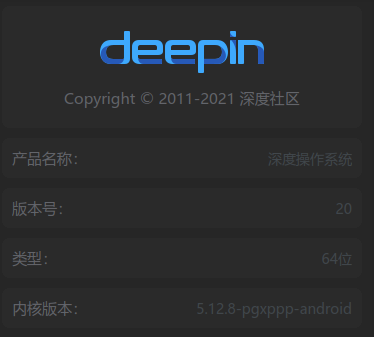
deepin 你装的哪个版本?截个图
5.12.6 运行不起来 现在已经卸载了
deepin .png)
deepin 大佬们这个怎么解决呀?
deepin 大佬们这个怎么解决呀?
去home源下载
 deepin
 home源和home商店源如何添加……
我略过这一步,到最后用下载好的qq.apk双击后是归档管理器……
deepin 去home源下载
home源什么来的
deepin home版的源和商店源地址是多少?
deepin home源和商店源是多少?
deepin 连不上github,手动下载的anbox包和子模块的包,但是最后make还是失败了
Popular Events
More


 The settings menu needs to be translated into Russian.
1.首先自己编译安装内核,请参考下面的链接
https://www.cnblogs.com/gettolive/p/14714022.html
下面是我自己编译的内核感兴趣的可以试试
链接: https://pan.baidu.com/s/1h9_40Ay6JZRcOssEIsuVCg 密码: g438
2.以新内核启动
3.控制中心关闭自动更新
4.添加Home版源,包括Home商店源也要添加
然后终端sudo apt update 一下,注意千万不要upgrade
5.下载uengine
使用命令apt download uengine得到deb包,
解包去掉依赖uengine-moudles-dkms并添加deepin-pre-package
deepin-pre-package
链接:https://pan.baidu.com/s/15F8ZOa6cp1sd1Vx5UVHazw
提取码:7pxj
uengine-android-image
链接: https://pan.baidu.com/s/161o5ZnHAmrMdTzzxyGxRBg 密码: m8br
重新打包,安装
这是我打好的包,拿走不谢(20210531更新)
链接: https://pan.baidu.com/s/1WHLiz9-90a3dZcJGmA1MXQ 密码: v4r5
安装成功后
双击apk文件,输入密码即可自动安装
6.终端 apt search uengine 看看可能会有你需要的,sudo apt install XXX 就可以了。