

 中文
中文 
erabbit deepin
2021-04-06 19:07 deepin 你要求这么高,能不能配张图片说明吗?
Reply Like 0 View the author
 deepin
 你要求这么高,能不能配张图片说明吗?
 deepin
 1. 标题栏感觉有点高。同感。。怎么设置弄小点呢?
 deepin
 任务栏和程序窗口间的空隙不清楚怎么改。
标题栏是可以改配置的,参考:https://github.com/linuxdeepin/developer-center/issues/1210
#根据你使用的主题创建目录
# 浅色主题
mkdir -p ~/.local/share/deepin/themes/deepin/light
# 深色主题
mkdir -p ~/.local/share/deepin/themes/deepin/dark

#进入刚刚创建的目录下,新建一个 titlebar.ini 文件
vim titlebar.ini

#输入以下内容
[Active]
height=18    #系统标题栏高度
textColor=#e6e6e6    #文字颜色
backgroundColor=#3b3b3b    #标题栏颜色
[Inactive]
height=18    #系统标题栏高度
textColor=#e6e6e6    #文字颜色
backgroundColor=#3b3b3b #标题栏颜色20版本UI还是花里胡哨的能不能再简单点

 deepin
 任务栏和程序窗口间的空隙不清楚怎么改。
标题栏是可以改配置的,参考:https://github.com/linuxdeepin/developer-center/issues/1210
#根据你使用的主题创建目录
# 浅色主题
mkdir -p ~/.local/share/deepin/themes/deepin/light
# 深色主题
mkdir -p ~/.local/share/deepin/themes/deepin/dark

#进入刚刚创建的目录下,新建一个 titlebar.ini 文件
vim titlebar.ini

#输入以下内容
[Active]
height=18    #系统标题栏高度
textColor=#e6e6e6    #文字颜色
backgroundColor=#3b3b3b    #标题栏颜色
[Inactive]
height=18    #系统标题栏高度
textColor=#e6e6e6    #文字颜色
backgroundColor=#3b3b3b    #标题栏颜色
回去我也试试
deepin 任务栏和程序窗口间的空隙不清楚怎么改。
标题栏是可以改配置的,参考:https://github.com/linuxdeepin/developer-center/issues/1210
#根据你使用的主题创建目录
# 浅色主题
mkdir -p ~/.local/share/deepin/themes/deepin/light
# 深色主题
mkdir -p ~/.local/share/deepin/themes/deepin/dark

#进入刚刚创建的目录下,新建一个 titlebar.ini 文件
vim titlebar.ini

#输入以下内容
[Active]
height=18    #系统标题栏高度
textColor=#e6e6e6    #文字颜色
backgroundColor=#3b3b3b    #标题栏颜色
[Inactive]
height=18    #系统标题栏高度
textColor=#e6e6e6    #文字颜色
backgroundColor=#3b3b3b    #标题栏颜色
厉害了
deepin 你要求这么高,能不能配张图片说明吗?
你不觉得UI占用空间吗,我在用终端的时候真觉得大,个人感觉,也许有人觉得好看,UI这个东西呀,看感觉
deepin 任务栏和程序窗口间的空隙不清楚怎么改。
标题栏是可以改配置的,参考:https://github.com/linuxdeepin/developer-center/issues/1210
#根据你使用的主题创建目录
# 浅色主题
mkdir -p ~/.local/share/deepin/themes/deepin/light
# 深色主题
mkdir -p ~/.local/share/deepin/themes/deepin/dark

#进入刚刚创建的目录下,新建一个 titlebar.ini 文件
vim titlebar.ini

#输入以下内容
[Active]
height=18    #系统标题栏高度
textColor=#e6e6e6    #文字颜色
backgroundColor=#3b3b3b    #标题栏颜色
[Inactive]
height=18    #系统标题栏高度
textColor=#e6e6e6    #文字颜色
backgroundColor=#3b3b3b    #标题栏颜色
原来不是我一个人这么觉得,
 deepin
 原来不是我一个人这么觉得,
几乎所有人都觉得那个标题栏太高太高了
 deepin
 任务栏和程序窗口间的空隙不清楚怎么改。
标题栏是可以改配置的,参考:https://github.com/linuxdeepin/developer-center/issues/1210
#根据你使用的主题创建目录
# 浅色主题
mkdir -p ~/.local/share/deepin/themes/deepin/light
# 深色主题
mkdir -p ~/.local/share/deepin/themes/deepin/dark

#进入刚刚创建的目录下,新建一个 titlebar.ini 文件
vim titlebar.ini

#输入以下内容
[Active]
height=18    #系统标题栏高度
textColor=#e6e6e6    #文字颜色
backgroundColor=#3b3b3b    #标题栏颜色
[Inactive]
height=18    #系统标题栏高度
textColor=#e6e6e6    #文字颜色
backgroundColor=#3b3b3b    #标题栏颜色
没啥用
v20版本以及以上的都不行
 deepin
 自行编译dtkwidget
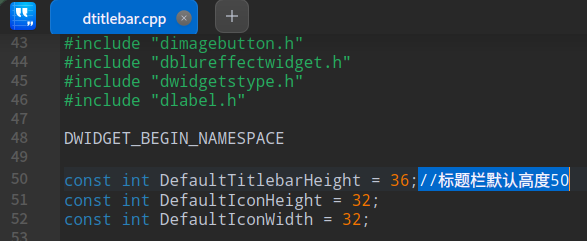
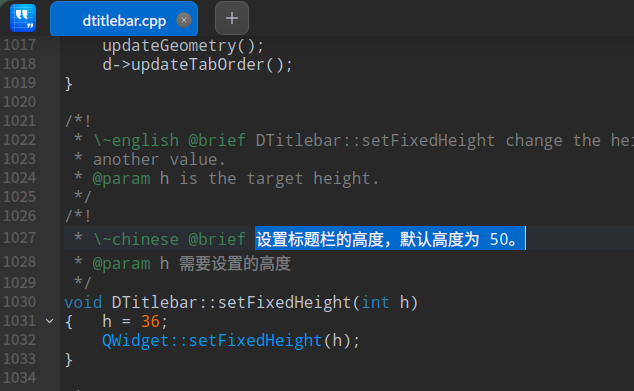
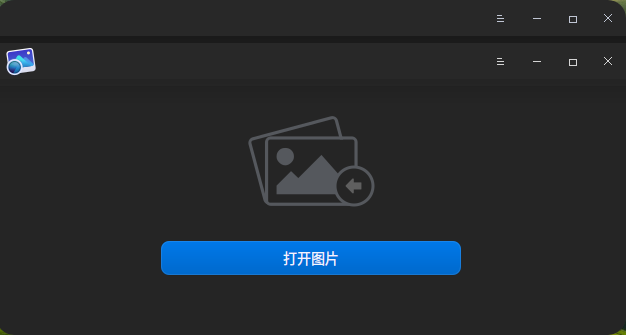
但这样会导致某些原生应用标题栏显示异常,比如双标题栏:
deepin 没啥用
v20版本以及以上的都不行
我不知道你想要什么效果,如果只是改系统标题栏以及文字的颜色大小的话,我自己用是生效的,v20.2
Popular Events
More


 the Network section no longer appears
时隔好久,又在虚拟机安装了deepin,惊艳的不少,但是强迫症的我有点难受:
1. 标题栏感觉有点高,不知道为啥,感觉比window或者其他linux桌面的标题栏高了一倍;
2. 时尚模式的任务栏,特么在下面还空出一点,这是什么风格,欣赏不来呀;
系统的UI占这么多桌面空间,不过分吗 ,不应该把更多的空间留给用户吗,还是有什么地方可以调整的,暂时没找到呀