

 中文
中文 
monkeycc deepin
2021-04-05 19:59 deepin https://bbs.deepin.org/zh/post/213969
解决方法:
https://github.com/zty199/dde-dock-switch_graphics_card/releases/
下载 安装deb
然后重启电脑
点击 切换到nvidia
Reply Like 0 View the author
 deepin
 https://bbs.deepin.org/zh/post/213969
解决方法:
https://github.com/zty199/dde-dock-switch_graphics_card/releases/
下载 安装deb
然后重启电脑
点击 切换到nvidia
 deepin
 https://bbs.deepin.org/zh/post/213969
解决方法:
https://github.com/zty199/dde-dock-switch_graphics_card/releases/
下载 安装deb
然后重启电脑
点击 切换到nvidia
重启后没找到切换的地方
deepin 重启后没找到切换的地方
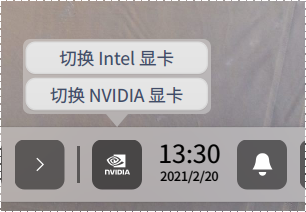
建议先安装 NVIDIA 驱动
deepin
建议先安装 NVIDIA 驱动
这里没有 终端输入 nvidia-settings 提示没找到该命令
deepin
建议先安装 NVIDIA 驱动
有NVIDIA 驱动安装教程么
deepin 有NVIDIA 驱动安装教程么
安装英伟达闭源驱动
sudo apt install nvidia-driver
sudo apt update -y
sudo apt install nvidia-smi -y
重启
deepin 安装英伟达闭源驱动
sudo apt install nvidia-driver
sudo apt update -y
sudo apt install nvidia-smi -y
重启
cryptsetup: WARNING: The initramfs image may not contain cryptsetup binaries
    nor crypto modules. If that's on purpose, you may want to uninstall the
    'cryptsetup-initramfs' package in order to disable the cryptsetup initramfs
    integration and avoid this warning.
setupcon is missing. Please install the 'console-setup' package.
W: plymouth: The plugin label.so is missing, the selected theme might not work as expected.
W: plymouth: You might want to install the plymouth-themes package to fix this.
live-boot: core filesystems devices utils udev blockdev dns.
一直有这个错误提示

 deepin
 论坛搜索双显卡,有相关教程
Popular Events
More


 the Network section no longer appears
读不到外接显示器咋办???
win10可以正常读取
HDMI外接接口
xrandr也不显示