[Seek Help] 关于部分用户反馈20.2升级卡死问题的日志信息收集
Tofloor
poster avatar
deepin-mq
deepin
2021-04-01 18:57
Author

20.2昨晚正式推送后,收到部分用户反馈升级卡死的问题,

研发正在紧急排查解决中,

为了能够更好的快速定位问题,提供解决方案,现需收集大家出现问题的系统日志。


日志导出方法:

1、打开【日志收集工具】应用

2、选择系统、内核、dpkg日志,导出

3、导出后将日志文件打包压缩后,上传到网盘,将网盘链接私信给本账号


给大家带来的不便,还请谅解。


Reply Favorite View the author
Comments
poster avatar
海天鹰
2021-04-02 04:16
@arctan 的方法真实有效,详见78楼,不懂问我。
poster avatar
arctan
2021-04-01 22:31
我试了一下 如果在更新时卡死,重新开机后先sudo rm /var/lib/dpkg/updates/* 然后手动按照下面这样更新 sudo apt-mark hold systemd sudo apt-get install linux-image-5.8.14-amd64-desktop 重启 sudo dpkg --configure -a sudo apt-mark unhold systemd sudo dpkg --configure -a sudo apt-get install -f sudo apt-get upgrade 这样应该可以完成本次更新
poster avatar
ljx_ivan
2021-04-01 19:31
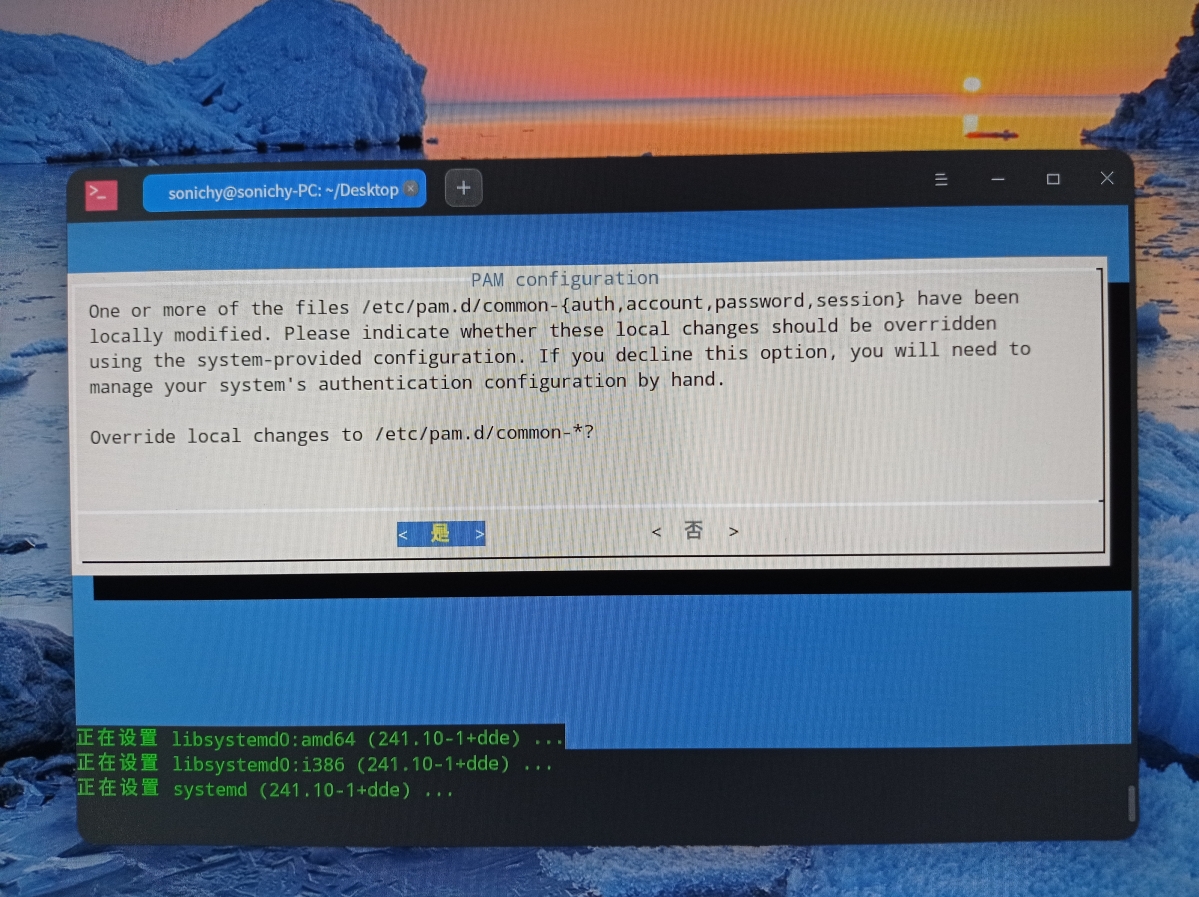
我刚检测到20.2的版本,但是点击更新完之后,也出现了卡死现象。然后我硬重启电脑后,打开命令行, 执行了:sudo rm -rf /var/lib/dpkg/updates/* 再执行:apt upgrade的时候,发现,命令一到:“正在设置 systemd(241.10-1+dde)”然后就没有响应了,键盘的小数字灯也不亮了。
All Replies
1 / 6
To page
szp1120
deepin
2021-04-01 18:59
#1

恭喜再次翻车

Reply View the author
152******14
deepin
2021-04-01 19:01
#2

以前论坛还可以发压缩包.....

Reply View the author
element
deepin
2021-04-01 19:02
#3

由于日志属于比较私密信息  私信比较好

Reply View the author
mscg
deepin
2021-04-01 19:13
#4

希望尽快解决

Reply View the author
joney
deepin
2021-04-01 19:23
#5
It has been deleted!
jelly
deepin
2021-04-01 19:23
#6

已私信发送,注意查收

Reply View the author
iafs
deepin
2021-04-01 19:25
#7

装不上去!

Reply View the author
Rainow
deepin
2021-04-01 19:26
#8

我是下载完整版全盘安装了,但是安装后应用商店里面的软件安装不了,提示没有依赖,比如说搜狗输入法,WPS,迅飞输入法的安装

Reply View the author
joney
deepin
2021-04-01 19:26
#9

更新卡死后,强制重启电脑后一直更新失败。

Reply View the author
152******14
deepin
2021-04-01 19:29
#10

用内核5.4.50终端更新成功 但重启后  所有内核试了一下一遍  登录页反复出现,dock缺失   

Reply View the author
181******88
deepin
2021-04-01 19:35
#11

这是没做过内测就直接发上来了么? 这么多人都遇到问题。

Reply View the author
coldlook
deepin
2021-04-01 19:50
#12
It has been deleted!
coldlook
deepin
2021-04-01 19:55
#13
 

已私信发送,注意查收

Reply View the author
xyaomodrss
deepin
2021-04-01 20:00
#14

更新卡死后,我已经进不了系统了。一进就黑屏

Reply View the author
niuquanyou
deepin
2021-04-01 20:03
#15
joney

更新卡死后,强制重启电脑后一直更新失败。

我的也是

Reply View the author
niuquanyou
deepin
2021-04-01 20:05
#16

卡死,强制关机,再次启动,检查更新,多次更新失败

Reply View the author
151******42
deepin
2021-04-01 20:09
#17

重启后,能听到启动音,然后一片黑,怎么搞

Reply View the author
151******42
deepin
2021-04-01 20:10
#18
xyaomodrss

更新卡死后,我已经进不了系统了。一进就黑屏

我也是,唉,第一次更新死了,这可是工作电脑啊,以后都不敢更新或者准备用红旗去了

Reply View the author
昨夜的星辰
deepin
2021-04-01 20:19
#19
151******42

我也是,唉,第一次更新死了,这可是工作电脑啊,以后都不敢更新或者准备用红旗去了

工作电脑建议上UOS,一年多了,UOS目前很稳定,不过过两天换CPU主板有可能UOS用不了了,5800X和B550M主板,正准备换deepin

Reply View the author
海天鹰
deepin
2021-04-01 20:21
#20

第一次在这里选是死机。

重启进入系统再更新提示:dpkg 被中断,您必须手工运行 ‘sudo dpkg --configure -a’ 解决此问题。

键入命令,显示:正在设置 systemd(241.10-1+dde),再次死机。

日志链接: https://pan.baidu.com/s/1ck4eyCf3AotCbIuct1AAbw,提取码: 3je6

Reply View the author
1 / 6
To page