

 中文
中文 
非专业摸鱼选手 deepin
2021-03-17 00:48 deepin 硬盘可是固态?
Reply Like 0 View the author
 deepin
 硬盘可是固态?
 deepin
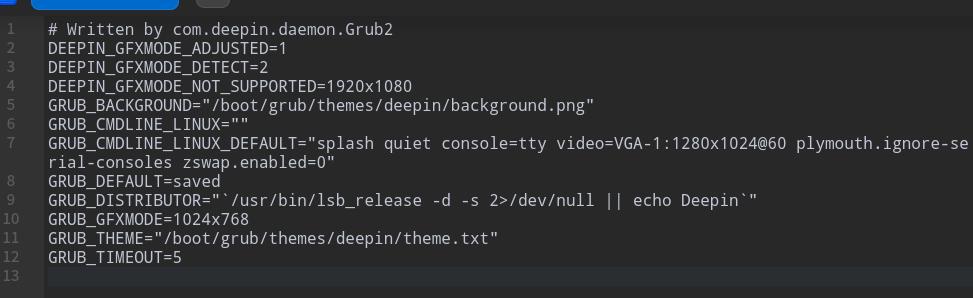
 终端里运行sudo deepin-editor /etc/default/grub
GRUB_CMDLINE_LINUX_DEFAULT这一行的引号里加上zswap.enabled=0 前后空格方式参照这一行其他内容
终端里运行sudo update-grub
重启
 deepin
 硬盘可是固态?
应该是单位给配的国产系统
deepin 终端里运行sudo deepin-editor /etc/default/grub
GRUB_CMDLINE_LINUX_DEFAULT这一行的引号里加上zswap.enabled=0 前后空格方式参照这一行其他内容
终端里运行sudo update-grub
重启
改了之后没有什么效果呢。。。不明白为什么开机的时候中间有段时间硬盘读写灯不是一直不停闪,而是很悠闲。这段时间正是显示系统logo的时候
deepin 应该是单位给配的国产系统
是整机自带系统还是后来统一安装的?

 deepin
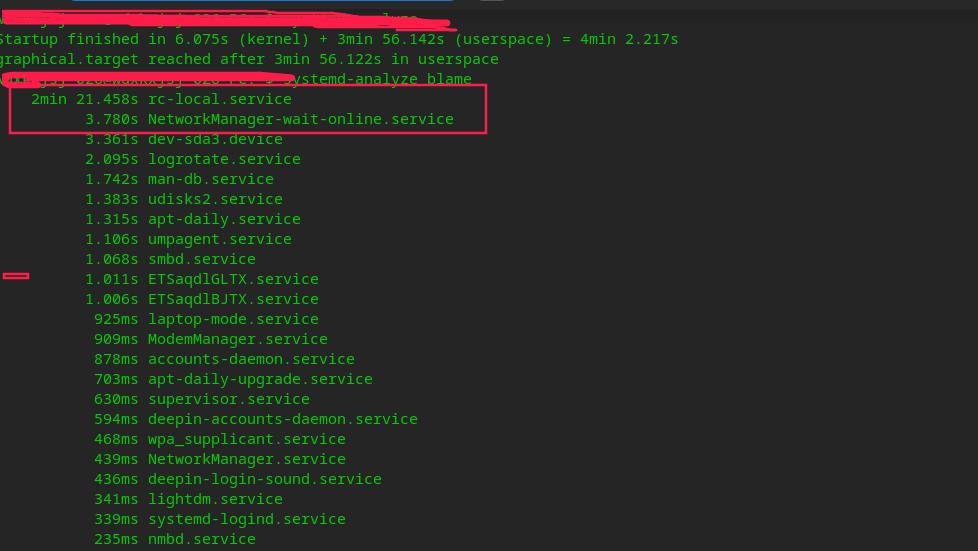
 1)建议楼主装最新的内核,再试一次开机启动时间
2)如果还是启动慢,楼主在终端运行一下这3个命令:
systemd-analyze
systemd-analyze blame
systemd-analyze critical-chain
然后把结果贴上来,让大家看看是什么地方耗时最多

 deepin
 什么配置?如果是单位配的,建议向技术人员反馈,有专业支持
deepin 1)建议楼主装最新的内核,再试一次开机启动时间
2)如果还是启动慢,楼主在终端运行一下这3个命令:
systemd-analyze
systemd-analyze blame
systemd-analyze critical-chain
然后把结果贴上来,让大家看看是什么地方耗时最多
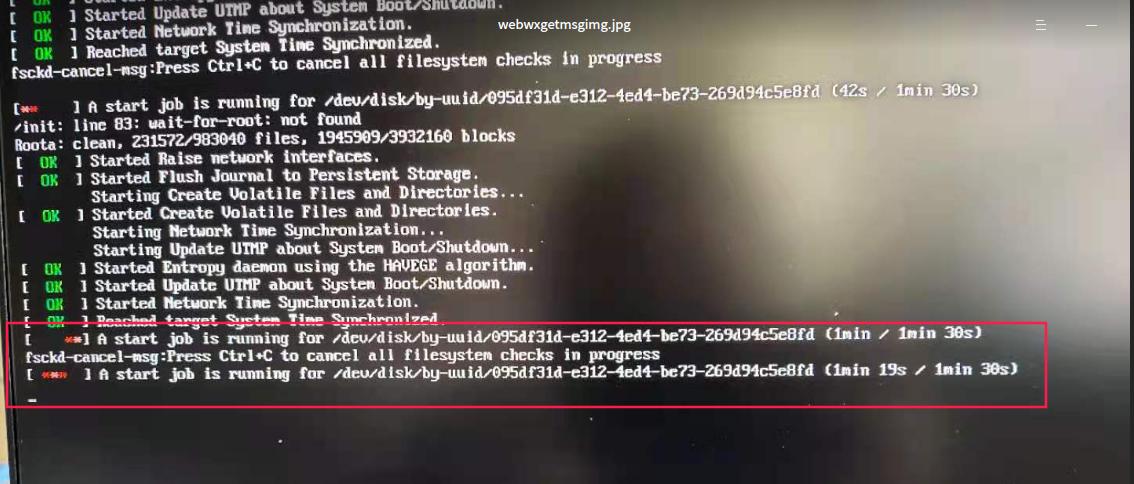
开机按esc键好像提示有一个进程是检查磁盘需1分30秒,这正式硬盘等比较空闲的 时候,怎么能取消这个阶段
deepin 开机按esc键好像提示有一个进程是检查磁盘需1分30秒,这正式硬盘等比较空闲的 时候,怎么能取消这个阶段
你可以用
systemctl disable rc-local.service
reboot
来disable这个service
如果有问题,再
systemctl enable rc-local.service
reboot
重新开启这个service
deepin 你可以用
systemctl disable rc-local.service
reboot
来disable这个service
如果有问题,再
systemctl enable rc-local.service
reboot
重新开启这个service
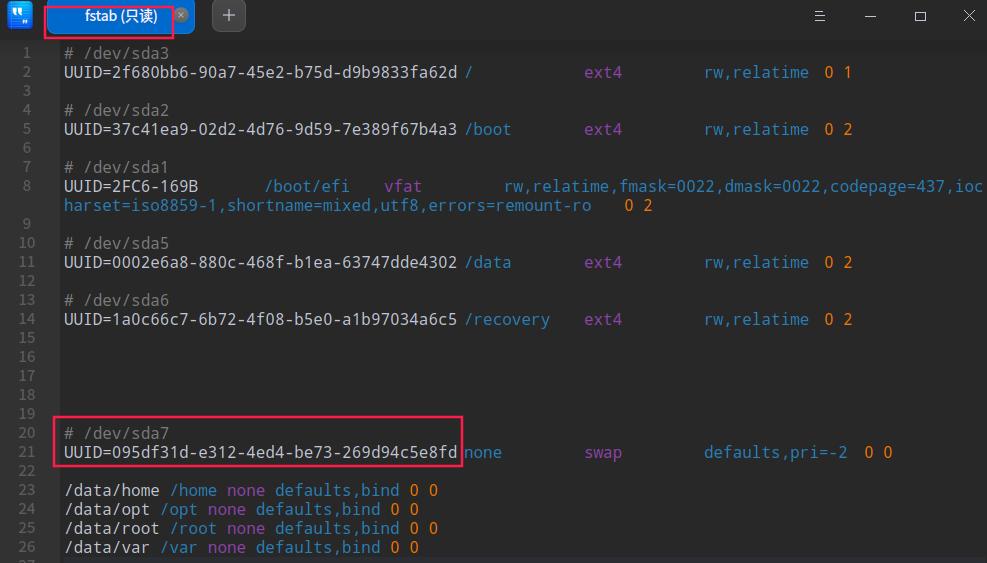
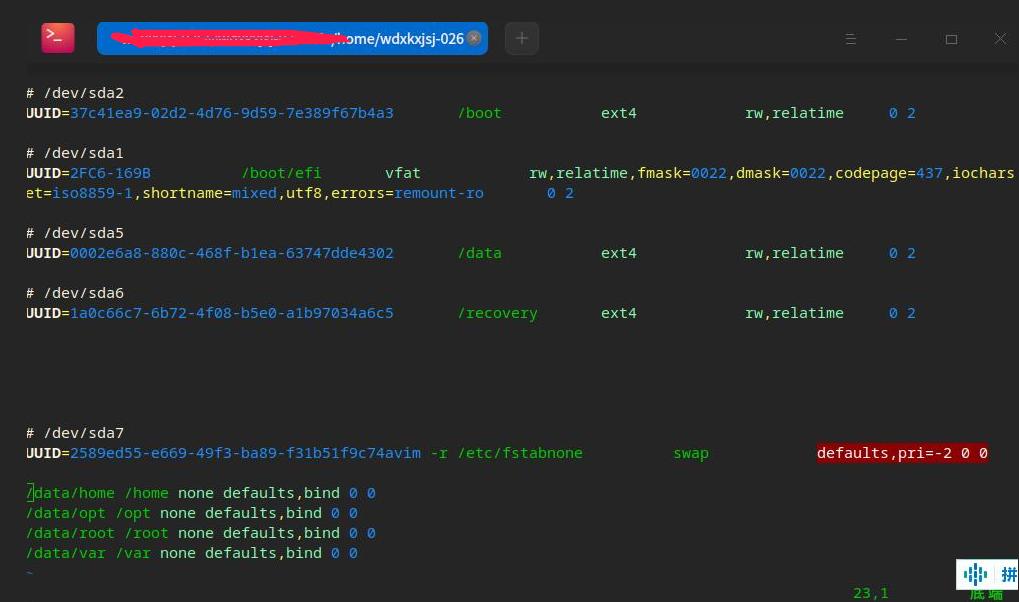
初步搜到原因了https://blog.csdn.net/qq_33528164/article/details/76725439
但是fstab文件是只读,不会改里面的信息
deepin 初步搜到原因了https://blog.csdn.net/qq_33528164/article/details/76725439
但是fstab文件是只读,不会改里面的信息
sudo gedit /etc/fstab 就可以改/etc/fstab了,改的时候小心点
deepin sudo gedit /etc/fstab 就可以改/etc/fstab了,改的时候小心点
是不是因为我格式化这个分区的原因,不知道是干啥的分区给格式化了。。。。

 deepin
 是不是因为我格式化这个分区的原因,不知道是干啥的分区给格式化了。。。。
交换分区不能有文件系统
deepin 交换分区不能有文件系统
小白用户,不明白啥意思
deepin sudo gedit /etc/fstab 就可以改/etc/fstab了,改的时候小心点
复制过去提示找不到命令呢
deepin sudo gedit /etc/fstab 就可以改/etc/fstab了,改的时候小心点
如何保存退出啊
deepin 如何保存退出啊
如果你用vi,:wq就保存退出了
如果你用linux,我建议你学一下vim的使用
Popular Ranking
ChangePopular Events
More


 the Network section no longer appears
开机时出现这个页面后就出现开机系统logo界面,需要等待挺长时间才出现输入密码的界面。在这期间硬盘读写灯不怎么亮,一看硬盘就不是正常开机读写比较忙的状态,怎么回事啊😱。刚用的时候来了挺快来,出现系统logo界面后很快就能进桌面,现在慢了很多。
今天在系统日志里看到了第二、三张截图,这两各图片中的时间明显间隔时间过长。