[Share Experiences] DTK 文档安装在本机的 Qt Assistants 中查看
Tofloor
poster avatar
偕臧
deepin
2021-03-10 23:21
Author

这两天整了一下,将 DTK 的开发者手册可安装到本机的  Qt Assistants, 然后在其中直接跳转;

sudo apt install doxygen graphviz                           # 安装准备软件
git clone --recursive https://github.com/linuxdeepin/dtk.git --depth=1 # 克隆代码
cd dtk                                                      # 进入项目文件夹
doxygen                                                     # 生成 html +  .qhp 和 .qch
sudo cp doc/dtk.qch /usr/share/qt5/doc                      # 与 Qt 文档存放在一起
assistant -register /usr/share/qt5/doc/dtk.qch              # 注册集成到 Qt 助手


实现原理感兴趣可参考:
1. Qt 项目用 doxygen 生成 .qch,嵌入文档到 Assistants 
2. 修改 Doxygen 主题,生成 Qt 风格的文档

Reply Favorite View the author
All Replies
element
deepin
2021-03-10 23:27
#1

这个可以有 。。。。

官方开发就是每周都应该上来打个卡

Reply View the author
偕臧
deepin
2021-03-10 23:37
#2

@ element  喵~

Reply View the author
q77190858
deepin
2021-03-11 00:01
#3

这个挺好的,方便

Reply View the author
Cris.Q
deepin
2021-03-11 03:55
#4

ohhh

Reply View the author
yjhenan
deepin
2021-03-11 21:02
#5

不会C++的路过

Reply View the author
houyawei
deepin
2021-03-25 17:07
#6

好东西

Reply View the author
偕臧
deepin
2021-03-25 22:01
#7
houyawei

好东西

我也觉着,可知道的人少,喜欢用这个的开发应该比较多

Reply View the author
houyawei
deepin
2021-03-31 01:09
#8

第二步git clone --recursive https://github.com/linuxdeepin/dtk.git --depth=1

克隆相关子仓库遇到了问题,然后手动clone就好了
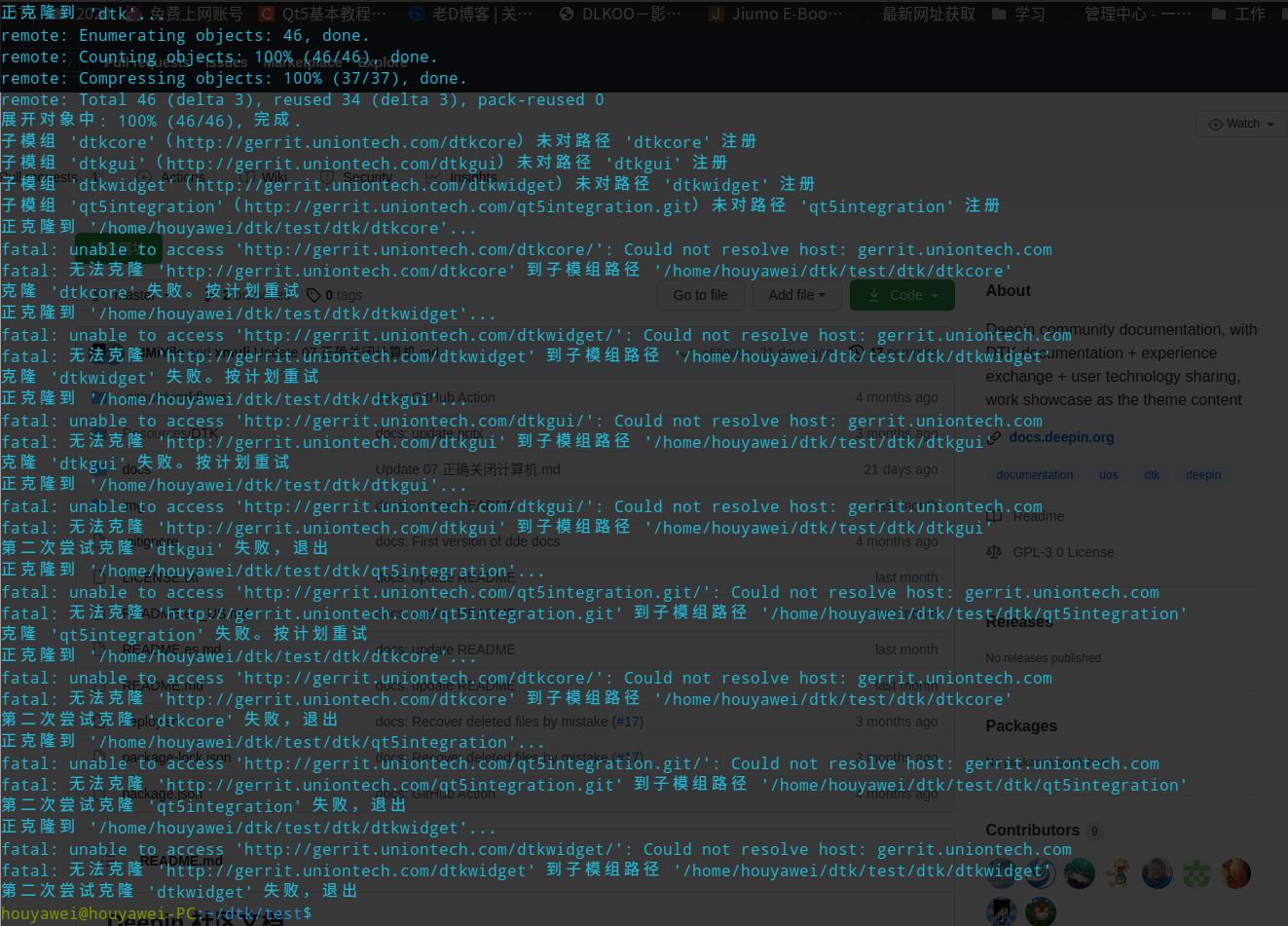
Reply View the author
偕臧
deepin
2021-04-01 17:31
#9

@ houyajie 使用 GitHub 使用 clone 的时候,可以考虑挂一个 蹄子;或者直接使用 Gitee 的国内镜像 https://gitee.com/linuxdeepin/dtk  进行克隆(刚已经设置同步了)

Reply View the author