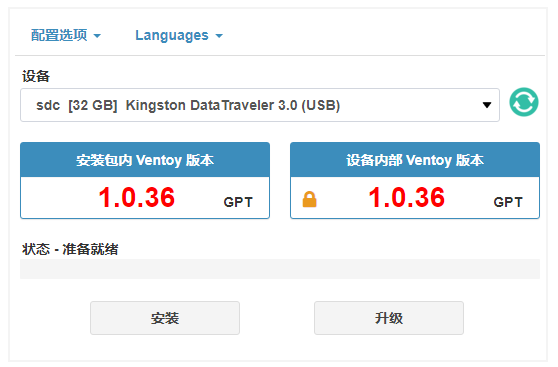
[Share Experiences] 【Ventoy-1.0.36版本】支持Linux下图形界面
Tofloor
poster avatar
ventoy
deepin
2021-02-28 18:30
Author
  • 2021/02/27 --- 1.0.36 发布
  1. 实验性支持 Linux 系统图形化界面(基于Web浏览器)说明
  2. 安装 Ventoy 时分区默认按照 4KB 对齐(提升性能以及某些机型 Legacy BIOS 模式的兼容性)
  3. 在 Ventoy2Disk.exe 界面上增加了一个 🔒 图标,用来标识安全启动选项
  4. 在 Ventoy2Disk.exe 界面上增加了一个 显示所有设备 的菜单(默认只显示 USB 设备)。
  5. Ventoy2Disk.exe 不再检查分区表中的可启动标记。
  6. 优化 Ventoy2Disk.sh 脚本
  7. Ventoy2Disk.sh 增加 nbd 类型设备 (PR #746)
  8. 更新语言文件 languages.ini


Reply Favorite View the author
All Replies
bxkdhao
deepin
2021-02-28 18:38
#1

非常喜欢ventoy,祝装机神器越来越好

Reply View the author
辉夜
deepin
2021-02-28 18:40
#2

Reply View the author
lbygljq
deepin
2021-02-28 19:46
#3

挺不错的,方便多了

Reply View the author
houyawei
deepin
2021-02-28 20:33
#4

 支持支持

Reply View the author
魔笛
deepin
2021-02-28 22:35
#5

安装系统神器,真的不错。

Reply View the author
鲁鹏
Junior Packager
2021-02-28 23:16
#6

Reply View the author
兴安
deepin
2021-03-01 02:52
#7

图形界面,更加友好

Reply View the author
Linux大宝
deepin
2021-03-01 09:54
#8

之前下载了 Linux 版,在命令行中创建启动优盘,3次都失败了

还好家里还有台瘟到死系统的电脑,这才做成功

Reply View the author