

 中文
中文 
westanke deepin
2021-02-04 05:54 deepin 在终端执行以下命令:内核升级
sudo apt install linux-image-deepin-stable-amd64 linux-headers-deepin-stable-amd64
Reply Like 0 View the author
 deepin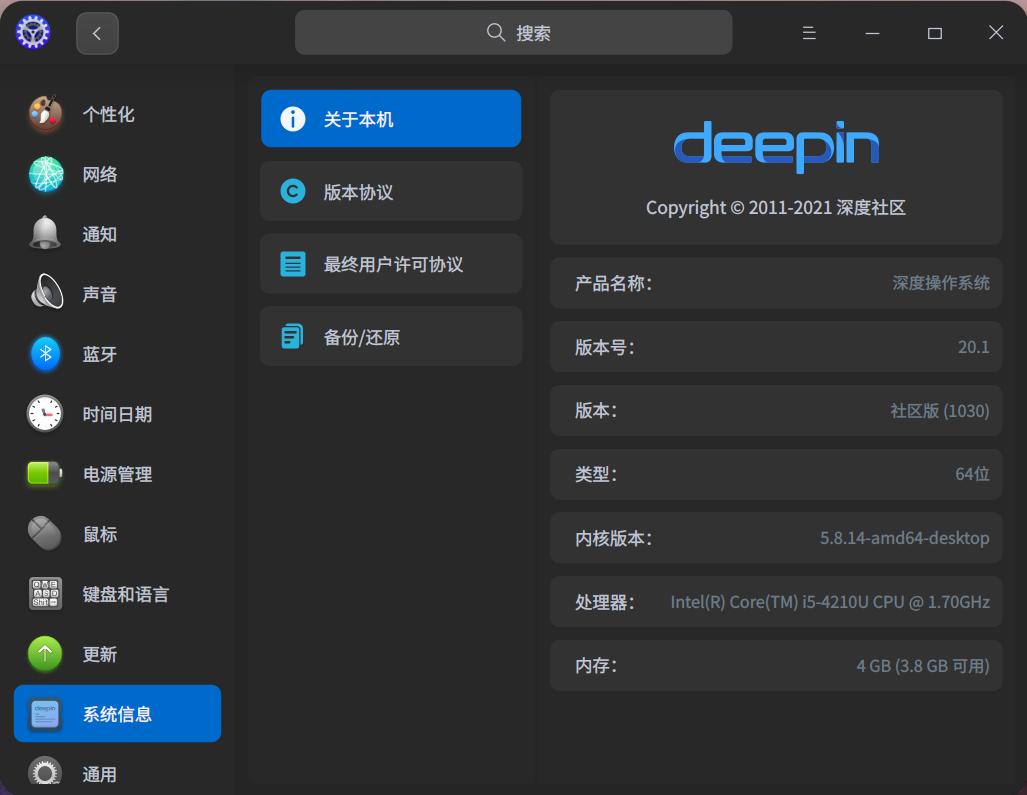
deepin 在终端执行以下命令:内核升级
sudo apt install linux-image-deepin-stable-amd64 linux-headers-deepin-stable-amd64

 deepin
 当然不变,如果变那么为什么官方在下面发什么手动更新的
deepin 我的怎么变了,自动更新内核了……

 deepin
 我的怎么变了,自动更新内核了……
我也是自动更新的...他可能是启动的时候没有选择用新内核启动...
 deepin
 我也是自动更新的内核
deepin 刚有人回复了,5.4的需要手动用命令安装5.10.5的内核...5.8的是随更新一起自动升级到5.10.5的...
 deepin
 刚有人回复了,5.4的需要手动用命令安装5.10.5的内核...5.8的是随更新一起自动升级到5.10.5的...
我这里系统更新失败,但是内核升级成功。

 deepin
 我也是自动更新的...他可能是启动的时候没有选择用新内核启动...
楼主应该是没装检查内核更新的元软件包(包名见沙发)
 deepin
 我和楼主遇到一样的情况,以前经常有人劝说不用升级内核,然而今天决定手动升级内核看看
deepin 你说那些不用使用命令的人,怎么更新内核呢?
 deepin
 你说那些不用使用命令的人,怎么更新内核呢?
我这里系统更新就自动更新了
deepin 你说那些不用使用命令的人,怎么更新内核呢?
用新立得找包呗
deepin 楼主应该是没装检查内核更新的元软件包(包名见沙发)
目前默认安装的 deepin 有两个内核版本: 5.4 和 5.8 ...
5.4 的需要手动安装 5.10.5 ...
5.8 的在这一波更新中会自动升级到 5.10.5 ...
你是自动安装,还是需要手动安装,取决与你目前使用的内核版本是 5.4 还是 5.8 ...
deepin 我这里系统更新失败,但是内核升级成功。
sudo apt update && sudo apt upgrade -y && sudo apt dist-upgrade
重新更新一试试...
都习惯了用 sudo apt update && sudo apt upgrade -y 更新...
实际上 sudo apt dist-upgrade 里还有更新包...
deepin 目前默认安装的 deepin 有两个内核版本: 5.4 和 5.8 ...
5.4 的需要手动安装 5.10.5 ...
5.8 的在这一波更新中会自动升级到 5.10.5 ...
你是自动安装,还是需要手动安装,取决与你目前使用的内核版本是 5.4 还是 5.8 ...
楼主应该是安装的时候选了 5.4,后来手动安装了 5.8,但又没有装用于更新 stable 内核的元软件包,所以就没有收到 5.10 的更新
deepin 楼主应该是安装的时候选了 5.4,后来手动安装了 5.8,但又没有装用于更新 stable 内核的元软件包,所以就没有收到 5.10 的更新
所以说预设方案和实际中的情况差别还是很大的...
deepin 你说那些不用使用命令的人,怎么更新内核呢?
5.8的版本自动更新内核,
5.4的只能等5.10的长期支持内核了
因为linux内核要分普通和长期支持两种
普通内核直接升
长期支持内核要更新到普通内核就手动
或者等下一个长期支持内核版本
 deepin
 Popular Ranking
ChangePopular Events
More


 the Network section no longer appears