

 中文
中文 
Ziggy deepin
2021-01-29 03:52 deepin ?打开进程,直接右键就行了
Reply Like 0 View the author
 deepin
 ?打开进程,直接右键就行了

 deepin
 ?打开进程,直接右键就行了
从哪里打开“进程”?

 deepin
 从哪里打开“进程”?
左下角启动器里,找到浏览器,打开它,然后就和win一样的操作了
deepin 从哪里打开“进程”?
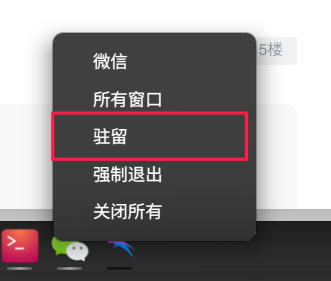
进程已经找到,但是右键还是没有找到驻留的地方
deepin 左下角启动器里,找到浏览器,打开它,然后就和win一样的操作了
我是说任务栏下面,之前是有浏览器的图标的,后来被我移除了,但是再加不进去了,请教加入方法。WINDOWS我直接把程序快捷图标拖下来就可以了,但是深度的这个,我拖显示×的,不行。
 deepin
 直接启动器里面右键发送到任务栏不行吗?
deepin 进程已经找到,但是右键还是没有找到驻留的地方
Popular Ranking
ChangePopular Events
More


 Deepin IDE?
无意中把浏览器驻留搞没有了,捣鼓半天没有成功拉回来,请教大神~