

 中文
中文 
Ziggy deepin
2021-01-28 04:12 deepin 看看BIOS时间有没有正确设置,一般系统时间不会影响开机
Reply Like 0 View the author

 deepin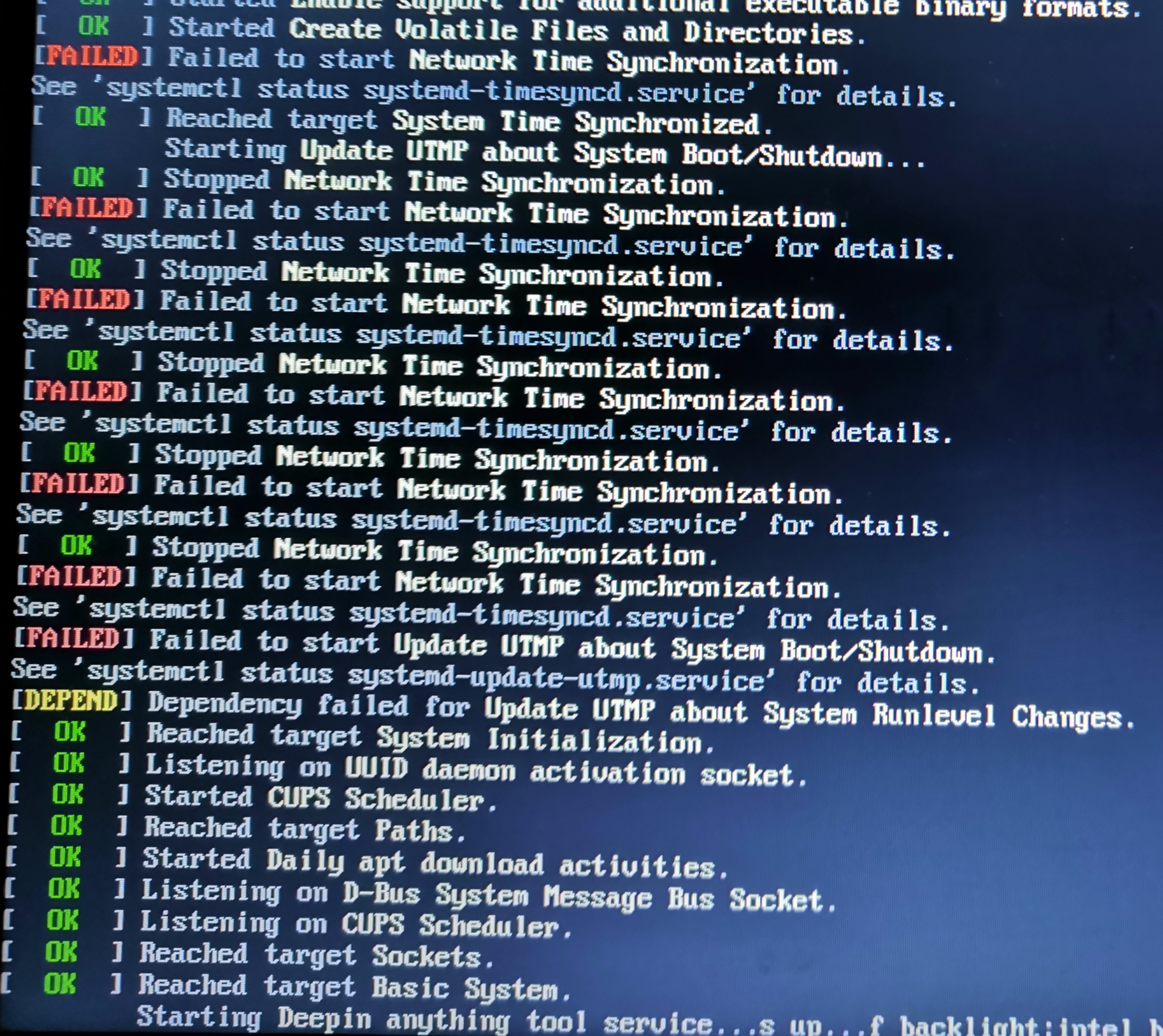
 deepin
 看看BIOS时间有没有正确设置,一般系统时间不会影响开机
deepin 应该不是这个原因,这个是我将disk磁盘管理中的ext4分区的启动加载改为自动,重启机器发现不能启动的。
deepin 查看BIOS时间是正确的

 deepin
 楼主没有看看图片最后返回什么信息?
楼主修改fstab?修改对了吗?可能你的根分区都没有加载。
deepin 没有返回了信息了,系统启动到这就不动了
deepin 没有直接修改fstab,就是把disk磁盘管理中的ext4分区的启动加载改为自动了
deepin 版主有正确的fstab截图吗?发一份我参考修改下,谢谢!
deepin 果然是因为修改EXT4分区的挂载选项导致的fstab中的ext4条目丢失了导致的,用系统修复盘启动手动修复fstab就可以启动了,但这个错误提示就太奇怪了,居然提示的是网络时间同步失败?谢谢版主指导!!!
Popular Ranking
ChangePopular Events
More


 Deepin IDE?