[Seek Help] 终端怎么连接OpenVPN
Tofloor
poster avatar
monkeycc
deepin
2021-01-07 02:09
Author

系统设置了 OpenVPN 可以正常访问

但是终端怎么访问OpenVPN

Reply Favorite View the author
All Replies
imic07
deepin
2021-01-07 03:01
#1

终端启动脚本

#! /bin/expect

set timeout -1

set password "密码1"


cd /home/imic/data/app/OpenVPN/config/vpn目录/

spawn sudo openvpn --config vpn配置.ovpn

expect   "sudo" 

send "密码2\r"

expect   "Password:" 

send "$password\r"

interact
Reply View the author
monkeycc
deepin
2021-01-07 03:43
#2
imic07

终端启动脚本

#! /bin/expect

set timeout -1

set password "密码1"


cd /home/imic/data/app/OpenVPN/config/vpn目录/

spawn sudo openvpn --config vpn配置.ovpn

expect   "sudo" 

send "密码2\r"

expect   "Password:" 

send "$password\r"

interact


Wed Jan  6 19:24:23 2021 OPTIONS IMPORT: timers and/or timeouts modified
Wed Jan  6 19:24:23 2021 OPTIONS IMPORT: --ifconfig/up options modified
Wed Jan  6 19:24:23 2021 OPTIONS IMPORT: route options modified
Wed Jan  6 19:24:23 2021 OPTIONS IMPORT: route-related options modified
Wed Jan  6 19:24:23 2021 OPTIONS IMPORT: --ip-win32 and/or --dhcp-option options modified
Wed Jan  6 19:24:23 2021 OPTIONS IMPORT: peer-id set
Wed Jan  6 19:24:23 2021 OPTIONS IMPORT: adjusting link_mtu to 1624
Wed Jan  6 19:24:23 2021 OPTIONS IMPORT: data channel crypto options modified
Wed Jan  6 19:24:23 2021 Data Channel: using negotiated cipher 'AES-256-GCM'
Wed Jan  6 19:24:23 2021 Outgoing Data Channel: Cipher 'AES-256-GCM' initialized with 256 bit key
Wed Jan  6 19:24:23 2021 Incoming Data Channel: Cipher 'AES-256-GCM' initialized with 256 bit key
Wed Jan  6 19:24:23 2021 ROUTE_GATEWAY 10.8.0.1/255.255.255.0 IFACE=tun0 HWADDR=00:00:00:00:00:00
Wed Jan  6 19:24:23 2021 TUN/TAP device tun1 opened
Wed Jan  6 19:24:23 2021 TUN/TAP TX queue length set to 100
Wed Jan  6 19:24:23 2021 /sbin/ip link set dev tun1 up mtu 1500
Wed Jan  6 19:24:23 2021 /sbin/ip addr add dev tun1 10.8.0.2/24 broadcast 10.8.0.255
Wed Jan  6 19:24:23 2021 /sbin/ip route add xxxxxxxxxxxxx/32 via 10.8.0.1
Wed Jan  6 19:24:23 2021 /sbin/ip route add 0.0.0.0/1 via 10.8.0.1
Wed Jan  6 19:24:23 2021 /sbin/ip route add 128.0.0.0/1 via 10.8.0.1
Wed Jan  6 19:24:23 2021 WARNING: this configuration may cache passwords in memory -- use the auth-nocache option to prevent this
Wed Jan  6 19:24:23 2021 Initialization Sequence Completed


首先感谢回复


不过这个导致不能上网了。。。


终端也上不了,浏览器也不能上

也不知道为什嘛~

Reply View the author
imic07
deepin
2021-01-07 17:49
#3
monkeycc


Wed Jan  6 19:24:23 2021 OPTIONS IMPORT: timers and/or timeouts modified
Wed Jan  6 19:24:23 2021 OPTIONS IMPORT: --ifconfig/up options modified
Wed Jan  6 19:24:23 2021 OPTIONS IMPORT: route options modified
Wed Jan  6 19:24:23 2021 OPTIONS IMPORT: route-related options modified
Wed Jan  6 19:24:23 2021 OPTIONS IMPORT: --ip-win32 and/or --dhcp-option options modified
Wed Jan  6 19:24:23 2021 OPTIONS IMPORT: peer-id set
Wed Jan  6 19:24:23 2021 OPTIONS IMPORT: adjusting link_mtu to 1624
Wed Jan  6 19:24:23 2021 OPTIONS IMPORT: data channel crypto options modified
Wed Jan  6 19:24:23 2021 Data Channel: using negotiated cipher 'AES-256-GCM'
Wed Jan  6 19:24:23 2021 Outgoing Data Channel: Cipher 'AES-256-GCM' initialized with 256 bit key
Wed Jan  6 19:24:23 2021 Incoming Data Channel: Cipher 'AES-256-GCM' initialized with 256 bit key
Wed Jan  6 19:24:23 2021 ROUTE_GATEWAY 10.8.0.1/255.255.255.0 IFACE=tun0 HWADDR=00:00:00:00:00:00
Wed Jan  6 19:24:23 2021 TUN/TAP device tun1 opened
Wed Jan  6 19:24:23 2021 TUN/TAP TX queue length set to 100
Wed Jan  6 19:24:23 2021 /sbin/ip link set dev tun1 up mtu 1500
Wed Jan  6 19:24:23 2021 /sbin/ip addr add dev tun1 10.8.0.2/24 broadcast 10.8.0.255
Wed Jan  6 19:24:23 2021 /sbin/ip route add xxxxxxxxxxxxx/32 via 10.8.0.1
Wed Jan  6 19:24:23 2021 /sbin/ip route add 0.0.0.0/1 via 10.8.0.1
Wed Jan  6 19:24:23 2021 /sbin/ip route add 128.0.0.0/1 via 10.8.0.1
Wed Jan  6 19:24:23 2021 WARNING: this configuration may cache passwords in memory -- use the auth-nocache option to prevent this
Wed Jan  6 19:24:23 2021 Initialization Sequence Completed


首先感谢回复


不过这个导致不能上网了。。。


终端也上不了,浏览器也不能上

也不知道为什嘛~

可能是vpn配置问题,可以配置指定网段才走vpn:

route-nopull #可以使VPN连接后,并不修改默认路由,也就不会有任何网络请求走VPN

# 可以ping 10.8.0.1 -t 检测vpn是否连接通
route 10.8.0.0 255.255.0.0 vpn_gateway

# 在家,配置公司内网(192.168.1.x)访问走vpn。家里局域网ip(192.168.31.x)
# 可以配置多个,指定ip走vpn,也可以把家里的网段改成192.168.2或其他,再配置route 192.168.1.0 255.255.0.0 vpn_gateway  
# 这样访问192.168.1开头的网段就会走vpn
route 192.168.1.0 255.255.255.0 vpn_gateway
Reply View the author
baifuwa
deepin
2021-07-05 05:32
#4

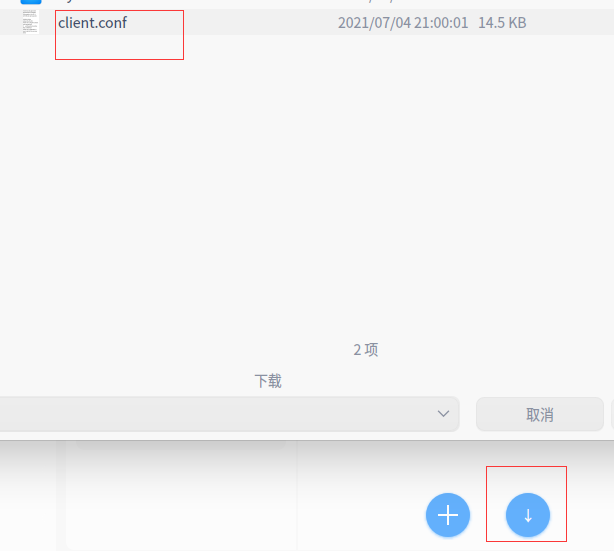
先登陆VPN,将配置文件下载,再把配置文件重命名,直接导入即可。

mv client.conf.ovpn client.conf

Reply View the author