

 中文
中文 
北冥夜未央 deepin
2021-01-07 04:05 deepin Ecological co-builder
系统bug,反馈很多次了,一直没有见修复。
Reply Like 0 View the author
 deepin
 系统bug,反馈很多次了,一直没有见修复。

 deepin
 很烦,debian没有这个问题,望早日修复,其实这个问题很严重。

 deepin
 马赛克应该是图片没打印出来,唉,老问题了
 deepin
 同样问题,求解决
 deepin
 这个问题一直存在,一直也没有得到解决
deepin 设置output resolution的值600DPI或者更高,试试,亲测有效,另外可以使用master pdf设置打印为图片(打印-高级-勾选“作为图像打印”)。
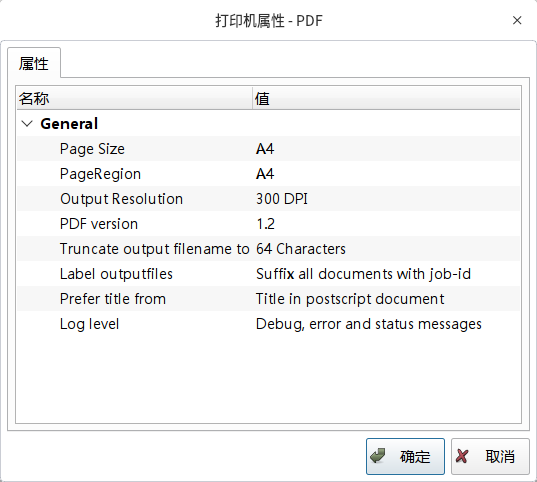


需要虚拟打印机,安装了cups-pdf,结果打印出来的文件莫名其妙的出现了马赛克,如下图所示。有没有哪位能帮忙指导一下cups-pdf的设置?
附:安装过程:sudo apt-get install cups-pdf 会出现一个名为“PDF”的虚拟打印机,打印好的文件在主目录下的“PDF”文件夹。但是出现了上面的效果,困惑。