

 中文
中文 
bennyming deepin
2020-12-23 00:47 deepin 输入法在红色框区域,无法切换到中文输入法,仿佛输入法不识别为可输入区域,用虚拟机安装的MintLinux可以正常切换到中文输入法。
Reply Like 1 View the author
deepin 输入法在红色框区域,无法切换到中文输入法,仿佛输入法不识别为可输入区域,用虚拟机安装的MintLinux可以正常切换到中文输入法。

 deepin
 其实我比较想知道楼主是咋个破解的
deepin 其实我比较想知道楼主是咋个破解的
https://github.com/HeQuanX/navicat-keygen-tools/releases/tag/20200226
这里
有说明。但在DeepinLinux里,无法切换中文输入法,糟心....
deepin https://github.com/HeQuanX/navicat-keygen-tools/releases/tag/20200226
这里
有说明。但在DeepinLinux里,无法切换中文输入法,糟心....
大佬,报错这个怎么搞?
./bin/navicat-keygen: error while loading shared libraries: libcrypto.so.1.0.0: cannot open shared object file: No such file or directory
 deepin
 关掉navicat,重新打开就可以了
 deepin
 在 Navicat 软件主界面的菜单栏点击 工具→选项,调出软件选项界面,如下图所示:
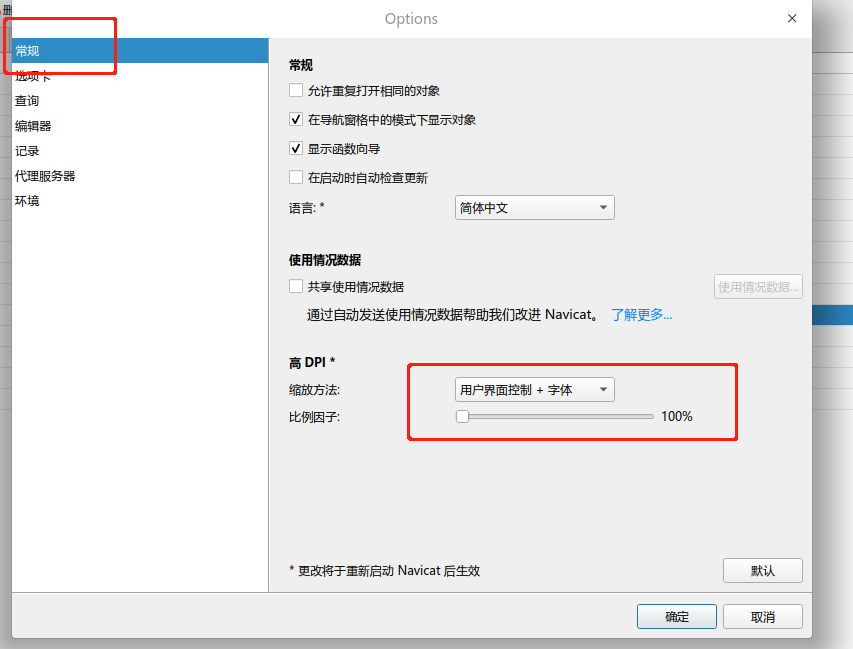
设置保存后,一定要关掉,在启动一下navicat
设置保存后,一定要关掉,在启动一下navicat
设置保存后,一定要关掉,在启动一下navicat
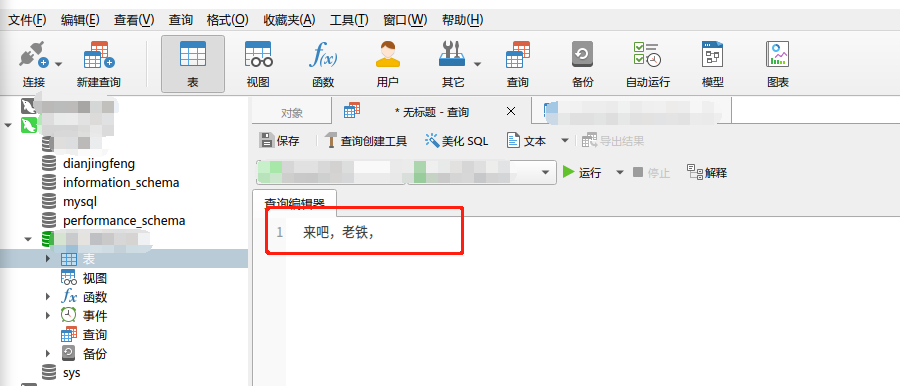


V20版本使用Navicat15输入法无法识别输入区域,求解决~~
如下图: