

 中文
中文 
juteman deepin
2020-11-20 18:17 deepin 显卡驱动的问题
Reply Like 0 View the author
 deepin
 显卡驱动的问题
deepin 还是机械革命code01香!
 deepin
 自己手动敲命令调节亮度,最好是写成脚本方便些:
查询当前显示设备
xrandr --current | sed -n 2p | awk '{print $1}'
调节亮度,10为最亮,DEVICE应该改为你的显示设备
xrandr --output DEVICE --brightness .7

 deepin
 显卡驱动版本?内核版本?
deepin 显卡驱动版本?内核版本?
稍等,我查一下
deepin 显卡驱动版本?内核版本?
显卡驱动版本查不到,内核5.7.7;之前尝试过升级到5.9,还是没法调节亮度
deepin 显卡驱动的问题
怎么解决呢
 deepin
 还是机械革命code01香!
同款
deepin 到bios里把某个显卡禁了,,只用外置或者内置的显示吧..
之后把内核升了5.8 我之前也是无法调亮度,后来升内核就好了
deepin 显卡驱动版本查不到,内核5.7.7;之前尝试过升级到5.9,还是没法调节亮度
怎么查的?apt search nvidia看看有没有
deepin deepin deepin 怎么查的?apt search nvidia看看有没有
bbswitch-dkms/未知 0.8-8 amd64
Interface for toggling the power on NVIDIA Optimus video cards
bbswitch-source/未知 0.8-8 amd64
Interface for toggling the power on NVIDIA Optimus video cards
boinc-client-nvidia-cuda/未知 7.14.2+dfsg-3 amd64
metȃpackage for CUDA-savvy BOINC client and manager
bumblebee/未知 3.2.1-20 amd64
NVIDIA Optimus support for Linux
bumblebee-nvidia/未知 3.2.1-20 amd64
NVIDIA Optimus support using the proprietary NVIDIA driver
conky-all/未知 1.10.8-1+b1 amd64
highly configurable system monitor (all features enabled)
conky-all-dbg/未知 1.10.8-1+b1 amd64
highly configurable system monitor (all features enabled - debug)
cpufreqd/未知 2.4.2-2+b2 amd64
fully configurable daemon for dynamic frequency and voltage scaling
dmraid/未知 1.0.0.rc16-8+apricot amd64
Device-Mapper Software RAID support tool
firmware-misc-nonfree/未知,未知 20190114-2 all
Binary firmware for various drivers in the Linux kernel
flashrom/未知 1.0-1 amd64
Identify, read, write, erase, and verify BIOS/ROM/flash chips
gcc-7-offload-nvptx/未知 7.4.0-6 amd64
GCC offloading compiler to NVPTX
gcc-8-offload-nvptx/未知 8.3.0.3-3+rebuild amd64
GCC offloading compiler to NVPTX
gcc-offload-nvptx/未知 4:8.3.0-1 amd64
GCC offloading compiler to NVPTX
glx-alternative-nvidia/未知 1.2.0-1-1+eagle amd64
allows the selection of NVIDIA as GLX provider
hashcat-nvidia/未知,未知 20180828+nmu1 all
Installs hashcat and its dependencies for users with NVIDIA GPU
hobbit-plugins/未知,未知 20190129 all
plugins for the Xymon network monitor
libaccinj64-9.2/未知 9.2.148-7 amd64
NVIDIA ACCINJ Library (64-bit)
libcg/未知 3.1.0013-5 amd64
Nvidia Cg core runtime library
libcggl/未知 3.1.0013-5 amd64
Nvidia Cg Opengl runtime library
libcublas9.2/未知 9.2.148-7 amd64
NVIDIA cuBLAS Library
libcuda1/未知 450.66-1+eagle amd64
NVIDIA CUDA Driver Library
libcuda1-i386/未知,未知 440.100-1 i386
NVIDIA CUDA 32-bit runtime library
libcudart9.2/未知 9.2.148-7 amd64
NVIDIA CUDA Runtime Library
libcufft9.2/未知 9.2.148-7 amd64
NVIDIA cuFFT Library
libcufftw9.2/未知 9.2.148-7 amd64
NVIDIA cuFFTW Library
libcuinj64-9.2/未知 9.2.148-7 amd64
NVIDIA CUINJ Library (64-bit)
libcupti-dev/未知 9.2.148-7 amd64
NVIDIA CUDA Profiler Tools Interface development files
libcupti-doc/未知,未知 9.2.148-7 all
NVIDIA CUDA Profiler Tools Interface documentation
libcupti9.2/未知 9.2.148-7 amd64
NVIDIA CUDA Profiler Tools Interface runtime library
libcurand9.2/未知 9.2.148-7 amd64
NVIDIA cuRAND Library
libcusolver9.2/未知 9.2.148-7 amd64
NVIDIA cuSOLVER Library
libcusparse9.2/未知 9.2.148-7 amd64
NVIDIA cuSPARSE Library
libegl-nvidia-legacy-390xx0/未知,未知 390.138-1~deb10u1+rebuild amd64
NVIDIA binary EGL library (390xx legacy version)
libegl-nvidia0/未知 450.66-1+eagle amd64
NVIDIA binary EGL library
libegl1-nvidia/未知,未知 418.152.00-1+rebuild i386
NVIDIA binary EGL library (non-GLVND variant)
libegl1-nvidia-legacy-340xx/未知 340.107-4 amd64
NVIDIA binary EGL library (340xx legacy version)
libegl1-nvidia-legacy-390xx/未知,未知 390.138-1~deb10u1+rebuild amd64
NVIDIA binary EGL library (non-GLVND variant) (390xx legacy version)
libgl1-nvidia-glvnd-glx/未知 450.66-1+eagle amd64
NVIDIA binary OpenGL/GLX library (GLVND variant)
libgl1-nvidia-legacy-340xx-glx/未知 340.107-4 amd64
NVIDIA binary OpenGL/GLX library (340xx legacy version)
deepin bbswitch-dkms/未知 0.8-8 amd64
Interface for toggling the power on NVIDIA Optimus video cards
bbswitch-source/未知 0.8-8 amd64
Interface for toggling the power on NVIDIA Optimus video cards
boinc-client-nvidia-cuda/未知 7.14.2+dfsg-3 amd64
metȃpackage for CUDA-savvy BOINC client and manager
bumblebee/未知 3.2.1-20 amd64
NVIDIA Optimus support for Linux
bumblebee-nvidia/未知 3.2.1-20 amd64
NVIDIA Optimus support using the proprietary NVIDIA driver
conky-all/未知 1.10.8-1+b1 amd64
highly configurable system monitor (all features enabled)
conky-all-dbg/未知 1.10.8-1+b1 amd64
highly configurable system monitor (all features enabled - debug)
cpufreqd/未知 2.4.2-2+b2 amd64
fully configurable daemon for dynamic frequency and voltage scaling
dmraid/未知 1.0.0.rc16-8+apricot amd64
Device-Mapper Software RAID support tool
firmware-misc-nonfree/未知,未知 20190114-2 all
Binary firmware for various drivers in the Linux kernel
flashrom/未知 1.0-1 amd64
Identify, read, write, erase, and verify BIOS/ROM/flash chips
gcc-7-offload-nvptx/未知 7.4.0-6 amd64
GCC offloading compiler to NVPTX
gcc-8-offload-nvptx/未知 8.3.0.3-3+rebuild amd64
GCC offloading compiler to NVPTX
gcc-offload-nvptx/未知 4:8.3.0-1 amd64
GCC offloading compiler to NVPTX
glx-alternative-nvidia/未知 1.2.0-1-1+eagle amd64
allows the selection of NVIDIA as GLX provider
hashcat-nvidia/未知,未知 20180828+nmu1 all
Installs hashcat and its dependencies for users with NVIDIA GPU
hobbit-plugins/未知,未知 20190129 all
plugins for the Xymon network monitor
libaccinj64-9.2/未知 9.2.148-7 amd64
NVIDIA ACCINJ Library (64-bit)
libcg/未知 3.1.0013-5 amd64
Nvidia Cg core runtime library
libcggl/未知 3.1.0013-5 amd64
Nvidia Cg Opengl runtime library
libcublas9.2/未知 9.2.148-7 amd64
NVIDIA cuBLAS Library
libcuda1/未知 450.66-1+eagle amd64
NVIDIA CUDA Driver Library
libcuda1-i386/未知,未知 440.100-1 i386
NVIDIA CUDA 32-bit runtime library
libcudart9.2/未知 9.2.148-7 amd64
NVIDIA CUDA Runtime Library
libcufft9.2/未知 9.2.148-7 amd64
NVIDIA cuFFT Library
libcufftw9.2/未知 9.2.148-7 amd64
NVIDIA cuFFTW Library
libcuinj64-9.2/未知 9.2.148-7 amd64
NVIDIA CUINJ Library (64-bit)
libcupti-dev/未知 9.2.148-7 amd64
NVIDIA CUDA Profiler Tools Interface development files
libcupti-doc/未知,未知 9.2.148-7 all
NVIDIA CUDA Profiler Tools Interface documentation
libcupti9.2/未知 9.2.148-7 amd64
NVIDIA CUDA Profiler Tools Interface runtime library
libcurand9.2/未知 9.2.148-7 amd64
NVIDIA cuRAND Library
libcusolver9.2/未知 9.2.148-7 amd64
NVIDIA cuSOLVER Library
libcusparse9.2/未知 9.2.148-7 amd64
NVIDIA cuSPARSE Library
libegl-nvidia-legacy-390xx0/未知,未知 390.138-1~deb10u1+rebuild amd64
NVIDIA binary EGL library (390xx legacy version)
libegl-nvidia0/未知 450.66-1+eagle amd64
NVIDIA binary EGL library
libegl1-nvidia/未知,未知 418.152.00-1+rebuild i386
NVIDIA binary EGL library (non-GLVND variant)
libegl1-nvidia-legacy-340xx/未知 340.107-4 amd64
NVIDIA binary EGL library (340xx legacy version)
libegl1-nvidia-legacy-390xx/未知,未知 390.138-1~deb10u1+rebuild amd64
NVIDIA binary EGL library (non-GLVND variant) (390xx legacy version)
libgl1-nvidia-glvnd-glx/未知 450.66-1+eagle amd64
NVIDIA binary OpenGL/GLX library (GLVND variant)
libgl1-nvidia-legacy-340xx-glx/未知 340.107-4 amd64
NVIDIA binary OpenGL/GLX library (340xx legacy version)
看起来没装驱动,sudo apt install xserver-xorg-video-nvidia,装450版本的
deepin 看起来没装驱动,sudo apt install xserver-xorg-video-nvidia,装450版本的

报错
deepin
报错
按照提示把那两个软件包装了
deepin 按照提示把那两个软件包装了
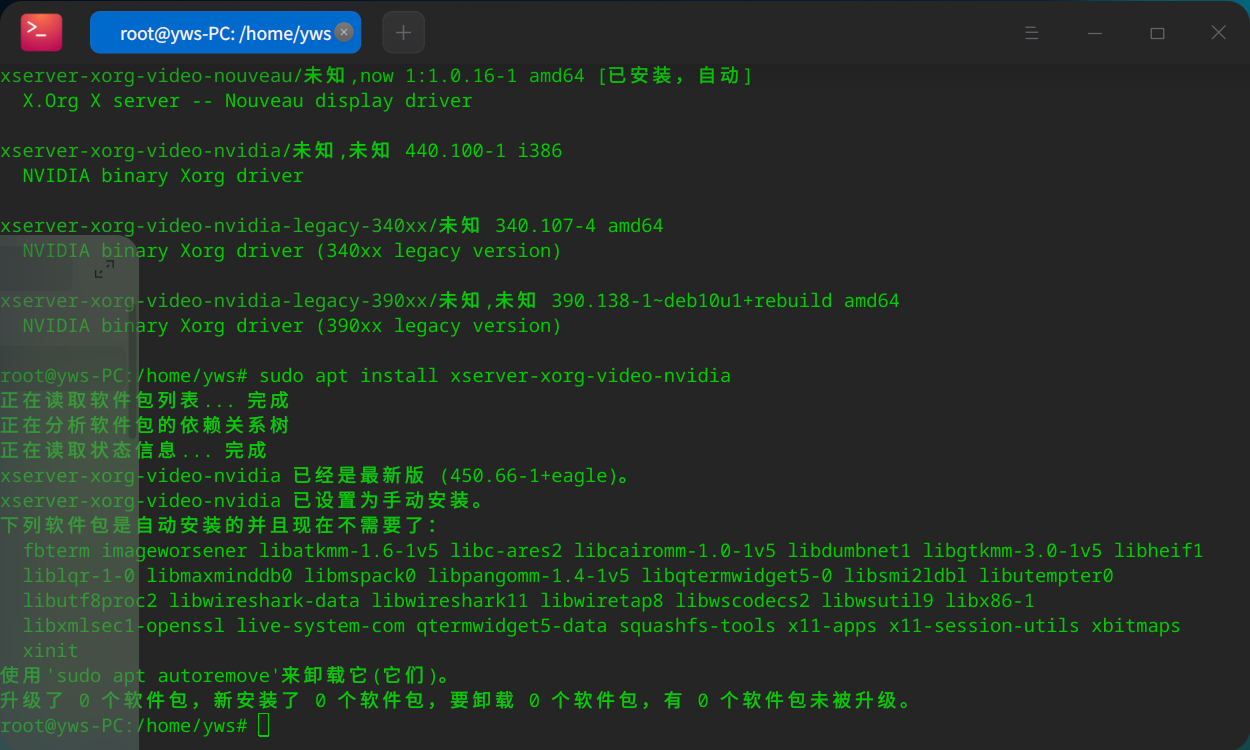
deepin 按照提示把那两个软件包装了
已经安装了最新版,但是亮度还是无法调节


如题,配置为 CPU AMD4800H 显卡 NIVDIA RTX2060 ;更新内核依旧无法调节