网卡禁用了,怎么修复,急等!!!
Tofloor
poster avatar
ShaunG_deepin
deepin
2020-10-29 00:35
Author
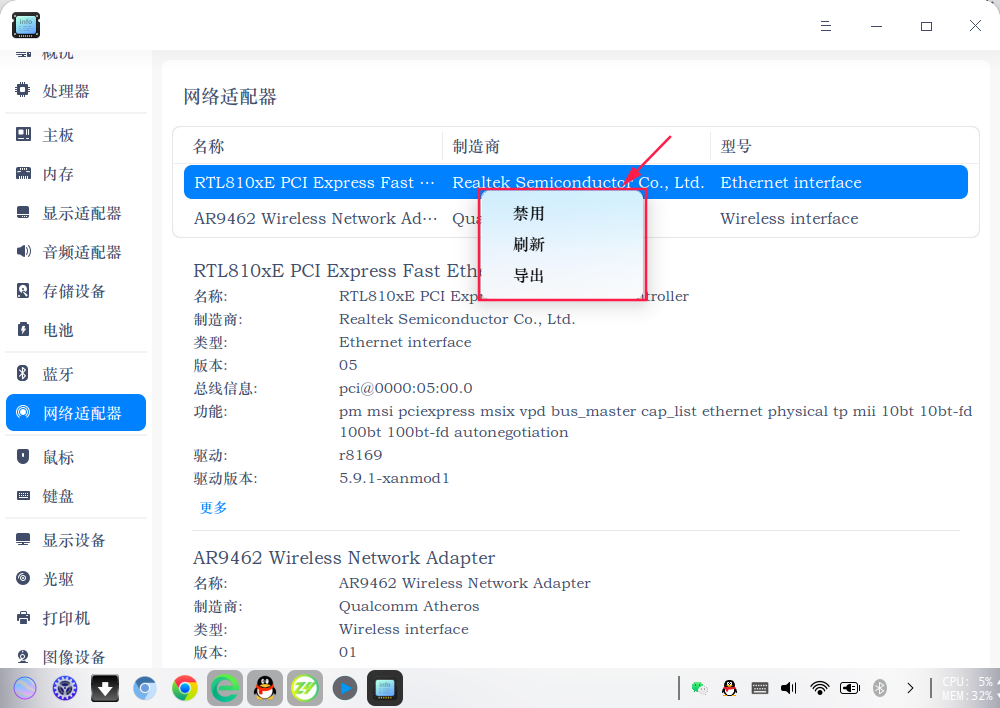
刚刚升级了一个小补丁,结果重启后发现网卡禁用了,网络设置都没有了,设备管理器里显示禁用,如图
如何修复?在线急等,现在双系统暂时切到window,但是工作资料都在deepin盘上。

Reply Favorite View the author
All Replies
1 / 2
To page
haohu1193
deepin
2020-10-29 00:57
#1


设备管理器...鼠标反键试试看...
Reply View the author
ShaunG_deepin
deepin
2020-10-29 00:58
#2
https://bbs.deepin.org/post/204574
设备管理器...鼠标反键试试看...

试了,不管用
Reply View the author
Shinglee
deepin
2020-10-29 00:59
#3
你这两种情况:
1. 你用了github上的驱动,升级了内核,github上的驱动不支持内核
    如果是这种情况,重启电脑,引导界面,Advanced Options,用旧内核引导进系统,卸载新内核
2. 删除屏蔽内核驱动的文件
    rm -f /etc/modprobe.d/文件名,你自己看文件内容,里面有 rtl 88 这些关键字的
Reply View the author
ShaunG_deepin
deepin
2020-10-29 01:02
#4
https://bbs.deepin.org/post/204574
你这两种情况:
1. 你用了github上的驱动,升级了内核,github上的驱动不支持内核
    如果是这种情况,重 ...

没有升级内核,用的是自带的5.7.7
Reply View the author
Shinglee
deepin
2020-10-29 01:03
#5
https://bbs.deepin.org/post/204574
没有升级内核,用的是自带的5.7.7

你有没有自己装过github上的第三方驱动?
sudo rm -f /etc/modprobe.d/文件名
Reply View the author
ShaunG_deepin
deepin
2020-10-29 01:16
#6
https://bbs.deepin.org/post/204574
你有没有自己装过github上的第三方驱动?
sudo rm -f /etc/modprobe.d/文件名

文件夹内文件如下
Reply View the author
ShaunG_deepin
deepin
2020-10-29 01:20
#7
Reply View the author
ShaunG_deepin
deepin
2020-10-29 01:22
#8
是不是iwlwifi.conf那个,今天去WeWork开会,好像是下载过它的一个网络驱动,不过没反应,就没在意
Reply View the author
Shinglee
deepin
2020-10-29 01:24
#9

你还是复制粘贴吧,图整的看不见
Reply View the author
ShaunG_deepin
deepin
2020-10-29 01:30
#10
https://bbs.deepin.org/post/204574
你还是复制粘贴吧,图整的看不见

这些文件

Reply View the author
Shinglee
deepin
2020-10-29 01:34
#11
mv /etc/modprobe.d/8821ce.conf /etc/modprobe.d/8821ce.conf_bak
重启
Reply View the author
ShaunG_deepin
deepin
2020-10-29 01:41
#12
https://bbs.deepin.org/post/204574
mv /etc/modprobe.d/8821ce.conf /etc/modprobe.d/8821ce.conf_bak
重启

不管用。。。。。。。。。。。。。。。。。
Reply View the author
Shinglee
deepin
2020-10-29 01:43
#13
https://bbs.deepin.org/post/204574
不管用。。。。。。。。。。。。。。。。。


systemctl start networkmanager.services
depmod -a
modprobe rtlpci
Reply View the author
ShaunG_deepin
deepin
2020-10-29 01:49
#14
https://bbs.deepin.org/post/204574
systemctl start networkmanager.services
depmod -a
modprobe rtlpci

运行第一条显示Unit networkmanager.services.service not found.
运行第三条条,显示Module rtlpci not found in directory /li/modules/5.7.7-amd64-desktop
Reply View the author
Shinglee
deepin
2020-10-29 01:52
#15
https://bbs.deepin.org/post/204574
运行第一条显示Unit networkmanager.services.service not found.
运行第三条条,显示Module rtlpci not  ...

sudo systemctl start NetworkManager
Reply View the author
Shinglee
deepin
2020-10-29 01:54
#16
主要是我电脑不在旁边,命令都是盲猜打给你的,头疼
Reply View the author
ShaunG_deepin
deepin
2020-10-29 01:54
#17
而且还有一个问题,本来我电脑可以设置圆角大小,今天中午进行一次小更新后,发现圆角都不能调了
Reply View the author
ShaunG_deepin
deepin
2020-10-29 01:55
#18
我觉得是今天这次更新有问题,大概3点几M,不知更新了啥补丁
Reply View the author
Shinglee
deepin
2020-10-29 01:57
#19
https://bbs.deepin.org/post/204574
我觉得是今天这次更新有问题,大概3点几M,不知更新了啥补丁

更新的是 微信
Reply View the author
ShaunG_deepin
deepin
2020-10-29 02:08
#20
我的网络没法弄了,抽疯一样,突然挂了。只能先用其他电脑代替,等版本下一次更新试试,有办法回退一下系统版本吗?
Reply View the author
1 / 2
To page