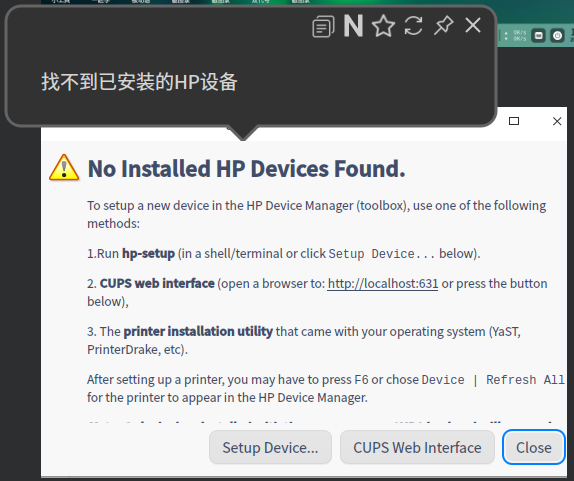
打印机这种情况怎么处理
Tofloor
poster avatar
deepin-chinaren
deepin
2020-10-26 01:20
Author
打印机这种情况怎么处理,请专家们指教!先谢谢了!
Reply Favorite View the author
All Replies
1 / 2
To page
zhoutj2001
deepin
2020-10-26 01:44
#1
惠普(HP)打印机驱动
1.打开深度终端,输入

sudo apt-get update && sudo apt-get install hplip hplip-gui hplip-plugin
2.接着终端输入:hp-setup, 按照提示一路下一步。
Reply View the author
haohu1193
deepin
2020-10-26 01:52
#2


Reply View the author
deepin-chinaren
deepin
2020-10-26 02:28
#3
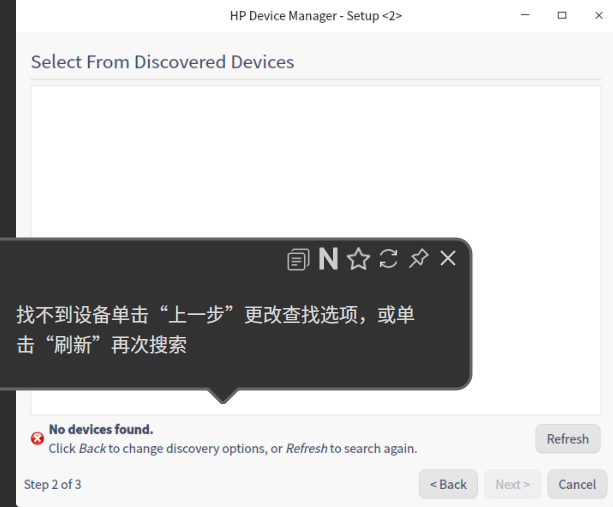
每次都是这过不去了,找不到设备,把网上的方法都试过了,都不行。
Reply View the author
deepin-chinaren
deepin
2020-10-26 02:30
#4
https://bbs.deepin.org/post/204391
每次都是这过不去了,找不到设备,把网上的方法都试过了,都不行。

怎么刷新都没用,安装了几天了,都在查资料,去官网下3.20.9插件都不行。
Reply View the author
deepin-chinaren
deepin
2020-10-26 02:32
#5
https://bbs.deepin.org/post/204391
惠普(HP)打印机驱动
1.打开深度终端,输入

win7下可以打印现来的,与线没有关系的。
Reply View the author
deepinuser17
deepin
2020-10-26 07:38
#6
打印机是如何连接的?  安装打印机时, 打印机是开机的吗?
Reply View the author
deepin-chinaren
deepin
2020-10-26 16:29
#7
https://bbs.deepin.org/post/204391
打印机是如何连接的?  安装打印机时, 打印机是开机的吗?

win7下都能正常运行和打印的。肯定正常了
Reply View the author
deepin-chinaren
deepin
2020-10-26 16:30
#8
https://bbs.deepin.org/post/204391
打印机是如何连接的?  安装打印机时, 打印机是开机的吗?

lpadmin:无效的device-uri""怎么改?
Reply View the author
deepinuser17
deepin
2020-10-27 06:53
#9
https://bbs.deepin.org/post/204391
win7下都能正常运行和打印的。肯定正常了

深度打印机管理器初始用USB连接方式. 如果打印机是通过本地网连接的, USB连接方式就无法工作.

URI是连接方式路径. USB连接的路径是: /dev/usb/lp1,  网络连接的打印机, URI路径是: ipp://<打印机IP地址>/ipp.
Reply View the author
deepin-chinaren
deepin
2020-10-27 15:58
#10
https://bbs.deepin.org/post/204391
深度打印机管理器初始用USB连接方式. 如果打印机是通过本地网连接的, USB连接方式就无法工作.

URI是连接 ...

用usb直接联电脑的,uri   usb://HP/DeskJet%201200%20series?serial=CN09M222KR
Reply View the author
rdlg
deepin
2020-10-27 16:42
#11
https://bbs.deepin.org/post/204391
用usb直接联电脑的,uri   usb://HP/DeskJet%201200%20series?serial=CN09M222KR

安装新版本 hplip,通过 sudo bash  <下载的.run文件> 安装,如果有报错贴上来。。。
Reply View the author
deepin-chinaren
deepin
2020-10-27 17:19
#12
https://bbs.deepin.org/post/204391
安装新版本 hplip,通过 sudo bash   安装,如果有报错贴上来。。。

sudo bash hplip-3.20.9.run
请输入密码
[sudo] dfq 的密码:
验证成功
Creating directory hplip-3.20.9
Verifying archive integrity... All good.
Uncompressing HPLIP 3.20.9 Self Extracting Archive

warning: hplip-install should not be run as root.

HP Linux Imaging and Printing System (ver. 3.20.9)
HPLIP Installer ver. 5.1

Copyright (c) 2001-18 HP Development Company, LP
This software comes with ABSOLUTELY NO WARRANTY.
This is free software, and you are welcome to distribute it
under certain conditions. See COPYING file for more details.

Installer log saved in: hplip-install_Tue-27-Oct-2020_09:05:35.log

warning: deepin distro is not found in AUTH_TYPES
\error: You are running the installer as root. It is highly recommended that you run the installer as
error: a regular (non-root) user. Do you still wish to continue?
Continue with installation (y=yes, n=no*, q=quit) ? y

note: Defaults for each question are maked with a '*'. Press to accept the default.
error: Auto installation is not supported for 'unknown' distro so all dependencies may not be installed.
Please install manually as mentioned in 'http://hplipopensource.com/hplip-web/install/manual/index.html' web-site                                                                                                           

Press 'y' to continue auto installation. Press 'n' to quit auto instalation(y=yes, n=no*): y


INSTALLATION MODE
-----------------
Automatic mode will install the full HPLIP solution with the most common options.
Custom mode allows you to choose installation options to fit specific requirements.

Please choose the installation mode (a=automatic*, c=custom, q=quit) : a


INTRODUCTION
------------
This installer will install HPLIP version 3.20.9 on your computer.
Please close any running package management systems now (YaST, Adept, Synaptic, Up2date, etc).


DISTRO/OS CONFIRMATION
----------------------


DISTRO/OS SELECTION
-------------------

Choose the name of the distro/OS that most closely matches your system:

Num.  Distro/OS Name         
----  ------------------------
0     Mepis                  
1     Debian                  
2     SUSE Linux              
3     Mandriva Linux         
4     Fedora                  
5     Red Hat                 
6     Red Hat Enterprise Linux
7     Ubuntu                  
8     PCLinuxOS               
9     Linux Mint              
10    gOS                     
11    Linpus Linux            
12    Manjaro Linux           
13    IGOS                    
14    Boss                    
15    Linux From Scratch      

Enter number 0...15 (q=quit) ?7

Choose the version of "Ubuntu" that most closely matches your system:

Num.  Distro/OS Version                       
----  ----------------------------------------
0     Unknown or not listed                  
1     10.04 ("Lucid", Released 2010)         
2     11.10 ("Oneiric", Released 13/10/2011)  
3     12.04 ("recise", Released 28/04/2012)  
4     12.10 ("Quantal", Released 18/10/2012)  
5     13.04 ("Raring", Released 25/04/2013)   
6     13.10 ("Saucy", Released 17/10/2013)   
7     14.04 ("Trusty", Released 17/04/2014)   
8     14.10 ("Utopic", Released 23/10/2014)   
9     15.04 ("Vivid", Released 17/04/2015)   
10    15.10 ("Willy", Released 22/10/2015)   
11    16.04 ("Xenial", Released 17/04/2016)   
12    16.10 ("Yakkety", Released 13/10/2016)  
13    17.04 ("Zesty", Released 31/05/2017)   
14    17.10 ("Artful Aardvark", Released      
      19/10/2017)                             
15    18.04 ("Bionic Beaver", Released        
      5/04/2018)                              
16    18.10 ("Cosmic Cuttlefish", Released   
      18/10/2018)                             
17    19.04 ("Cosmic Cuttlefish", Released   
      18/10/2018)                             
18    19.10 ("Eoan Ermine", Released         
      26/10/2019)                             
19    20.04 ("Cosmic Cuttlefish", Released   
      18/10/2018)                             

Enter number 0...19 (q=quit) ?18

Distro set to: Ubuntu 19.10

Initializing. Please wait...


SECURITY PACKAGES
-----------------
AppArmor is installed.
AppArmor protects the application from external intrusion attempts making the application secure

Would you like to have this installer install the hplip specific policy/profile (y=yes*, n=no, q=quit) ? y


RUNNING PRE-INSTALL COMMANDS
----------------------------
OK


RUNNING HPLIP LIBS REMOVE COMMANDS
----------------------------------
None
OK


MISSING DEPENDENCIES
--------------------
Following dependencies are not installed. HPLIP will not work if all REQUIRED dependencies are not installed and some of the HPLIP features will not work if OPTIONAL dependencies are not installed.
Package-Name         Component            Required/Optional   
libnetsnmp-devel     network              REQUIRED            
sane-devel           scan                 REQUIRED            
pil                  scan                 OPTIONAL            
gcc                  base                 REQUIRED            
pyqt4-dbus           gui_qt4              REQUIRED            
python-devel         base                 REQUIRED            
cups-devel           base                 REQUIRED            
libavahi-dev         scan                 REQUIRED            
reportlab            fax                  OPTIONAL            
pyqt4                gui_qt4              REQUIRED            
libusb               base                 REQUIRED            
libtool              base                 REQUIRED            
cups-image           base                 REQUIRED            
python-notify        gui_qt4              OPTIONAL            
xsane                scan                 OPTIONAL            
libjpeg              base                 REQUIRED            
avahi-utils          network              OPTIONAL            
Do you want to install these missing dependencies (y=yes*, n=no, q=quit) ? y
Reply View the author
rdlg
deepin
2020-10-27 17:28
#13
https://bbs.deepin.org/post/204391
sudo bash hplip-3.20.9.run
请输入密码
[sudo] dfq 的密码:

因为hplip官方的版本没有适配过deepin,你可以选debian 10,然后看提示差哪些包,装上后再运行一次。
Reply View the author
deepin-chinaren
deepin
2020-10-27 17:31
#14
https://bbs.deepin.org/post/204391
安装新版本 hplip,通过 sudo bash   安装,如果有报错贴上来。。。

Do you want to install these missing dependencies (y=yes*, n=no, q=quit) ? y


INSTALL MISSING REQUIRED DEPENDENCIES
-------------------------------------
note: Installation of dependencies requires an active internet connection.
warning: Missing REQUIRED dependency: gcc (gcc - GNU Project C and C++ Compiler)
warning: This installer cannot install 'gcc' for your distro/OS and/or version.
error: Installation cannot continue without this dependency. Please manually install this dependency and re-run this installer.
Reply View the author
deepin-chinaren
deepin
2020-10-27 17:39
#15
https://bbs.deepin.org/post/204391
因为hplip官方的版本没有适配过deepin,你可以选debian 10,然后看提示差哪些包,装上后再运行一次。 ...

warning: hplip-install should not be run as root.

HP Linux Imaging and Printing System (ver. 3.20.9)
HPLIP Installer ver. 5.1

Copyright (c) 2001-18 HP Development Company, LP
This software comes with ABSOLUTELY NO WARRANTY.
This is free software, and you are welcome to distribute it
under certain conditions. See COPYING file for more details.

Installer log saved in: hplip-install_Tue-27-Oct-2020_09:37:27.log

warning: deepin distro is not found in AUTH_TYPES
\error: You are running the installer as root. It is highly recommended that you run the installer as
error: a regular (non-root) user. Do you still wish to continue?
Continue with installation (y=yes, n=no*, q=quit) ? y

note: Defaults for each question are maked with a '*'. Press to accept the default.
error: Auto installation is not supported for 'unknown' distro so all dependencies may not be installed.
Please install manually as mentioned in 'http://hplipopensource.com/hplip-web/install/manual/index.html' web-site                                                                                                           

Press 'y' to continue auto installation. Press 'n' to quit auto instalation(y=yes, n=no*): y


INSTALLATION MODE
-----------------
Automatic mode will install the full HPLIP solution with the most common options.
Custom mode allows you to choose installation options to fit specific requirements.

Please choose the installation mode (a=automatic*, c=custom, q=quit) : a


INTRODUCTION
------------
This installer will install HPLIP version 3.20.9 on your computer.
Please close any running package management systems now (YaST, Adept, Synaptic, Up2date, etc).


DISTRO/OS CONFIRMATION
----------------------


DISTRO/OS SELECTION
-------------------

Choose the name of the distro/OS that most closely matches your system:

Num.  Distro/OS Name         
----  ------------------------
0     Mepis                  
1     Debian                  
2     SUSE Linux              
3     Mandriva Linux         
4     Fedora                  
5     Red Hat                 
6     Red Hat Enterprise Linux
7     Ubuntu                  
8     PCLinuxOS               
9     Linux Mint              
10    gOS                     
11    Linpus Linux            
12    Manjaro Linux           
13    IGOS                    
14    Boss                    
15    Linux From Scratch      

Enter number 0...15 (q=quit) ?1

Choose the version of "Debian" that most closely matches your system:

Num.  Distro/OS Version                       
----  ----------------------------------------
0     Unknown or not listed                  
1     10.0 ("Buster", Released 22/07/2017)   
2     10.1 ("Buster", Released 22/07/2017)   
3     10.2 ("Buster", Released 22/07/2017)   
4     10.3 ("Buster", Released 08/02/2020)   
5     10.4 ("Buster", Released 09/05/2020)   
6     6.0 ("Squeeze")                        
7     6.0.1 ("Squeeze")                       
8     6.0.10 ("Squeeze")                     
9     6.0.2 ("Squeeze")                       
10    6.0.3 ("Squeeze")                       
11    6.0.4 ("Squeeze")                       
12    6.0.5 ("Squeeze")                       
13    6.0.6 ("Squeeze")                       
14    6.0.7 ("Squeeze")                       
15    6.0.8 ("Squeeze")                       
16    6.0.9 ("Squeeze")                       
17    7.0 ("Wheezy", Released 04/05/2013)     
18    7.1 ("Wheezy", Released 04/05/2013)     
19    7.2 ("Wheezy", Released 04/05/2013)     
20    7.3 ("Wheezy", Released 04/05/2013)     
21    7.4 ("Wheezy", Released 04/05/2013)     
22    7.5 ("Wheezy", Released 04/05/2013)     
23    7.6 ("Wheezy", Released 04/05/2013)     
24    7.7 ("Wheezy", Released 04/05/2013)     
25    7.8 ("Wheezy", Released 04/05/2013)     
26    7.9 ("Wheezy", Released 04/05/2013)     
27    8.0 ("Jessie", Released 04/05/2015)     
28    8.1 ("Jessie", Released 04/05/2015)     
29    8.2 ("Jessie", Released 04/05/2015)     
30    8.3 ("Jessie", Released 04/05/2015)     
31    8.4 ("Jessie", Released 04/05/2016)     
32    8.5 ("Jessie", Released 27/08/2016)     
33    8.6 ("Jessie", Released 22/10/2016)     
34    8.7 ("Jessie", Released 22/10/2016)     
35    8.8 ("Jessie", Released 31/05/2017)     
36    9.1 ("Stretch", Released 22/07/2017)   
37    9.2 ("Stretch", Released 7/10/2017)     
38    9.3 ("Stretch", Released 9/12/2017)     
39    9.4 ("Stretch", Released 10/3/2018)     
40    9.5 ("Stretch", Released 10/3/2018)     
41    9.6 ("Stretch", Released 10/11/2018)   
42    9.7 ("Stretch", Released 23/1/2019)     
43    9.8 ("Stretch", Released 16/2/2019)     
44    9.9 ("Stretch", Released 22/07/2017)   

Enter number 0...44 (q=quit) ?1

Distro set to: Debian 10.0

Initializing. Please wait...


SECURITY PACKAGES
-----------------
AppArmor is installed.
AppArmor protects the application from external intrusion attempts making the application secure

Would you like to have this installer install the hplip specific policy/profile (y=yes*, n=no, q=quit) ? y


RUNNING PRE-INSTALL COMMANDS
----------------------------
OK


RUNNING HPLIP LIBS REMOVE COMMANDS
----------------------------------
None
OK


MISSING DEPENDENCIES
--------------------
Following dependencies are not installed. HPLIP will not work if all REQUIRED dependencies are not installed and some of the HPLIP features will not work if OPTIONAL dependencies are not installed.
Package-Name         Component            Required/Optional   
pyqt5-dbus           gui_qt5              OPTIONAL            
libnetsnmp-devel     network              REQUIRED            
sane-devel           scan                 REQUIRED            
pil                  scan                 OPTIONAL            
gcc                  base                 REQUIRED            
pyqt4-dbus           gui_qt4              REQUIRED            
python-devel         base                 REQUIRED            
cups-devel           base                 REQUIRED            
libavahi-dev         scan                 REQUIRED            
reportlab            fax                  OPTIONAL            
pyqt5                gui_qt5              REQUIRED            
pyqt4                gui_qt4              REQUIRED            
libusb               base                 REQUIRED            
libtool              base                 REQUIRED            
cups-image           base                 REQUIRED            
python-notify        gui_qt5              OPTIONAL            
xsane                scan                 OPTIONAL            
libjpeg              base                 REQUIRED            
avahi-utils          network              OPTIONAL            
Do you want to install these missing dependencies (y=yes*, n=no, q=quit) ? y


INSTALL MISSING REQUIRED DEPENDENCIES
-------------------------------------
note: Installation of dependencies requires an active internet connection.
warning: Missing REQUIRED dependency: gcc (gcc - GNU Project C and C++ Compiler)
warning: This installer cannot install 'gcc' for your distro/OS and/or version.
error: Installation cannot continue without this dependency. Please manually install this dependency and re-run this installer.
Reply View the author
大白用户
deepin
2020-10-27 18:13
#16
https://bbs.deepin.org/post/204391
warning: hplip-install should not be run as root.

HP Linux Imaging and Printing System (ver. 3.20 ...

看样子是提示没有安装gcc
Reply View the author
deepinuser17
deepin
2020-10-27 20:35
#17
本帖最后由 deepinuser17 于 2020-10-27 12:46 编辑
https://bbs.deepin.org/post/204391
warning: hplip-install should not be run as root.

HP Linux Imaging and Printing System (ver. 3.20 ...

应该选5.
  1. 5     10.4 ("Buster", Released 09/05/2020)   
Copy the Code
Reply View the author
deepinuser17
deepin
2020-10-27 20:39
#18
https://bbs.deepin.org/post/204391
用usb直接联电脑的,uri   usb://HP/DeskJet%201200%20series?serial=CN09M222KR


  1. usb://HP/DeskJet%201200%20series?serial=CN09M222KR
Copy the Code


改成:
  1. usb://dev/usb/lp1
Copy the Code


确认打印机路径:
  1. ls -lh /dev/usb/lp*
Copy the Code
Reply View the author
KeiSyut
deepin
2020-10-27 21:00
#19
我的惠普机子型号跟你的不一样。
但安装操作是一样的。我的可以正常使用。
我的URI显示是这样的。你试下改下看能不能用。


Reply View the author
deepin-chinaren
deepin
2020-10-27 21:09
#20

ls -lh /dev/usb/lp*
ls: 无法访问'/dev/usb/lp*': 没有那个文件或目录
Reply View the author
1 / 2
To page