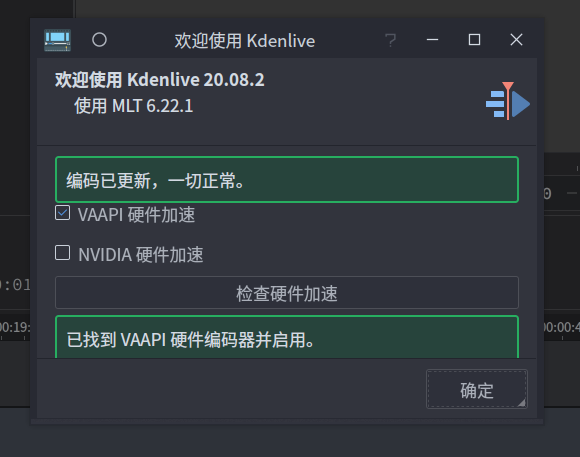
kdenlive如何加入vaapi硬件编码?
Tofloor
poster avatar
lfweqaz
deepin
2020-10-16 16:52
Author

kdenlive如何加入vaapi硬件编码?这涉及到我的知识盲区了,求网能网友支招
Reply Favorite View the author
All Replies
Feng Yu
deepin
2020-10-16 17:45
#1
本帖最后由 abcfy2 于 2020-10-16 09:53 编辑

那是硬件层面支持的,如果你的显卡太老是不支持的。检查vainfo的输出。如果支持VA-API的话,vainfo输出是不会报错的,而且会打印出当前显卡支持的硬件解码profile
Reply View the author
lfweqaz
deepin
2020-10-16 17:53
#2
https://bbs.deepin.org/post/203907
那是硬件层面支持的,如果你的显卡太老是不支持的。检查vainfo的输出

我的显卡是rx580,kdenlive是appimage格式的,在网上找的资料说是kdenlive自带的ffmpeg不带硬解码,需要开启硬解码得更换ffmpe。
Reply View the author
Feng Yu
deepin
2020-10-16 17:55
#3
https://bbs.deepin.org/post/203907
我的显卡是rx580,kdenlive是appimage格式的,在网上找的资料说是kdenlive自带的ffmpeg不带硬解码,需要 ...

我也是rx580,是支持va-api的,而AMD的开源驱动mesa就已经支持了:

  1. $ inxi -G
  2. Graphics:  Device-1: Advanced Micro Devices [AMD/ATI] Polaris 20 XL [Radeon RX 580 2048SP] driver: amdgpu v: kernel
  3.            Display: x11 server: X.Org 1.20.9 driver: amdgpu FAILED: ati unloaded: modesetting resolution: 2560x1440~60Hz
  4.            OpenGL: renderer: AMD Radeon RX 580 2048SP (POLARIS10 DRM 3.39.0 5.9.0-1-MANJARO LLVM 10.0.1) v: 4.6 Mesa 20.2.0
Copy the Code

  1. $ vainfo
  2. vainfo: VA-API version: 1.9 (libva 2.9.1)
  3. vainfo: Driver version: Mesa Gallium driver 20.2.0 for AMD Radeon RX 580 2048SP (POLARIS10, DRM 3.39.0, 5.9.0-1-MANJARO, LLVM 10.0.1)
  4. vainfo: Supported profile and entrypoints
  5.       VAProfileMPEG2Simple            : VAEntrypointVLD
  6.       VAProfileMPEG2Main              : VAEntrypointVLD
  7.       VAProfileVC1Simple              : VAEntrypointVLD
  8.       VAProfileVC1Main                : VAEntrypointVLD
  9.       VAProfileVC1Advanced            : VAEntrypointVLD
  10.       VAProfileH264ConstrainedBaseline: VAEntrypointVLD
  11.       VAProfileH264ConstrainedBaseline: VAEntrypointEncSlice
  12.       VAProfileH264Main               : VAEntrypointVLD
  13.       VAProfileH264Main               : VAEntrypointEncSlice
  14.       VAProfileH264High               : VAEntrypointVLD
  15.       VAProfileH264High               : VAEntrypointEncSlice
  16.       VAProfileHEVCMain               : VAEntrypointVLD
  17.       VAProfileHEVCMain               : VAEntrypointEncSlice
  18.       VAProfileHEVCMain10             : VAEntrypointVLD
  19.       VAProfileJPEGBaseline           : VAEntrypointVLD
  20.       VAProfileNone                   : VAEntrypointVideoProc
Copy the Code
Reply View the author
lfweqaz
deepin
2020-10-16 18:01
#4
https://bbs.deepin.org/post/203907
我也是rx580,是支持va-api的,而AMD的开源驱动mesa就已经支持了:

那怎样做才能让kdenlive能识别到vaapi硬编码呢?我通过星火商店安装的kdenlive20.04.1也是提示找不到可用的硬件编码
Reply View the author
Feng Yu
deepin
2020-10-16 18:15
#5
https://bbs.deepin.org/post/203907
那怎样做才能让kdenlive能识别到vaapi硬编码呢?我通过星火商店安装的kdenlive20.04.1也是提示找不到可用 ...

检查下vainfo输出
Reply View the author
lfweqaz
deepin
2020-10-16 20:32
#6
  1. libva info: VA-API version 1.4.0
  2. libva info: va_getDriverName() returns 0
  3. libva info: Trying to open /usr/lib/x86_64-linux-gnu/dri/radeonsi_drv_video.so
  4. libva info: Found init function __vaDriverInit_1_4
  5. libva info: va_openDriver() returns 0
  6. vainfo: VA-API version: 1.4 (libva 2.4.0)
  7. vainfo: Driver version: Mesa Gallium driver 19.2.6 for Radeon RX 580 Series (POLARIS10, DRM 3.37.0, 5.7.7-amd64-desktop, LLVM 7.0.1)
  8. vainfo: Supported profile and entrypoints
  9.       VAProfileMPEG2Simple            : VAEntrypointVLD
  10.       VAProfileMPEG2Main              : VAEntrypointVLD
  11.       VAProfileVC1Simple              : VAEntrypointVLD
  12.       VAProfileVC1Main                : VAEntrypointVLD
  13.       VAProfileVC1Advanced            : VAEntrypointVLD
  14.       VAProfileH264ConstrainedBaseline: VAEntrypointVLD
  15.       VAProfileH264ConstrainedBaseline: VAEntrypointEncSlice
  16.       VAProfileH264Main               : VAEntrypointVLD
  17.       VAProfileH264Main               : VAEntrypointEncSlice
  18.       VAProfileH264High               : VAEntrypointVLD
  19.       VAProfileH264High               : VAEntrypointEncSlice
  20.       VAProfileHEVCMain               : VAEntrypointVLD
  21.       VAProfileHEVCMain               : VAEntrypointEncSlice
  22.       VAProfileHEVCMain10             : VAEntrypointVLD
  23.       VAProfileJPEGBaseline           : VAEntrypointVLD
  24.       VAProfileNone                   : VAEntrypointVideoProc
Copy the Code
Reply View the author
Feng Yu
deepin
2020-10-16 20:42
#7
本帖最后由 abcfy2 于 2020-10-16 12:53 编辑

你的libva已经正常工作了,应该是可以使用的才对。
我装了下试下了,我这边就可以识别到。


你在终端启动kdenlive,到这里点几下检查硬件加速看看终端输出。

我感觉似乎它的检测只是调用ffmpeg使用硬件编解码,如果是的话,可能是debian上游ffmpeg没有编译加入va-api支持,你可以试试。

我这边的终端输出类似于这样:
  1. ++++++ Unknown asset :  "sox"
  2. ++++++ Unknown asset :  "timewarp"
  3. ++++++ Unknown asset :  "opencv.tracker"
  4. ++++++ Unknown asset :  "opencv.tracker"
  5. // FFMPEG ARGS:  ("-hide_banner", "-y", "-vaapi_device", "/dev/dri/renderD128", "-f", "lavfi", "-i", "smptebars=duration=5:size=1280x720:rate=25", "-vf", "format=nv12,hwupload", "-c:v", "h264_vaapi", "-an", "-f", "mp4", "/tmp/hCGpZD.mp4")
  6. /// ++ VAAPI YES SUPPORTED ::::::
  7. // FFMPEG ARGS:  ("-hide_banner", "-y", "-hwaccel", "cuvid", "-f", "lavfi", "-i", "smptebars=duration=5:size=1280x720:rate=25", "-c:v", "h264_nvenc", "-an", "-f", "mp4", "/tmp/zTUJxo.mp4")
  8. /// ++ NVENC FAILED ::::::
  9. // FFMPEG ARGS:  ("-hide_banner", "-filters")
  10. /// ++ SCALE_NPP NOT SUPPORTED
  11. ^[[B// FFMPEG ARGS:  ("-hide_banner", "-y", "-vaapi_device", "/dev/dri/renderD128", "-f", "lavfi", "-i", "smptebars=duration=5:size=1280x720:rate=25", "-vf", "format=nv12,hwupload", "-c:v", "h264_vaapi", "-an", "-f", "mp4", "/tmp/AzRTPW.mp4")
  12. /// ++ VAAPI YES SUPPORTED ::::::
  13. // FFMPEG ARGS:  ("-hide_banner", "-y", "-hwaccel", "cuvid", "-f", "lavfi", "-i", "smptebars=duration=5:size=1280x720:rate=25", "-c:v", "h264_nvenc", "-an", "-f", "mp4", "/tmp/JlPope.mp4")
  14. /// ++ NVENC FAILED ::::::
  15. // FFMPEG ARGS:  ("-hide_banner", "-filters")
  16. /// ++ SCALE_NPP NOT SUPPORTED
  17. // FFMPEG ARGS:  ("-hide_banner", "-y", "-vaapi_device", "/dev/dri/renderD128", "-f", "lavfi", "-i", "smptebars=duration=5:size=1280x720:rate=25", "-vf", "format=nv12,hwupload", "-c:v", "h264_vaapi", "-an", "-f", "mp4", "/tmp/cHuFMR.mp4")
  18. /// ++ VAAPI YES SUPPORTED ::::::
  19. // FFMPEG ARGS:  ("-hide_banner", "-y", "-hwaccel", "cuvid", "-f", "lavfi", "-i", "smptebars=duration=5:size=1280x720:rate=25", "-c:v", "h264_nvenc", "-an", "-f", "mp4", "/tmp/DLXROJ.mp4")
  20. /// ++ NVENC FAILED ::::::
  21. // FFMPEG ARGS:  ("-hide_banner", "-filters")
  22. /// ++ SCALE_NPP NOT SUPPORTED
Copy the Code
如果只是ffmpeg没有编译支持va-api的话,换个别的编译过的版本放到/usr/local/bin/下理论上应该就解决了。

也可以看看ffmpeg -encoders 2>/dev/null | grep -i vaapi 的输出,确认下本身ffmpeg有没有编译进去vaapi编码支持

  1. $ ffmpeg -encoders 2>/dev/null | grep -i vaapi
  2. V..... h264_vaapi           H.264/AVC (VAAPI) (codec h264)
  3. V..... hevc_vaapi           H.265/HEVC (VAAPI) (codec hevc)
  4. V..... mjpeg_vaapi          MJPEG (VAAPI) (codec mjpeg)
  5. V..... mpeg2_vaapi          MPEG-2 (VAAPI) (codec mpeg2video)
  6. V..... vp8_vaapi            VP8 (VAAPI) (codec vp8)
  7. V..... vp9_vaapi            VP9 (VAAPI) (codec vp9)
Copy the Code

EDIT:
从终端输出来看,它用的检测VAAPI是否可用的时候调用的ffmpeg测试的,测试命令类似于: ffmpeg -hide_banner -y -vaapi_device /dev/dri/renderD128 -f lavfi -i smptebars=duration=5:size=1280x720:rate=25 -vf format=nv12,hwupload -c:v h264_vaapi -an -f mp4 /tmp/BLFJUV.mp4

你可以执行下这个,看看什么输出,然后用播放器打开/tmp/BLFJUV.mp4看看是否能正常播放?

  1. $ ffmpeg -hide_banner -y -vaapi_device /dev/dri/renderD128 -f lavfi -i smptebars=duration=5:size=1280x720:rate=25 -vf format=nv12,hwupload -c:v h264_vaapi -an -f mp4 /tmp/BLFJUV.mp4
  2. Input #0, lavfi, from 'smptebars=duration=5:size=1280x720:rate=25':
  3.   Duration: N/A, start: 0.000000, bitrate: N/A
  4.     Stream #0:0: Video: rawvideo (I420 / 0x30323449), yuv420p, 1280x720 [SAR 1:1 DAR 16:9], 25 tbr, 25 tbn, 25 tbc
  5. Stream mapping:
  6.   Stream #0:0 -> #0:0 (rawvideo (native) -> h264 (h264_vaapi))
  7. Press [q] to stop, [?] for help
  8. [h264_vaapi @ 0x556a786cddc0] No quality level set; using default (20).
  9. [h264_vaapi @ 0x556a786cddc0] Driver does not support some wanted packed headers (wanted 0xd, found 0).
  10. [h264_vaapi @ 0x556a786cddc0] Driver does not support packed sequence headers, but a global header is requested.
  11. [h264_vaapi @ 0x556a786cddc0] No global header will be written: this may result in a stream which is not usable for some purposes (e.g. not muxable to some containers).
  12. Output #0, mp4, to '/tmp/BLFJUV.mp4':
        encoder         : Lavf58.62.100
  13.     Stream #0:0: Video: h264 (h264_vaapi) (High) (avc1 / 0x31637661), vaapi_vld, 1280x720 [SAR 1:1 DAR 16:9], q=-1--1, 25 fps, 12800 tbn, 25 tbc
          encoder         : Lavc58.111.100 h264_vaapi
  14. frame=  125 fps=120 q=-0.0 Lsize=       8kB time=00:00:04.96 bitrate=  13.8kbits/s speed=4.78x   
  15. video:7kB audio:0kB subtitle:0kB other streams:0kB global headers:0kB muxing overhead: 18.627180%
Copy the Code


Reply View the author
lfweqaz
deepin
2020-10-16 22:22
#8
https://bbs.deepin.org/post/203907
你的libva已经正常工作了,应该是可以使用的才对。
我装了下试下了,我这边就可以识别到。

输入ffmpeg -encoders 2>/dev/null | grep -i vaapi 返回的结果和你的一样;
输入ffmpeg -hide_banner -y -vaapi_device /dev/dri/renderD128 -f lavfi -i smptebars=duration=5:size=1280x720:rate=25 -vf format=nv12,hwupload -c:v h264_vaapi -an -f mp4 /tmp/BLFJUV.mp4貌似就有报错了

  1. $ ffmpeg -hide_banner -y -vaapi_device /dev/dri/renderD128 -f lavfi -i smptebars=duration=5:size=1280x720:rate=25 -vf format=nv12,hwupload -c:v h264_vaapi -an -f mp4 /tmp/BLFJUV.mp4
  2. Input #0, lavfi, from 'smptebars=duration=5:size=1280x720:rate=25':
  3.   Duration: N/A, start: 0.000000, bitrate: N/A
  4.     Stream #0:0: Video: rawvideo (I420 / 0x30323449), yuv420p, 1280x720 [SAR 1:1 DAR 16:9], 25 tbr, 25 tbn, 25 tbc
  5. Stream mapping:
  6.   Stream #0:0 -> #0:0 (rawvideo (native) -> h264 (h264_vaapi))
  7. Press [q] to stop, [?] for help
  8. [h264_vaapi @ 0x55be01443400] Driver does not support some wanted packed headers (wanted 0xd, found 0).
  9. [h264_vaapi @ 0x55be01443400] Driver does not support packed sequence headers, but a global header is requested.
  10. [h264_vaapi @ 0x55be01443400] No global header will be written: this may result in a stream which is not usable for some purposes (e.g. not muxable to some containers).
  11. Output #0, mp4, to '/tmp/BLFJUV.mp4':
        encoder         : Lavf58.20.100
  12.     Stream #0:0: Video: h264 (h264_vaapi) (High) (avc1 / 0x31637661), vaapi_vld, 1280x720 [SAR 1:1 DAR 16:9], q=-1--1, 25 fps, 12800 tbn, 25 tbc
          encoder         : Lavc58.35.100 h264_vaapi
  13. [Parsed_smptebars_0 @ 0x55be0143df00] EOF timestamp not reliableate=   0.1kbits/s speed= 3.9x   
  14. frame=  125 fps=100 q=-0.0 Lsize=       8kB time=00:00:04.96 bitrate=  12.8kbits/s speed=3.96x               
  15. video:7kB audio:0kB subtitle:0kB other streams:0kB global headers:0kB muxing overhead: 19.459866%
Copy the Code
Reply View the author
Feng Yu
deepin
2020-10-16 23:31
#9
https://bbs.deepin.org/post/203907
输入ffmpeg -encoders 2>/dev/null | grep -i vaapi 返回的结果和你的一样;
输入ffmpeg -hide_banner -y  ...

这不是没报错么?最后的输出应该是编码完成了。想确定是否执行成功,在命令执行完成之后输入echo $?,如果是0就是上一条命令执行正常,否则就是报错,具体的数字就是退出码。

另外你在终端运行kdenlive,看看检测vaapi的时候它用的命令行是啥,检测VAAPI的时候是否会显示VAAAPI YES SUPPORTED
Reply View the author
lfweqaz
deepin
2020-10-17 00:43
#10
https://bbs.deepin.org/post/203907
这不是没报错么?最后的输出应该是编码完成了。想确定是否执行成功,在命令执行完成之后输入echo $?,如 ...

我打开的是appimage格式的kdenlive
  1. // FFMPEG ARGS:  ("-hide_banner", "-y", "-vaapi_device", "/dev/dri/renderD128", "-f", "lavfi", "-i", "smptebars=duration=5:size=1280x720:rate=25", "-vf", "format=nv12,hwupload", "-c:v", "h264_vaapi", "-an", "-f", "mp4", "/tmp/VCFMWh.mp4")
  2. /// ++ VAAPI FAILED ::::::
  3. // FFMPEG ARGS:  ("-hide_banner", "-y", "-hwaccel", "cuvid", "-f", "lavfi", "-i", "smptebars=duration=5:size=1280x720:rate=25", "-c:v", "h264_nvenc", "-an", "-f", "mp4", "/tmp/ztrhED.mp4")
  4. /// ++ NVENC FAILED ::::::
  5. // FFMPEG ARGS:  ("-hide_banner", "-filters")
  6. /// ++ SCALE_NPP NOT SUPPORTED
Copy the Code
Reply View the author
Feng Yu
deepin
2020-10-17 01:20
#11
https://bbs.deepin.org/post/203907
我打开的是appimage格式的kdenlive

哪下的Appimage?发出来我看下,我怀疑是AppImage自己打包进去了一个ffmpeg
Reply View the author
lfweqaz
deepin
2020-10-17 01:23
#12
https://bbs.deepin.org/post/203907
哪下的Appimage?发出来我看下,我怀疑是AppImage自己打包进去了一个ffmpeg

在这下:https://kdenlive.org/en/download/
除了appimage这个包,我还在终端打开了通过星火商店装的kdenlive20.04.1,也同样是返回/// ++ VAAPI FAILED ::::::
Reply View the author
Feng Yu
deepin
2020-10-17 01:46
#13
怀疑是appimage编译环境的问题,它的ffmpeg好像版本太低了,会报错。用ppa的就没问题,而且appimage似乎也没编译进去qt多语言支持,都是英文的
Reply View the author
lfweqaz
deepin
2020-10-17 01:50
#14
https://bbs.deepin.org/post/203907
怀疑是appimage编译环境的问题,它的ffmpeg好像版本太低了,会报错。用ppa的就没问题,而且appimage似乎也 ...

你是怎么装上kdenlive20.08.3的?可以大概说下吗?谢谢
Reply View the author
ytl-0898
deepin
2020-10-17 02:07
#15
中文怎么设置,搞了好久都整不好
Reply View the author
Feng Yu
deepin
2020-10-17 02:11
#16
本帖最后由 abcfy2 于 2020-10-16 18:59 编辑
https://bbs.deepin.org/post/203907
你是怎么装上kdenlive20.08.3的?可以大概说下吗?谢谢

从ppa下载那两个deb包手工安装就行了。不过我用Manjaro,直接官方仓库就是最新版本,不用折腾.
EDIT:

看了下deepin仓库中的kdenlive(包名: org.kdenlive.kdenlive),其实就是AppImage解包版本的,理论上应该也不行。你可以试试直接从命令行安装kdenlive(包名: kdenlive)这个包,虽然版本比较低(18.xx),不过理论上应该使用的是系统自带的ffmpeg,你可以先用这个测试一下是否支持VA-API
Reply View the author
lfweqaz
deepin
2020-10-17 03:56
#17
https://bbs.deepin.org/post/203907
从ppa下载那两个deb包手工安装就行了。不过我用Manjaro,直接官方仓库就是最新版本,不用折腾.
EDIT:

ppa上的包我装不上,估计和以来有关,不过我通过flathub就装上了,vaapi能用了,还真是软件报的问题,感谢这一天的解答
Reply View the author
lfweqaz
deepin
2020-10-17 03:57
#18
https://bbs.deepin.org/post/203907
中文怎么设置,搞了好久都整不好

flathub上的kdenlive自带中文,可以试试
Reply View the author