
客户操作系统已禁用cpu
Tofloor
poster avatar
gelonggld
deepin
2020-09-28 00:22
Author
本帖最后由 gelonggld 于 2020-9-27 16:35 编辑

我使用的vmware 安装的deepin,之前使用一直好好的,今天突然爆出错误:
  1. 客户机操作系统已禁用 CPU。请关闭或重置虚拟机
Copy the Code
这是界面的错误信息,谁能给些指导,谢谢了.
我还装了一个ubuntu 18 系统,可以正常使用。
Reply Favorite View the author
All Replies
Ziggy
deepin
2020-09-28 01:26
#1
虚拟机设置了多少核心?
Reply View the author
juteman
deepin
2020-09-28 01:27
#2
你还有别的内核吗。
这个unknown-block(0 0)的错误原因还挺多的, 比如文件系统不支持, 还有就是启动的磁盘名称变更,比如一般是sda,启动成了sdb这样的。这两种比较常见,不过感觉你应该不是这种情况。
还有/boot 空间不足,导致initrd被删除,运行了update-initramfs,但是没有运行update-grub更新grub。但感觉你可能也不是这种情况。

总之如果你有别的内核grub,应该能获取到更多的信息。
要是只有这一个, 俺也没招了
Reply View the author
jingle
deepin
2020-09-28 01:43
#3
引导失败,检查下硬盘的挂载
Reply View the author
gelonggld
deepin
2020-09-28 01:47
#4
https://bbs.deepin.org/post/202968
虚拟机设置了多少核心?

1 个cpu4个核心
Reply View the author
gelonggld
deepin
2020-09-28 01:50
#5
https://bbs.deepin.org/post/202968
你还有别的内核吗。
这个unknown-block(0 0)的错误原因还挺多的, 比如文件系统不支持, 还有就是启动的磁 ...
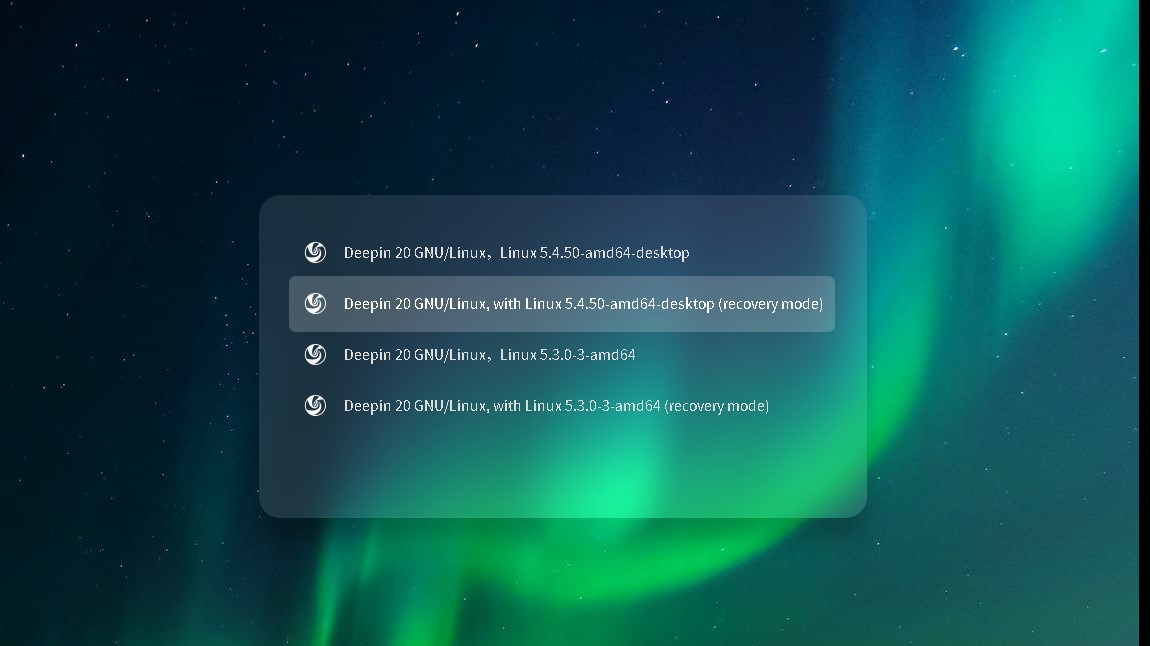
我可以进入这个页面,不知道怎么操作

Reply View the author
juteman
deepin
2020-09-28 01:50
#6
https://bbs.deepin.org/post/202968
我可以进入这个页面,不知道怎么操作

第三个,kernel5.3
Reply View the author
gelonggld
deepin
2020-09-28 01:54
#7
https://bbs.deepin.org/post/202968
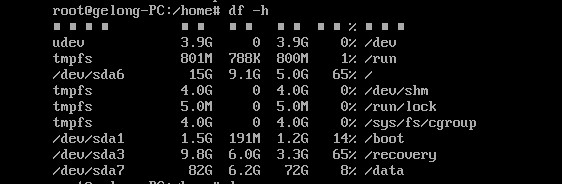
引导失败,检查下硬盘的挂载

这是硬盘挂载情况,没满
Reply View the author
gelonggld
deepin
2020-09-28 01:56
#8

点第三个进来了, 有办法修复吗
Reply View the author
juteman
deepin
2020-09-28 02:00
#9
https://bbs.deepin.org/post/202968
点第三个进来了, 有办法修复吗

从df -h来看, 你的boot空间很足,所以排除情况。 又能成功找到文件系统排除情形1 ,2。

我建议如果想用5.4内核把5.4的kernel删了重装。5.3内核做备用,现在看不出来什么问题
Reply View the author
gelonggld
deepin
2020-09-28 02:19
#10
https://bbs.deepin.org/post/202968
从df -h来看, 你的boot空间很足,所以排除情况。 又能成功找到文件系统排除情形1 ,2。

我建议如果想用 ...
666,好了
Reply View the author

