分享一个 东方财富第二版
Tofloor
poster avatar
Frain
deepin
2020-09-28 00:08
Author
安装环境 deepin v20  1002版本  
deepin-wine 版本 deepin-wine5
CPU : AMD

第一次打包,不敢保证完全可用,需要再deepin下炒股同学,可以尝试一下。


百度网盘地址永久共享:

链接: https://pan.baidu.com/s/1UTejvHe5ESy3cpuHA-6lqw 密码: vpqq

本链接为第二版打包:

1、deepin-wine5 配置环境xp  主题deepin

2、解决第一版打包残留的个人(信息)

3、清理掉所有腾讯残留信息

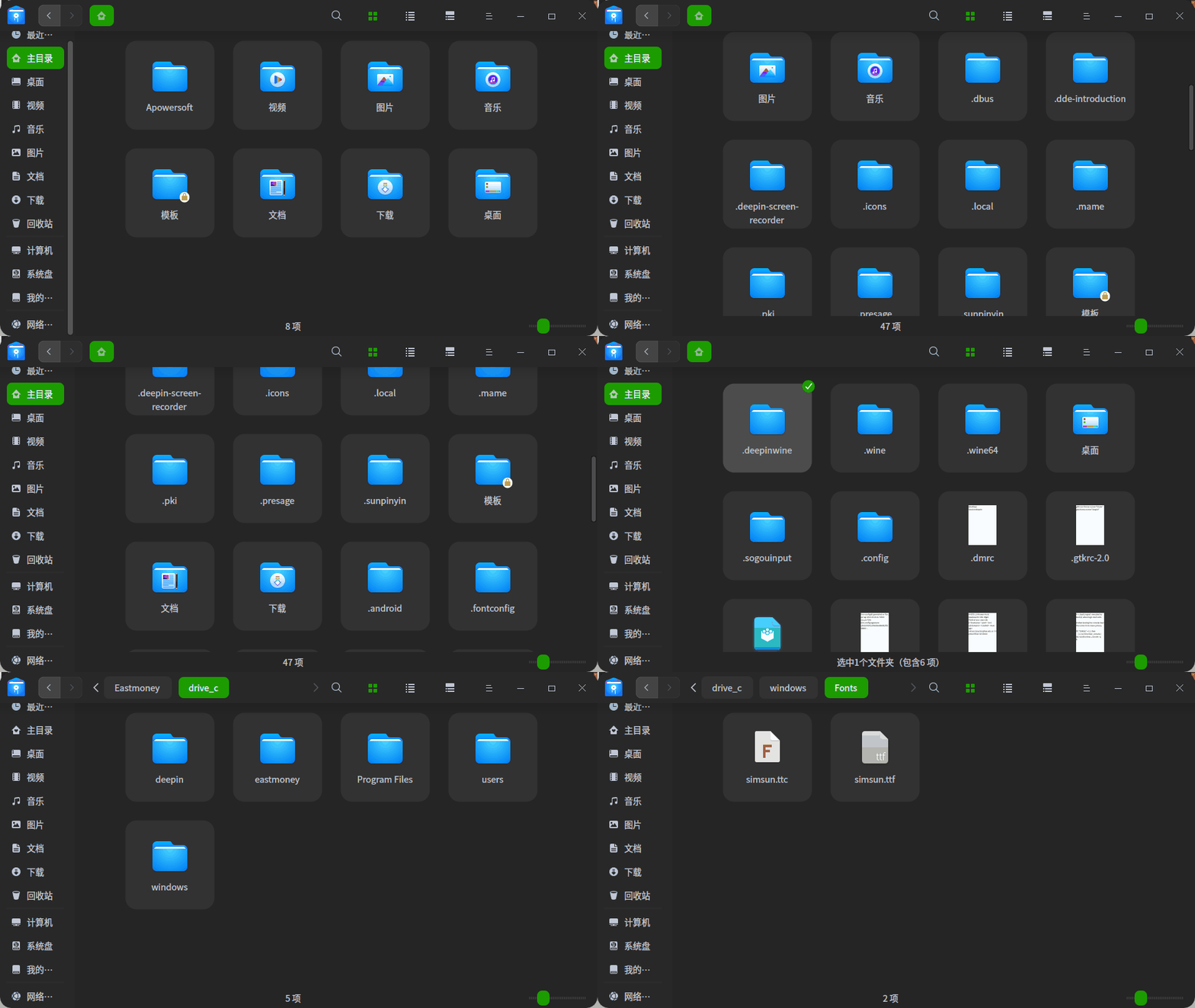
4、已经默认集成了simsun.ttc字体 ,修复了字体偏小问题


Reply Favorite View the author
All Replies
1 / 2
To page
lmrong
deepin
2020-09-28 06:13
#1
感谢分享
Reply View the author
tmld
deepin
2020-09-29 05:43
#2
有万和证券吗?
Reply View the author
不会开车有驾照
deepin
2020-09-29 06:08
#3
实测可用,一点小瑕疵,打不开添加的其它证券公司的委托客户端
Reply View the author
不会开车有驾照
deepin
2020-09-29 06:08
#4
建议投稿星火商店
Reply View the author
不会开车有驾照
deepin
2020-09-29 06:31
#5
cpu占用和内存占用
Reply View the author
sgb76
deepin
2020-09-29 07:11
#6
赞一个!给楼主提个小建议,这也是我刚学会wine打包时没有注意的地方,后来经论坛里的@zty199大佬指导才知道,打包的时候还需要处理一下users目录下个人文件夹,也就是应该把users目录下你本人名称的个人文件夹直接改名为 @current_user@ 即可,同时在容器根目录里需要执行 sed -i "s#$USER#@current_user@#" ./*.reg,将三个注册表 .reg 文件里自己的用户名替换为 @current_user@  这样处理后,其他用户安装软件后,run_v3.sh 脚本中会自动把users目录下的用户名处理为当前用户名,从而避免出现你的用户名文件夹
Reply View the author
Comments
renfengrui
2020-10-10 22:44
感谢反馈,又学习了新的知识了
kirin2020
deepin
2020-09-29 15:34
#7
https://bbs.deepin.org/post/202967
赞一个!给楼主提个小建议,这也是我刚学会wine打包时没有注意的地方,后来经论坛里的@zty199大佬指导才知 ...

建议楼主重新打包一次,学以致用嘛
Reply View the author
greenice
deepin
2020-10-02 14:04
#8
谢谢分享!你们是否存在列表字、下拉菜单及侧边拦的字都太小吗?
我的都很小,怎么解决?

上传不了图片

Reply View the author
mickeybull
deepin
2020-10-03 15:46
#9
为了顶你的帖子,专门注册了论坛。你真的很棒!
Reply View the author
mardou
deepin
2020-10-03 18:42
#10
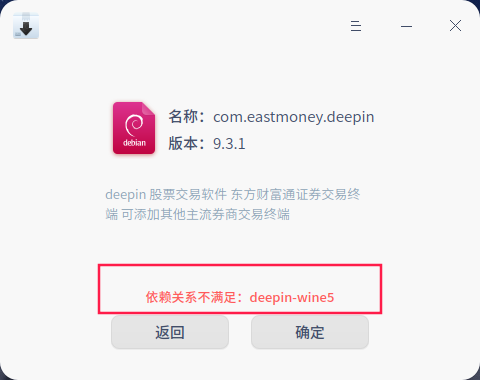
昨晚下载,但在安装时出现提示,说是“依赖关系不足:deepin-wine5”。我的理解是认为我没有安装deepin-wine5,其实我早已安装过了。如何解决,尚无经验。
Reply View the author
Linux初学者
deepin
2020-10-04 17:52
#11
https://bbs.deepin.org/post/202967
谢谢分享!你们是否存在列表字、下拉菜单及侧边拦的字都太小吗?
我的都很小,怎么解决?

我也有这个问题
Reply View the author
Frain
deepin
2020-10-09 17:21
#12

安装宋体字体 到 虚拟盘 fonts 目录下即可
Reply View the author
Linux初学者
deepin
2020-10-10 03:51
#13
多谢,这样确实好多了,不过菜单的字体也变小了些。总体比之前好多了
Reply View the author
greenice
deepin
2020-10-10 05:18
#14
https://bbs.deepin.org/post/202967
安装宋体字体 到 虚拟盘 fonts 目录下即可

有好些,但也还是偏小。要是能达到象在windows下的一样就好了
Reply View the author
kirin2020
deepin
2020-10-15 05:57
#15
楼主有没有详细的打包教程?视频的最好,谢谢
Reply View the author
不会开车有驾照
deepin
2020-10-15 06:03
#16
股票软件建议安装通达信,简单好用得多,委托程序添加方便
Reply View the author
Frain
deepin
2020-10-15 21:08
#17
https://bbs.deepin.org/post/202967
股票软件建议安装通达信,简单好用得多,委托程序添加方便

通达信的不知道为什么一直运行不起来
Reply View the author
不会开车有驾照
deepin
2020-10-16 01:49
#18
https://bbs.deepin.org/post/202967
通达信的不知道为什么一直运行不起来

我安装通达信成功,使用一切正常,可惜我不会打包
Reply View the author
不会开车有驾照
deepin
2020-10-16 01:54
#19
通达信的
Reply View the author
Frain
deepin
2020-10-16 17:43
#20

有包么大神?
Reply View the author
1 / 2
To page