安装nvidia440驱动后黑屏进不去系统怎么办
Tofloor
poster avatar
xiaogouzhu521
deepin
2020-09-23 03:52
Author
安装完440驱动后重启可以出现登录界面,输入密码登录后黑屏,只能看见鼠标可以动,点击没有任何反映。如果说可以驱动降级或者删除驱动应该怎么做,还有没有其他办法?
Reply Favorite View the author
All Replies
Ziggy
deepin
2020-09-23 04:21
#1
显卡型号?我的帖子有卸载方法,ctrl+alt+F2-F6进tty执行命令
Reply View the author
xiaogouzhu521
deepin
2020-09-24 01:44
#2
本帖最后由 xiaogouzhu521 于 2020-9-23 17:51 编辑
https://bbs.deepin.org/post/202684
显卡型号?我的帖子有卸载方法,ctrl+alt+F2-F6进tty执行命令

显卡1060 6G,440和390驱动装上后可以正常使用,但是只要重启就登陆后黑屏,340装上没反映,是不是我只能等了
Reply View the author
Ziggy
deepin
2020-09-24 01:51
#3
https://bbs.deepin.org/post/202684
显卡1060 6G,440和390驱动装上就黑屏,340装上没反映,是不是我只能等了

??你的是什么源?现在源内应该是450才对,你apt search xserver-xorg-video-nvidia看看有没有450版本的,有就装
Reply View the author
xiaogouzhu521
deepin
2020-09-24 01:54
#4
https://bbs.deepin.org/post/202684
??你的是什么源?现在源内应该是450才对,你apt search xserver-xorg-video-nvidia看看有没有450版本的, ...

使用apt search xserver-xorg-video-nvidia后,只有440.390.340三个版本,没有其他的。我也不知道是啥源,新手学习中。
Reply View the author
Ziggy
deepin
2020-09-24 02:00
#5
https://bbs.deepin.org/post/202684
使用apt search xserver-xorg-video-nvidia后,只有440.390.340三个版本,没有其他的。我也不知道是啥源 ...

升级过来的?哪个版本显示已安装?
Reply View the author
xiaogouzhu521
deepin
2020-09-24 02:14
#6
https://bbs.deepin.org/post/202684
升级过来的?哪个版本显示已安装?

直接安装的V20,不是升级。为了防止启动卡logo,现在装的340,但是没有作用。
Reply View the author
Ziggy
deepin
2020-09-24 02:21
#7
https://bbs.deepin.org/post/202684
直接安装的V20,不是升级。为了防止启动卡logo,现在装的340,但是没有作用。 ...

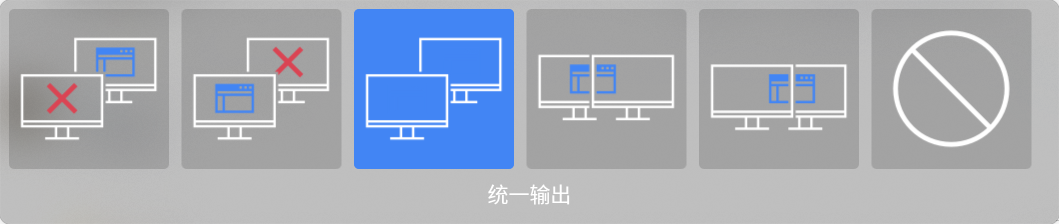
update再搜索一下看看有没有450的,黑屏能不能进tty?尝试win+P不断切换,可能是不兼容,超出范围了
Reply View the author
xiaogouzhu521
deepin
2020-09-24 02:37
#8
https://bbs.deepin.org/post/202684
update再搜索一下看看有没有450的,黑屏能不能进tty?尝试win+P不断切换,可能是不兼容,超出范围了 ...

不知道怎么update。。。,黑屏ctrl+alt+F2进的是不是tty,这个可以进,我在那里删的驱动才能进桌面,tty啥意思。。。win+P没反映啊
Reply View the author
Ziggy
deepin
2020-09-24 02:42
#9
https://bbs.deepin.org/post/202684
不知道怎么update。。。,黑屏ctrl+alt+F2进的是不是tty,这个可以进,我在那里删的驱动才能进桌面,tty ...

tty就是终端,能输命令就是了,sudo apt update再看一下apt里的最新驱动多少.Win+P要一直按或者不规律连按的,交互不像Win一按就有反应
Reply View the author
xiaogouzhu521
deepin
2020-09-24 03:02
#10
https://bbs.deepin.org/post/202684
tty就是终端,能输命令就是了,sudo apt update再看一下apt里的最新驱动多少.Win+P要一直按或者不规律连 ...
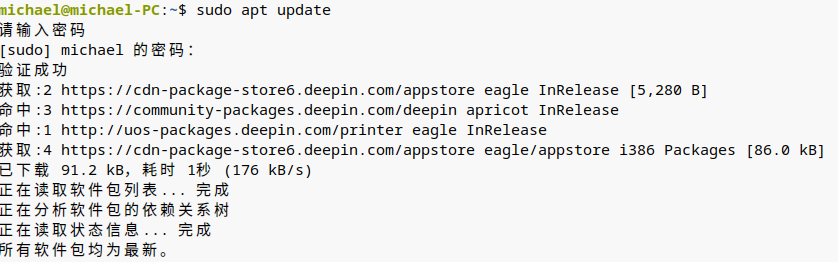
update就这样,win+p还是没反映,太麻烦你了,感谢!
Reply View the author
lcw0268
deepin
2020-09-24 03:31
#11
2个版本的源吧?
Reply View the author
Ziggy
deepin
2020-09-24 03:32
#12
https://bbs.deepin.org/post/202684
update就这样,win+p还是没反映,太麻烦你了,感谢!

apt search xserver-xorg-video-nvidia看看最新版本有没有450,win+P不要就按一次,要不断按、交替按,用不同的方式按
Reply View the author
lcw0268
deepin
2020-09-24 03:35
#13
谁说的WIN+P键进tty的,Ctrl+Alt+F2-6好不好。


Reply View the author
xiaogouzhu521
deepin
2020-09-24 15:42
#14
https://bbs.deepin.org/post/202684
apt search xserver-xorg-video-nvidia看看最新版本有没有450,win+P不要就按一次,要不断按、交替按,用 ...

没有450,win+p也各种按了,我已经放弃了,谢谢了
Reply View the author
xiaogouzhu521
deepin
2020-09-24 15:43
#15
https://bbs.deepin.org/post/202684
谁说的WIN+P键进tty的,Ctrl+Alt+F2-6好不好。
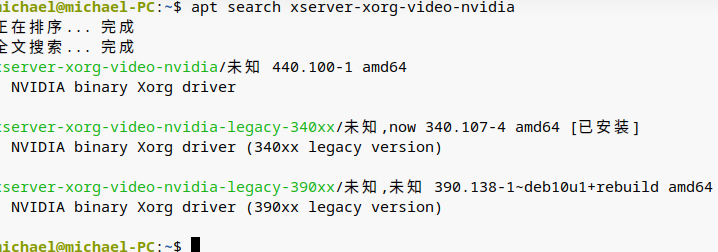
人家没说win+p是进tty的。。。
Reply View the author