华宇拼音输入法(可以选用五笔86版) 2.3.1.17 DEB(改版)
Tofloor
poster avatar
字甲达宾
deepin
2020-09-18 18:43
Author
本帖最后由 nowave 于 2020-9-19 20:46 编辑

华宇拼音输入法(即原“紫光拼音”。可以选用五笔86版) 2.3.1.17 DEB(改版)
2020-9-18
2020-9-19,第1次更新

原 DEB 来自 UOS 适配中心。修正了一些文件权限、属主错误,以及其它错误。
-----------
1. UOS 原版 DEB
https://docs.deepin.com/d/8b3e1bf056/
sign.com.thunisoft.input_2.3.1.17_amd64.deb
39.7 M

-----------
2. 改版 DEB
https://www.lanzoux.com/imoUkgq6pjc
33 M
-----------
测试平台:Debian 10.5 amd64
测试结果:运行正常

注意:
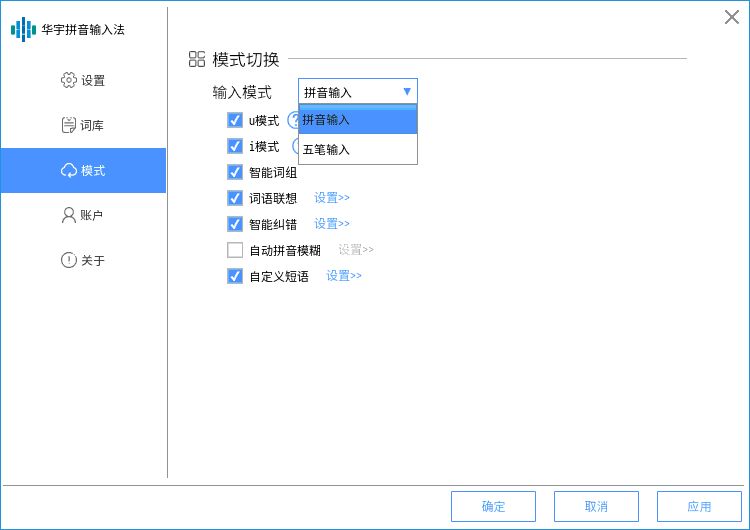
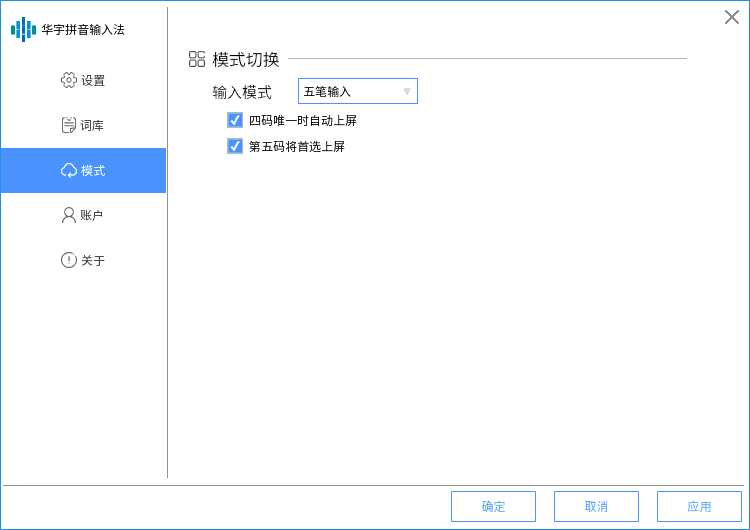
* 1. 默认为拼音(可以在 模式 里,改为 五笔,即 五笔86版 )!
* 2. 安装后,重新启动系统后,输入法生效。

* 3. 默认配置文件为 ~/.config/fcitx-huayupy/config.ini
  1. 在第 31行中,
    wubimode=0 代表使用 拼音 输入法(默认方案)
    wubimode=1 代表使用 五笔 输入法
Copy the Code

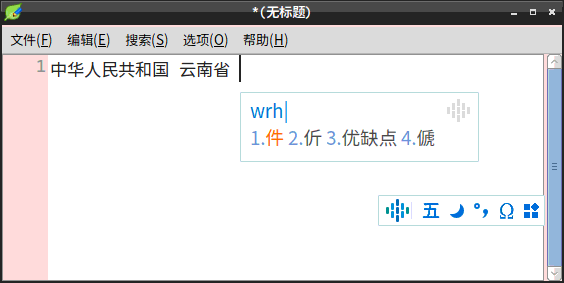
优点:界面清爽。反应速度快。

附图:


* 主要调整内容:
  * update debian/control, add depends libc6 and libstdc++6|libstdc++5;

  * fix some bad file/directorie permissions (0775 to 0755, 0664 to 0644; 0664
    to 0755);
  * fix some 'wrong-file-owner-uid-or-gid' errors (1000/1000 to root/root);

  * add README.zh_CN, changelog.Debian, copyright to directory
    usr/share/doc/com.thunisoft.input/;
  * add lintian overrides to ignore errors of 'dir-or-file-in-opt opt/apps/*/'
    (114 total);

  * fix 2 bad icon sizes for fcitx-huayupy.png, resize 32x32
    usr/share/fcitx/imicon/huayupy_tray.png to right sizes:
    - opt/apps/com.thunisoft.input/entries/icons/hicolor/128x128/apps/
    - opt/apps/com.thunisoft.input/entries/icons/hicolor/48x48/apps/

  * remove empty icon directories:
    - opt/apps/com.thunisoft.input/entries/icons/hicolor/256x256/
    - opt/apps/com.thunisoft.input/entries/icons/hicolor/512x512/
    - opt/apps/com.thunisoft.input/entries/icons/hicolor/scalable/
  * remove empty subdirectories in opt/apps/com.thunisoft.input/entries:
    applications/, GConf/, glib-2.0/, help/, locale/, plugins/ and services/;

  * add 5 fcitx-huayupy.png icons (16x16, 24x24, 32x32, 48x48, 128x128) to
    directories usr/share/icons/hicolor/SIZE/apps/;

  * update /home/deb-src/com.thunisoft.input/opt/apps/com.thunisoft.input/
    entries/autostart/com.thunisoft.input.desktop, add strings Icon and
    Keywords;
  * add etc/xdg/autostart/com.thunisoft.input.desktop;

  * convert encodings of opt/apps/com.thunisoft.input/files/huayu-umode.html
    GBK to utf-8.

Reply Favorite View the author
All Replies
wangzh
deepin
2020-09-19 07:02
#1
喜欢五笔拼音在一起,安装一个,平常打五笔,偶有打不出的用下拼音
Reply View the author
字甲达宾
deepin
2020-09-19 16:28
#2
https://bbs.deepin.org/post/202409
喜欢五笔拼音在一起,安装一个,平常打五笔,偶有打不出的用下拼音

经测试,原来也可以切换为五笔输入法。

在 输入法设置 -> 模式 -> 模式切换 -> 输入模式,
有两种模式:

* 拼音模式 (默认)
* 五笔模式

选择 五笔模式 即可。

----
技术解析:

1. 默认字典文件在
/opt/apps/com.thunisoft.input/files/zi/ 目录下,如

cmap.dat  hzbs.dat  hzjf.dat  j2f.dat   
hzbh.dat  hzcf.dat  hzpy.dat  wubi.dat

上面的  hzpy.dat 即拼音输入法的码表文件;
wubi.dat 即五笔输入法。

2. 个人用户设置在
~/.config/huayupy/ 目录下。


Reply View the author
fengyes
deepin
2020-09-19 16:48
#3
這名字不好聽
Reply View the author
parsgo
deepin
2020-09-19 19:53
#4
不错,不错。可以编辑五笔的码表文件吗?
Reply View the author
kevinlong
deepin
2020-09-19 21:30
#5
用不起啦, 文字候择框不能显示文字,只显示了一个蓝色的小框框,
但是能打出中文,
我们屏幕是4k,2倍缩放
Reply View the author
hxy1992
deepin
2020-09-20 00:28
#6
The user is banned, and the content is hidden.