deepin20系统占这么大的磁盘吗?
Tofloor
poster avatar
liyingsong
deepin
2020-09-17 22:47
Author
以前的deepin 没有这么大的占用量啊。。比win都恐怖!


Reply Favorite View the author
All Replies
zhoutj2001
deepin
2020-09-17 23:00
#1
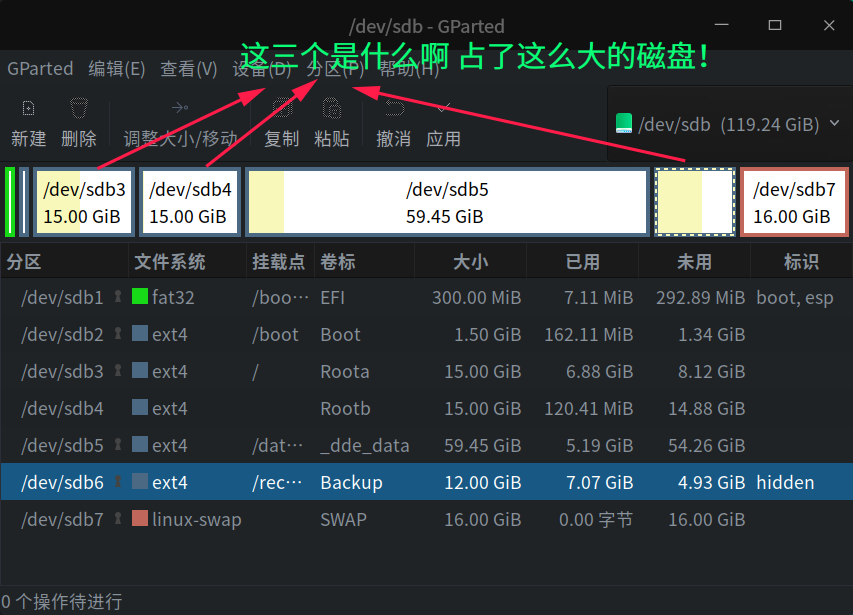
你的系统安装在/dev/sdb6,只用了7.07GiB,多吗?
Reply View the author
昨夜的星辰
deepin
2020-09-17 23:15
#2
全盘安装时有两个根,两个根应该互为备份,那个隐藏的看着像是恢复分区,类似紧急系统修复之类用
Reply View the author
liyingsong
deepin
2020-09-18 00:35
#3
https://bbs.deepin.org/post/202357
全盘安装时有两个根,两个根应该互为备份,那个隐藏的看着像是恢复分区,类似紧急系统修复之类用 ...
有没有办法不要?
Reply View the author
Jokul
deepin
2020-09-18 00:48
#4
https://bbs.deepin.org/post/202357
你的系统安装在/dev/sdb6,只用了7.07GiB,多吗?

那是备份系统分区,用于系统更新失败还原用的,不是程序运行系统
Reply View the author
Jokul
deepin
2020-09-18 01:00
#5
sd1:EFI分区 为系统启动引导
sd2:Boot分区 linux操作系统内核分区
sd3还有sd4:deepin系统分区  应该是root用户和装系统时新建用两个帐号数据分两个区
sd5:数据分区 用于存储数据以及软件程序
sd6:系统恢复还原分区 用于系统更新失败,修复回滚系统
sd7:swap交换分区  类似于window的虚拟内存
Reply View the author
liyingsong
deepin
2020-09-18 01:08
#6
https://bbs.deepin.org/post/202357
sd1:EFI分区 为系统启动引导
sd2:Boot分区 linux操作系统内核分区
sd3还有sd4:deepin系统分区  应该是ro ...

sd5-6 sd3或者sd4 怎么搞可以不要
Reply View the author
Jokul
deepin
2020-09-18 01:15
#7
https://bbs.deepin.org/post/202357
sd5-6 sd3或者sd4 怎么搞可以不要

在安装系统的时候不要用自动分区,用手动分区方式来自定义划分分区大小。一般手动分区分两个就够了,一个启动分区,一个根分区。根分区就是把3-7整合在了一起。当然你也可以根据需求拆分自定义功能分区
Reply View the author
181******81
deepin
2020-09-18 01:16
#8
其他还好。只是这个swap分的实在太多了,桌面用户不需要这样。希望能优化一下。

@管理员
Reply View the author
azhe911010
deepin
2020-09-18 01:48
#9
https://bbs.deepin.org/post/202357
有没有办法不要?

可以手动安装
Reply View the author
昨夜的星辰
deepin
2020-09-18 03:07
#10
https://bbs.deepin.org/post/202357
有没有办法不要?

可以不要,安装的时候手动分区就行了,一般分个根和/home就可以了,内存够大就不用swap
Reply View the author