u盘启动盘装系统出现 “—” 解决方案
Tofloor
poster avatar
zhangjiashun0502
deepin
2020-09-15 22:09
Author
u盘启动盘装系统出现  “—”   解决方案,请问怎么解决呢?
Reply Favorite View the author
All Replies
1 / 2
To page
Ziggy
deepin
2020-09-15 22:16
#1
什么配置?哪个iso?什么时候出现?
Reply View the author
zhangjiashun0502
deepin
2020-09-15 23:09
#2
https://bbs.deepin.org/post/202193
什么配置?哪个iso?什么时候出现?

deepin20 官网下载的最新ios
Reply View the author
zhangjiashun0502
deepin
2020-09-15 23:11
#3
https://bbs.deepin.org/post/202193
什么配置?哪个iso?什么时候出现?

就是安装官网教程做的,电脑是麦本本小麦6a
Reply View the author
zhangjiashun0502
deepin
2020-09-15 23:13
#4
https://bbs.deepin.org/post/202193
什么配置?哪个iso?什么时候出现?

在选择u盘启动之后出现全屏幕黑,中心位置有个     “_"符号
Reply View the author
152******14
deepin
2020-09-15 23:13
#5
https://bbs.deepin.org/post/202193
在选择u盘启动之后出现全屏幕黑,中心位置有个     “_"符号

重新制作优盘试试
Reply View the author
zhangjiashun0502
deepin
2020-09-16 01:58
#6
https://bbs.deepin.org/post/202193
重新制作优盘试试

还是不行
Reply View the author
zhangjiashun0502
deepin
2020-09-16 02:07
#7
顶贴,希望有大佬指导一下
Reply View the author
残念
deepin
2020-09-16 02:21
#8
https://bbs.deepin.org/post/202193
顶贴,希望有大佬指导一下

试一下替换为ubuntu的引导


grubx64.zip


Reply View the author
lcw0268
deepin
2020-09-16 02:33
#9
写出这样标题,我以为是大腕,进来看是新新坛友。
楼主先百度,看看。
就楼主简单一句,我搜楼主机型,看参数,时间都比楼主花的多。
如果是真有意,废时间说说也值。
就怕废老时间,楼主如仙鹤一去不见踪影。
Reply View the author
zhangjiashun0502
deepin
2020-09-16 02:36
#10
https://bbs.deepin.org/post/202193
试一下替换为ubuntu的引导

好的,我试一试,谢谢
Reply View the author
lcw0268
deepin
2020-09-16 03:34
#11
https://bbs.deepin.org/post/202193
好的,我试一试,谢谢

那要换2次的,知道吗?
希望你还能回来看看这帖子。
Reply View the author
Ziggy
deepin
2020-09-16 03:43
#12

BIOS有没有关闭安全启动? 不行就ventoy引导
Reply View the author
152******14
deepin
2020-09-16 05:48
#13
把系统配置贴出来  如果方便把bios 版本也发出来
Reply View the author
zhangjiashun0502
deepin
2020-09-16 16:02
#14
https://bbs.deepin.org/post/202193
试一下替换为ubuntu的引导

替换之后,完全可以了
Reply View the author
zhangjiashun0502
deepin
2020-09-16 16:02
#15
https://bbs.deepin.org/post/202193
那要换2次的,知道吗?
希望你还能回来看看这帖子。

说话有点逻辑,听不懂你说什么
Reply View the author
zhangjiashun0502
deepin
2020-09-16 16:04
#16
本帖最后由 zhangjiashun0502 于 2020-9-16 09:05 编辑

加了官方群,在群友的指导下,前进了一大步,但是还是翻车了,过程是这样的,我在官网下载了u盘安装盘,下载ios镜像,重启电脑直接开始做系统,本以为就如官方教程一般简单,结果就出现了如本贴开头的现象,u盘选择启动后屏幕中心出现“—”,在@peterzhang1234指导下试了一下替换为ubuntu的引导grubx.efi文件,成功进入装机界面,发现选择安装会直接格式化我的整个硬盘,又去群里寻找大神帮忙,将我的硬盘1格式更改位GPT格式,然后u盘启动开始安装进入选择专门留出deepin盘大小100g的盘区,此时提示需要一个efi分区,把deepin盘删除分为2个盘,分别是一个300m一个不到100g的,进入正常安装。。。。提示安装完成。重启,电脑左上角出现“-”。。。以翻车结束。。。。
Reply View the author
残念
deepin
2020-09-16 16:37
#17
https://bbs.deepin.org/post/202193
加了官方群,在群友的指导下,前进了一大步,但是还是翻车了

重启后有grub引导界面吗?
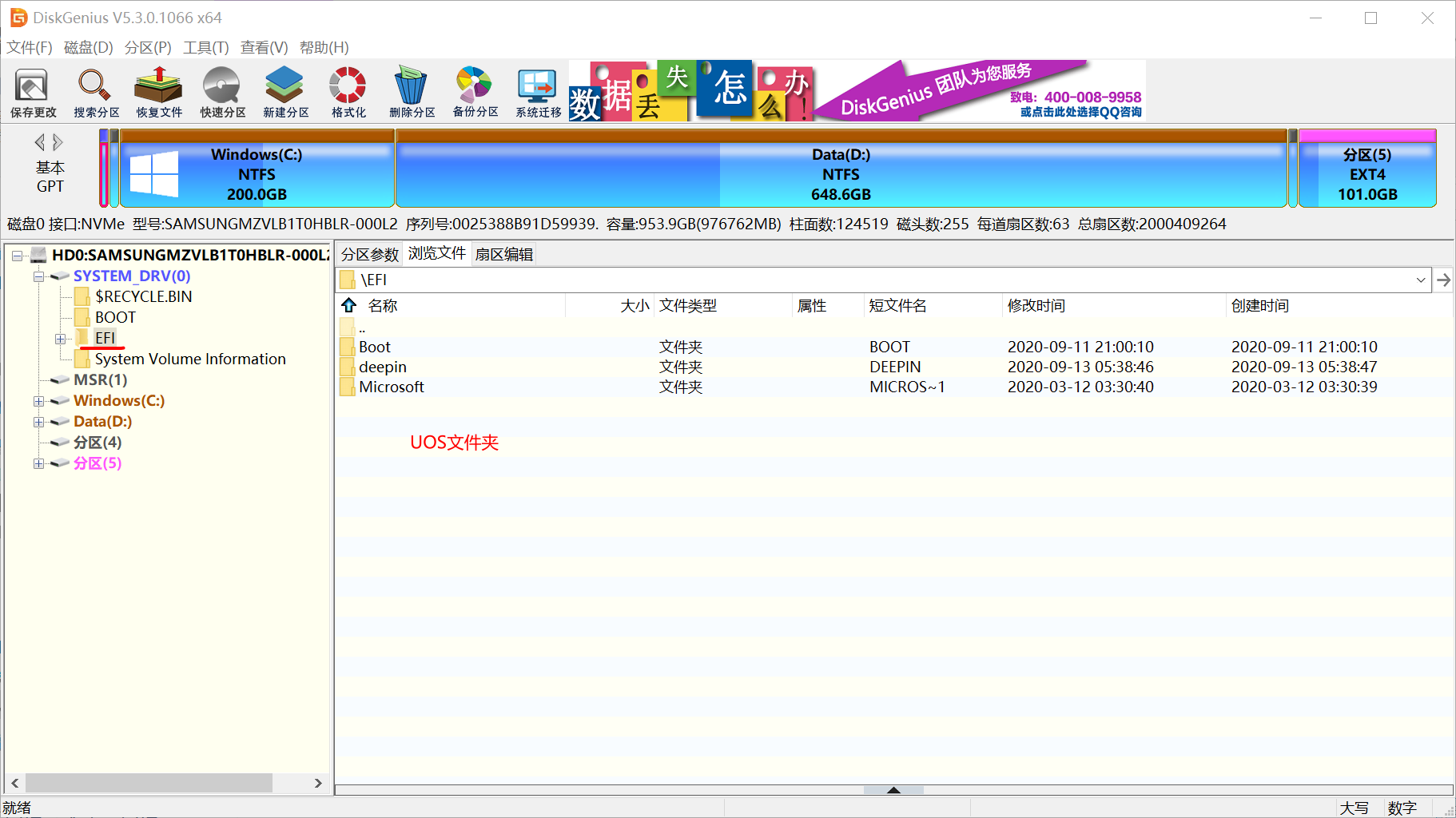
还需要换一次电脑上的进windows打开DiskGenius
将我发给你的ubuntu的引导文件放到UOS文件夹替换


试一下能不能正常引导进入deepin和windows
不知道群友有没有然你用arch/manjaro镜像生成引导文件
Reply View the author
zhangjiashun0502
deepin
2020-09-16 17:05
#18
https://bbs.deepin.org/post/202193
重启后有grub引导界面吗?
还需要换一次电脑上的进windows打开DiskGenius
将我发给你的ubuntu的引导 ...

不是很明白
Reply View the author
残念
deepin
2020-09-16 17:10
#19

你现在安装到电脑上的引导文件还是deepin的,和原先U盘内的引导是一样的,所以你还要将电脑硬盘上的引导文件换一下
Reply View the author
zhangjiashun0502
deepin
2020-09-16 17:15
#20
https://bbs.deepin.org/post/202193
你现在安装到电脑上的引导文件还是deepin的,和原先U盘内的引导是一样的,所以你还要将电脑硬盘上的引导 ...
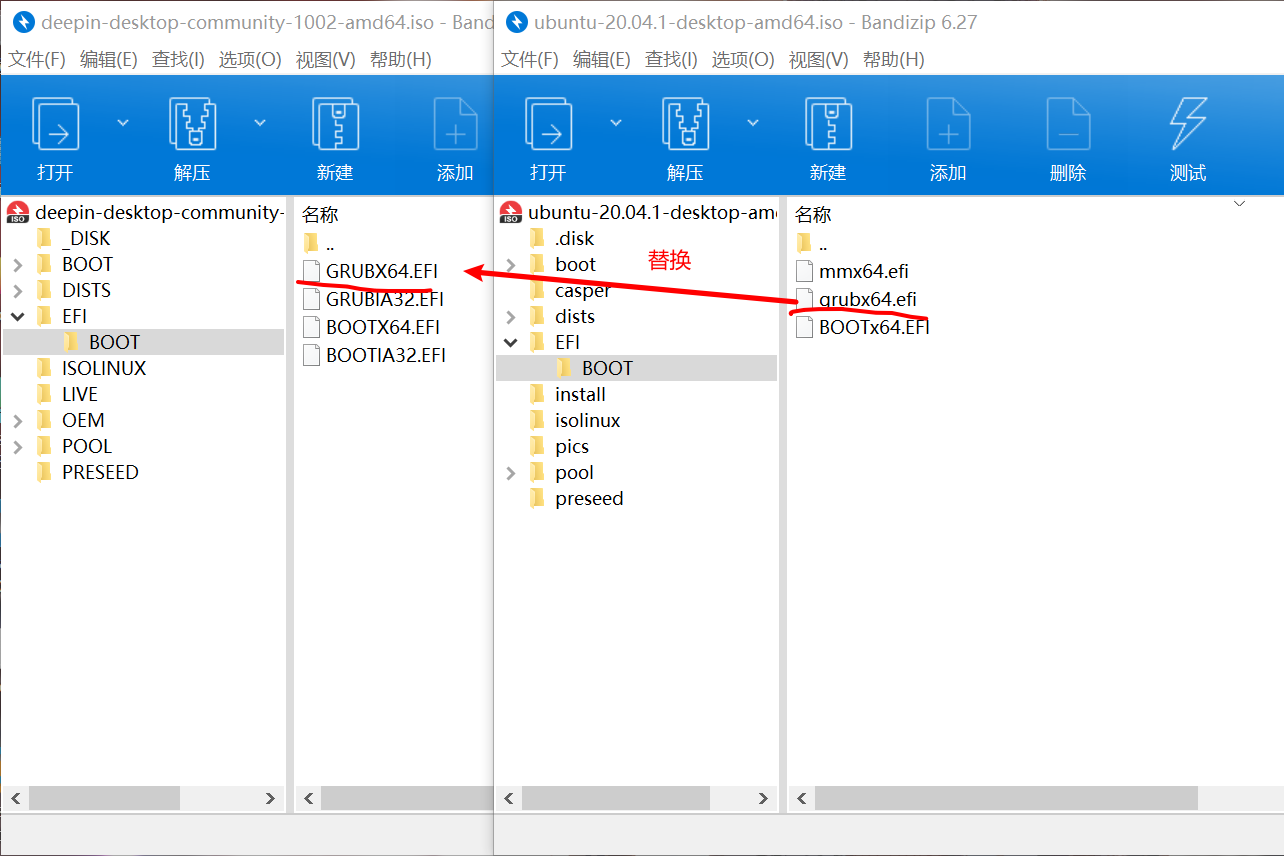
怎么操作呢?
Reply View the author
1 / 2
To page