小新pro13.3 锐龙版2020 4600U安装不了deepin20
Tofloor
poster avatar
damonpzl123
deepin
2020-09-14 22:10
Author
本帖最后由 damonpzl123 于 2020-9-14 14:31 编辑

小新pro13.3 锐龙版2020 无法安装新发布的正式版deepin 20
选择 4.5 内核 和 4.7内核都不行 咋办  星空屏一直   U盘是 金士顿   进U盘是 F12选择启动U盘
求解  配置是
R5 4600U + 16G三星 + 512G ssd (SN730) + 16:10屏幕QHD + 2.5K + 1.28kg + 希望拓展坞链接HDMI 1080p


怎么办啊 怎么搞 求解
自带的制作U盘的工具 字体都很小


Reply Favorite View the author
All Replies
3 / 4
To page
damonpzl123
deepin
2020-09-25 19:29
#41
https://bbs.deepin.org/post/202102
matebook 14 锐龙版表示5.7内核无压力

项目 啊啊啊  你是选安全图形卡 还是另一个
Reply View the author
shanzhuer
deepin
2020-09-25 22:15
#42
https://bbs.deepin.org/post/202102
项目 啊啊啊  你是选安全图形卡 还是另一个

就普通5.7内核安装
Reply View the author
damonpzl123
deepin
2020-09-26 07:07
#43
https://bbs.deepin.org/post/202102
就普通5.7内核安装

我电脑就不行
Reply View the author
damonpzl123
deepin
2020-09-28 06:01
#44
https://bbs.deepin.org/post/202102
深度的efi引导有问题,用legacy引导

这个选项只有开关
Reply View the author
damonpzl123
deepin
2020-09-28 06:02
#45
https://bbs.deepin.org/post/202102
matebook 14 锐龙版表示5.7内核无压力

早知道买华为了
Reply View the author
残念
deepin
2020-09-28 07:23
#46
https://bbs.deepin.org/post/202102
这个选项只有开关

那就关了试一下
Reply View the author
damonpzl123
deepin
2020-09-28 07:57
#47

关了 U盘都找不见了
Reply View the author
残念
deepin
2020-09-28 08:23
#48
https://bbs.deepin.org/post/202102
关了 U盘都找不见了

不好意思,我看错了,USB看成了UEFI了,把这个选项打开才能从U盘启动
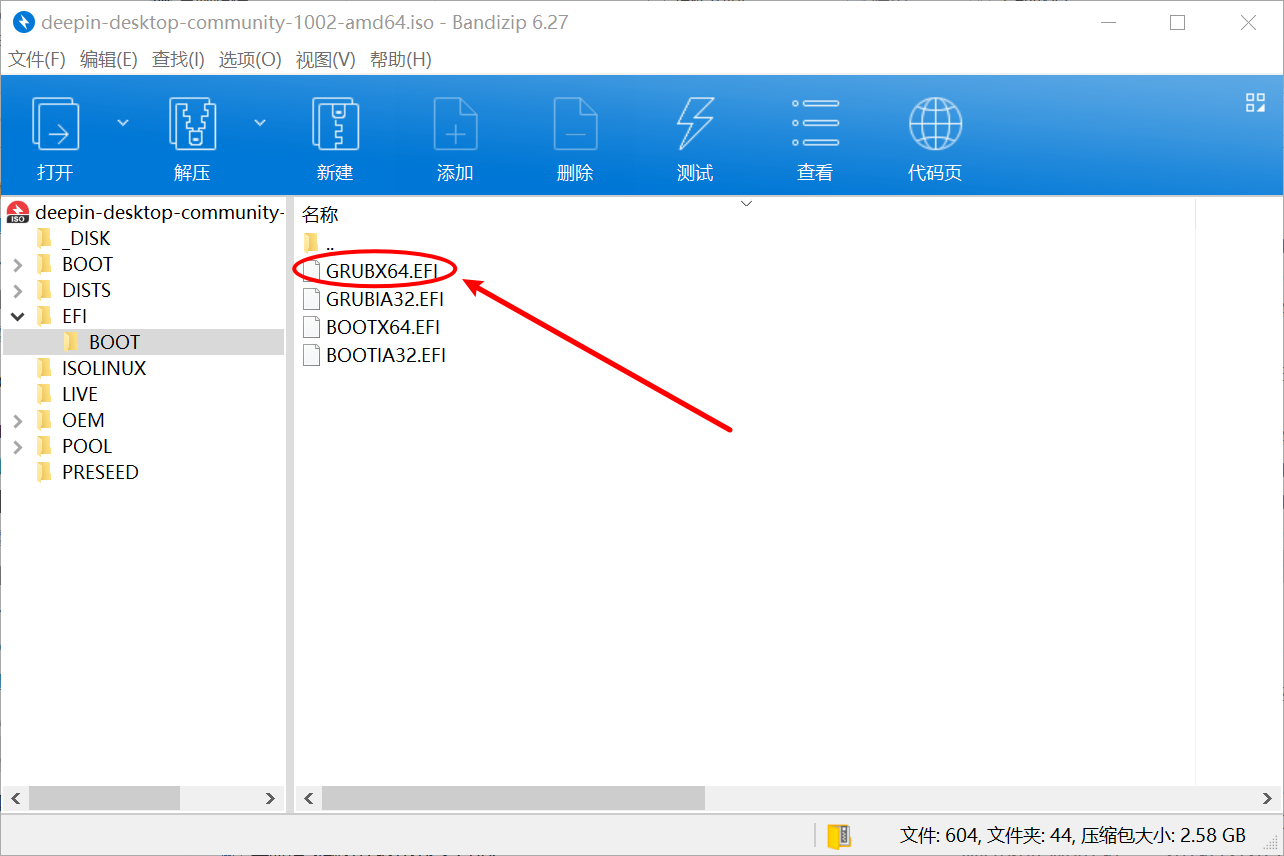
小新好像只支持UEFI引导了,看来只能换引导文件了
将U盘中图中所示的文件替换


grubx64.zip


Reply View the author
damonpzl123
deepin
2020-09-29 00:00
#49
https://bbs.deepin.org/post/202102
不好意思,我看错了,USB看成了UEFI了,把这个选项打开才能从U盘启动
小新好像只支持UEFI引 ...

我晚上回去试试,O(∩_∩)O谢谢
Reply View the author
damonpzl123
deepin
2020-09-29 00:02
#50
https://bbs.deepin.org/post/202102
不好意思,我看错了,USB看成了UEFI了,把这个选项打开才能从U盘启动
小新好像只支持UEFI引 ...

那选的是普通的5.7还是   5.7(safe的)
Reply View the author
残念
deepin
2020-09-29 00:31
#51
https://bbs.deepin.org/post/202102
那选的是普通的5.7还是   5.7(safe的)

直接5.7吧,只要能进入安装界面就可以了
Reply View the author
damonpzl123
deepin
2020-09-29 07:05
#52
https://bbs.deepin.org/post/202102
直接5.7吧,只要能进入安装界面就可以了

最终结果还不是不行
Reply View the author
残念
deepin
2020-09-29 07:46
#53
本帖最后由 peterzhang1234 于 2020-9-28 23:56 编辑
https://bbs.deepin.org/post/202102
最终结果还不是不行

啊~~这。。。
还是星空背景?
U盘是使用深度官方的刻录工具吗?文件是替换的grubx64.efi吗?要不你下载一下ubuntu的镜像? https://mirrors.tuna.tsinghua.ed ... 1-desktop-amd64.iso
Reply View the author
herozsq
deepin
2020-09-29 16:43
#54
用ventory什么也不用设置,选择5.7安装没任何问题。前面都有人说了,你不试试
Reply View the author
damonpzl123
deepin
2020-09-29 18:17
#55
https://bbs.deepin.org/post/202102
用ventory什么也不用设置,选择5.7安装没任何问题。前面都有人说了,你不试试 ...

试了  一样的, 进去之后还是选择5.7,昨晚群里大神给我改参数,结果跑马卡在指纹认证,但是我电脑只有人脸,而且Ubuntu完全可以进去,Ubuntu内核才5.4
Reply View the author
damonpzl123
deepin
2020-09-29 18:18
#56
https://bbs.deepin.org/post/202102
啊~~这。。。
还是星空背景?
U盘是使用深度官方的刻录工具吗?文件是替换的grubx64.efi吗?要不 ...

我试了Ubuntu20   完全可以进去
Reply View the author
ltree
deepin
2020-09-29 18:42
#57
弱弱问一句,点回车了吗
Reply View the author
damonpzl123
deepin
2020-09-29 18:46
#58
https://bbs.deepin.org/post/202102
弱弱问一句,点回车了吗

按照大神改完参数之后 如图   卡住的点
Reply View the author
ltree
deepin
2020-09-29 21:48
#59
https://bbs.deepin.org/post/202102
按照大神改完参数之后 如图   卡住的点

抱歉,是我草率了,你看看bios里有没有关于指纹的选项,如果有就关掉试试,如果没有就试试uos吧,我看到适配表里有联想小新
Reply View the author
ltree
deepin
2020-09-29 21:57
#60
https://bbs.deepin.org/post/202102
抱歉,是我草率了,你看看bios里有没有关于指纹的选项,如果有就关掉试试,如果没有就试试uos吧,我看到 ...

你那个最后一张卡在那个pci那里,我上网搜了下,在win下,要单独从官网下载驱动安装,在linux下我就不知道了,很有可能是bios里面有些什么硬件加速的设置,你把那些关掉试试看,我的能力也有限,实在不行你就观望一段时间,先试试uos吧,以后应该会好点
Reply View the author
3 / 4
To page