
V20安装完成之后硬盘容量变小了~什么原因啊
Tofloor
poster avatar
nyldxh
deepin
2020-09-14 08:16
Author


笔记本是 surface 硬盘容量120G~安装系统的时候就显示正常,但是安装完之后再桌面打开发现系统盘15G,数据盘64G

奇怪了~这加起来也才80G啊~ 那40G白白蒸发了啊~ 求大神给想想办法~


Reply Favorite View the author
All Replies
haohu1193
deepin
2020-09-14 08:23
#1
本帖最后由 haohu1193 于 2020-9-14 00:26 编辑

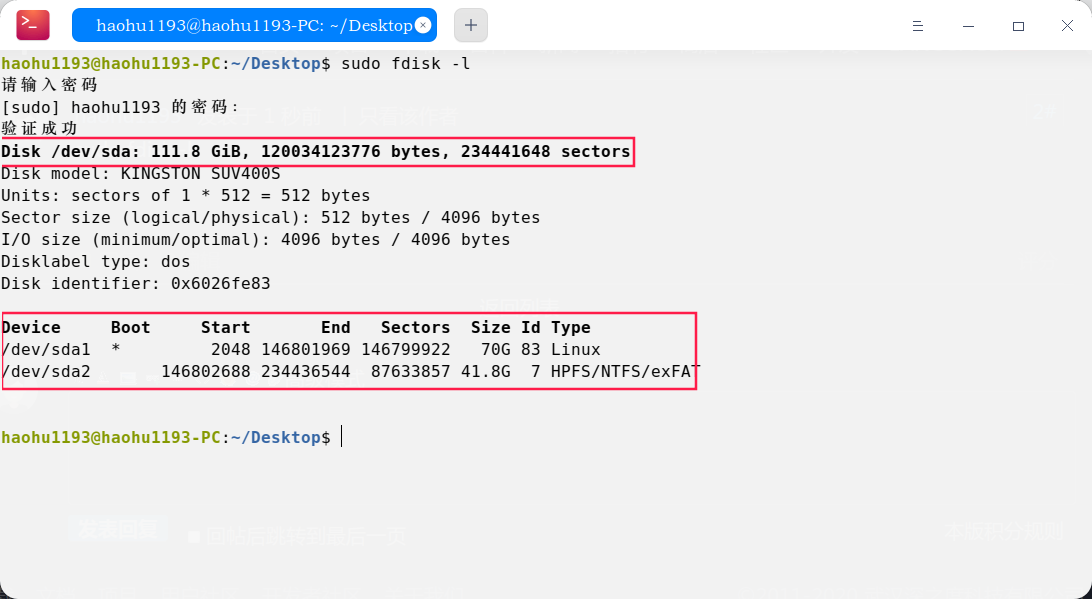
sudo fdisk -l


Reply View the author
nyldxh
deepin
2020-09-14 08:43
#2

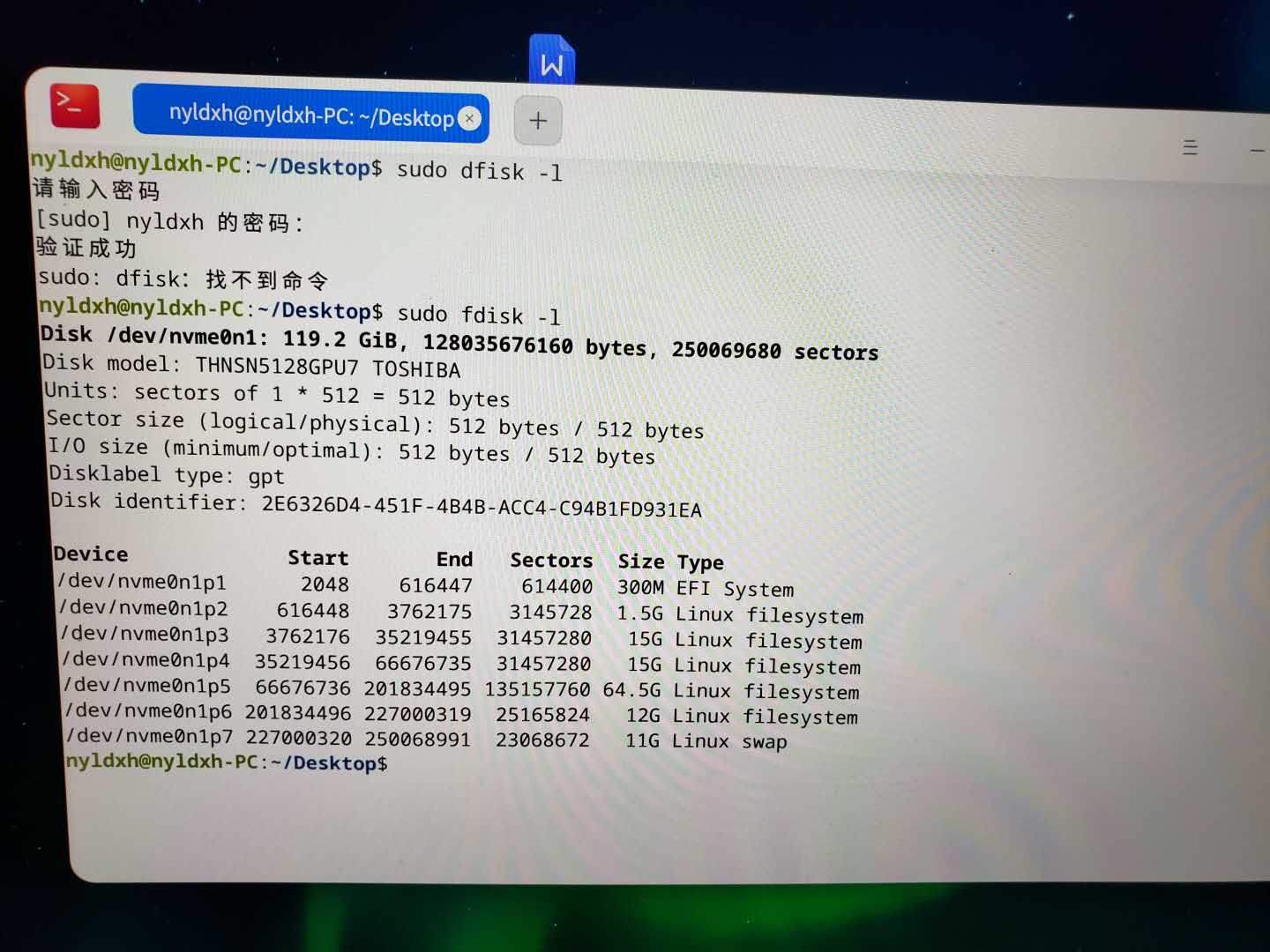
为什么我的打开显示好多分区好像~ 你的只有2个~

Reply View the author
haohu1193
deepin
2020-09-14 08:47
#3
本帖最后由 haohu1193 于 2020-9-14 00:52 编辑
https://bbs.deepin.org/post/202044
为什么我的打开显示好多分区好像~ 你的只有2个~

手动安装---分两个区---70GB的选择挂载 "/" 目录装系统,另一个40GB用来当数据盘---开始安装...

你这swap就去了11GB...
Reply View the author
nyldxh
deepin
2020-09-14 08:49
#4
https://bbs.deepin.org/post/202044
手动安装---指定空闲分区---挂载 "/" 目录,开始安装...

你这swap就去了11GB... ...

哦~~ 明白了~谢谢你啊~
我一开始没手动分区 ~直接就点安装了~
Reply View the author
haohu1193
deepin
2020-09-14 08:56
#5
https://bbs.deepin.org/post/202044
哦~~ 明白了~谢谢你啊~
我一开始没手动分区 ~直接就点安装了~

我这个分法有风险...有重要数据的还是多找点资料看看再弄...home可以单独分个区...swap对系统休眠有影响...根据自己的需求来...
Reply View the author
nyldxh
deepin
2020-09-14 09:14
#6
谢谢~~学习了 ~ 看来linux入门还得好好学习一番
Reply View the author
Fredoong
deepin
2020-09-14 09:43
#7
文件管理器里并不一定显示所有的磁盘。
Reply View the author
nyldxh
deepin
2020-09-14 17:54
#8
https://bbs.deepin.org/post/202044
文件管理器里并不一定显示所有的磁盘。

明白了~ 我也是之后才发现的~ 谢谢你
Reply View the author
lanyun712
deepin
2020-09-14 18:25
#9
我的习惯是home必需要个分区,这样重装也没什么事,资料都在
Reply View the author
nyldxh
deepin
2020-09-14 18:29
#10
https://bbs.deepin.org/post/202044
我的习惯是home必需要个分区,这样重装也没什么事,资料都在
学习借鉴一下~ 我回去重装~ 除了系统盘~剩下的空间都给home
Reply View the author
