

 中文
中文 
haohu1193 deepin
2020-09-13 22:25 deepin windows的快速启动关了没?有没有在Windows下加密硬盘?有些这玩意在,其他系统是操作不了Windows分区的...
我这单硬盘,单系统,双格式分区...随便怎么整都可以...
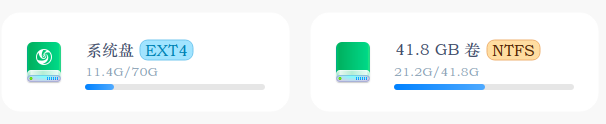
我这单硬盘,单系统,双格式分区...随便怎么整都可以...
Reply Like 0 View the author
 deepin
  deepin
 deepin
 https://bbs.deepin.org/post/201984
官方新的镜像有问题,我之前的镜像都没有这个问题,今天我重新做了系统,也有这个问题了 ...
deepin https://bbs.deepin.org/post/201984
官方新的镜像有问题,我之前的镜像都没有这个问题,今天我重新做了系统,也有这个问题了 ...
deepin https://bbs.deepin.org/post/201984
问题解决了,参考这个网页。关闭windows系统的快速启动就可以了。
https://ywnz.com/linuxjc/3747.html ...


deepin下如何读写,windows的ntfs文件系统文件夹?
原本可以自由操作windows下的分区,现在都是被锁定了,只能读取,不能操作。例如:从deepin下复制文件到windows分区的目录中。