我安装的时候怎么没见到在哪里选择5.4和5.7的内核的?
Tofloor
poster avatar
落墨
deepin
2020-09-13 03:26
Author
重装过程中没见到选择选项。装完直接就是5.4的内核了。

Reply Favorite View the author
All Replies
舞天逸尘
deepin
2020-09-13 03:39
#1
同问 安装的时候直接就是5.4选项
Reply View the author
archlte
deepin
2020-09-13 04:13
#2
安装界面出来时的 Grub 界面有个 Advanced options ,选择它就行

Reply View the author
kirin2020
deepin
2020-09-13 04:24
#3
https://bbs.deepin.org/post/201908
安装界面出来时的 Grub 界面有个 Advanced options ,选择它就行

楼上正解,安装时就要进入这个选项里面选内核版本了。
Reply View the author
andktan
deepin
2020-09-13 04:40
#4
我是直接升级的,没见这个选项呀
Reply View the author
Ziggy
deepin
2020-09-13 04:41
#5
楼上正解
Reply View the author
忘记、过去
deepin
2020-09-13 05:03
#6
https://bbs.deepin.org/post/201908
我是直接升级的,没见这个选项呀

直接升级默认安装5.4,需要5.7的话要手动安装

sudo apt install linux-headers-5.7.7-amd64-desktop linux-image-5.7.7-amd64-desktop
Reply View the author
Comments
samlukeyes123
2020-09-15 23:14
建议用 app4deepin 的 5.8 内核,deepin 官方提供的 5.7 不会持续更新
songyiyong
2020-09-15 20:07
感谢你的方法
andktan
deepin
2020-09-13 05:43
#7
https://bbs.deepin.org/post/201908
直接升级默认安装5.4,需要5.7的话要手动安装

sudo apt install linux-headers-5.7.7-amd64-desktop lin ...
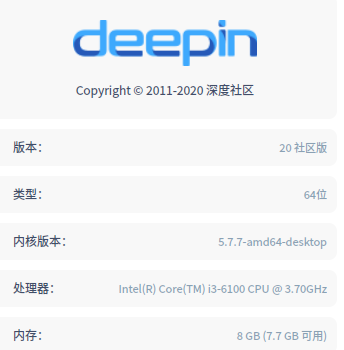
厉害,按你的命令,成功升级内核!谢谢。

Reply View the author
csworldcup
deepin
2020-09-13 06:07
#8
内核升级有什么改进吗?今天自动升级之后输入法在 IDE 中用不了了,升级内核能解决这个问题不?
Reply View the author
lenke
deepin
2020-09-13 06:16
#9
csworldcup 发表于 2020-9-12 22:07
内核升级有什么改进吗?今天自动升级之后输入法在 IDE 中用不了了,升级内核能解决这个问题不? ...

不能......
Reply View the author
落墨
deepin
2020-09-15 03:49
#10
https://bbs.deepin.org/post/201908
楼上正解,安装时就要进入这个选项里面选内核版本了。

好的,谢谢。但我实在不想再重装一遍了。。。
Reply View the author
落墨
deepin
2020-09-15 03:51
#11

谢谢!但我实在不想重装了。。。
Reply View the author
csworldcup
deepin
2020-09-15 04:00
#12
https://bbs.deepin.org/post/201908
谢谢!但我实在不想重装了。。。

可以手动安装 5.7内核

我装了5.7内核不兼容双屏幕,安装不了宝塔,只能又重装了系统,装回5.4了
Reply View the author
SamLukeYes
deepin
2020-09-15 04:47
#13
5.7 的内核只是针对某些机型无法用 5.4 完成安装的解决方案。目前 5.7 已经 EOL,而且看起来官方也不会继续更新 5.7 的内核。如果实在是对新内核有需求,建议安装 5.8。可以在这里添加针对 deepin 的内核仓库(非官方):https://app4deepin.com/repository/
Reply View the author
猪猪侠
deepin
2020-09-15 18:59
#14
已更新5.8
Reply View the author
songyiyong
deepin
2020-09-15 20:09
#15
https://bbs.deepin.org/post/201908
直接升级默认安装5.4,需要5.7的话要手动安装

sudo apt install linux-headers-5.7.7-amd64-desktop lin ...

非常感谢你的方法已经升级成功

sudo apt install linux-headers-5.7.7-amd64-desktop linux-image-5.7.7-amd64-desktop

Reply View the author
hww
deepin
2020-09-15 21:03
#16
感觉内核新旧对于我这老爷机无影响,反正都支持。对于新机器影响估计比较大
Reply View the author
139******07
deepin
2020-09-15 22:28
#17
必须5.7,不然好多新硬件,支持得不好
Reply View the author