deepin有没有win10快速启动状态栏程序的快捷键?
Tofloor
poster avatar
embed
deepin
2020-09-09 00:26
Author
win10中可以通过super+1 快捷键调用状态栏上第一位程序,不知deepin有没有这个功能?
我现在是通过手工定义快捷键的方式实现,有2个问题
第一,有点低效,如果程序有变动还要改系统快捷键
第二,像firefox这类程序每次快捷键后会打开一个新实例,而我只是想把它呼叫到最上层。

像win10那样就很方便,快捷键只与状态栏程序顺序有关,谁在第一位,谁的快捷键就对应 super+1

Reply Favorite View the author
All Replies
jingle
deepin
2020-09-09 00:50
#1
感谢建议
Reply View the author
189******23
deepin
2020-09-09 01:18
#2
现在super+数字是切工作区。
可别瞎改。
Reply View the author
lon
deepin
2020-09-09 01:31
#3
想法不错
Reply View the author
embed
deepin
2020-09-10 16:39
#4
https://bbs.deepin.org/post/201594
现在super+数字是切工作区。
可别瞎改。

super+方向,才是切工作区
Reply View the author
liwl
deepin
2020-09-10 17:22
#5

会实现吗?我都是自定义的。
Reply View the author
Comments
jingle
2020-09-11 05:12
不一定
liwl
deepin
2020-09-11 18:41
#6
https://bbs.deepin.org/post/201594
会实现吗?我都是自定义的。

那还是自定义吧
Reply View the author
189******23
deepin
2020-09-12 03:42
#7
https://bbs.deepin.org/post/201594
super+方向,才是切工作区

你为啥不试一下?
Reply View the author
embed
deepin
2020-09-15 06:40
#8
https://bbs.deepin.org/post/201594
你为啥不试一下?

我就是测试了才发的贴子
Reply View the author
189******23
deepin
2020-09-16 03:33
#9
https://bbs.deepin.org/post/201594
我就是测试了才发的贴子

super+数字就是切工作区,我意思是你为啥不试一下super+数字
Reply View the author
embed
deepin
2020-09-17 00:48
#10
https://bbs.deepin.org/post/201594
super+数字就是切工作区,我意思是你为啥不试一下super+数字

试一下用super+数字自定义吗?
Reply View the author
189******23
deepin
2020-09-17 17:08
#11
https://bbs.deepin.org/post/201594
试一下用super+数字自定义吗?

不需要自定义,super+1就是第一个工作区,2就是第二个。
Reply View the author
embed
deepin
2020-09-19 06:38
#12
本帖最后由 embed 于 2020-9-18 22:39 编辑
https://bbs.deepin.org/post/201594
不需要自定义,super+1就是第一个工作区,2就是第二个。

我的deepin真的就是super+方向,不是super+数字,super+数字在我的deepin上没反应。求同存异吧,反正这两种都不是我想要的。我想要的跟我的deepin也不冲突。
Reply View the author
189******23
deepin
2020-09-21 07:48
#13
https://bbs.deepin.org/post/201594
我的deepin真的就是super+方向,不是super+数字,super+数字在我的deepin上没反应。求同存异吧,反正这两 ...
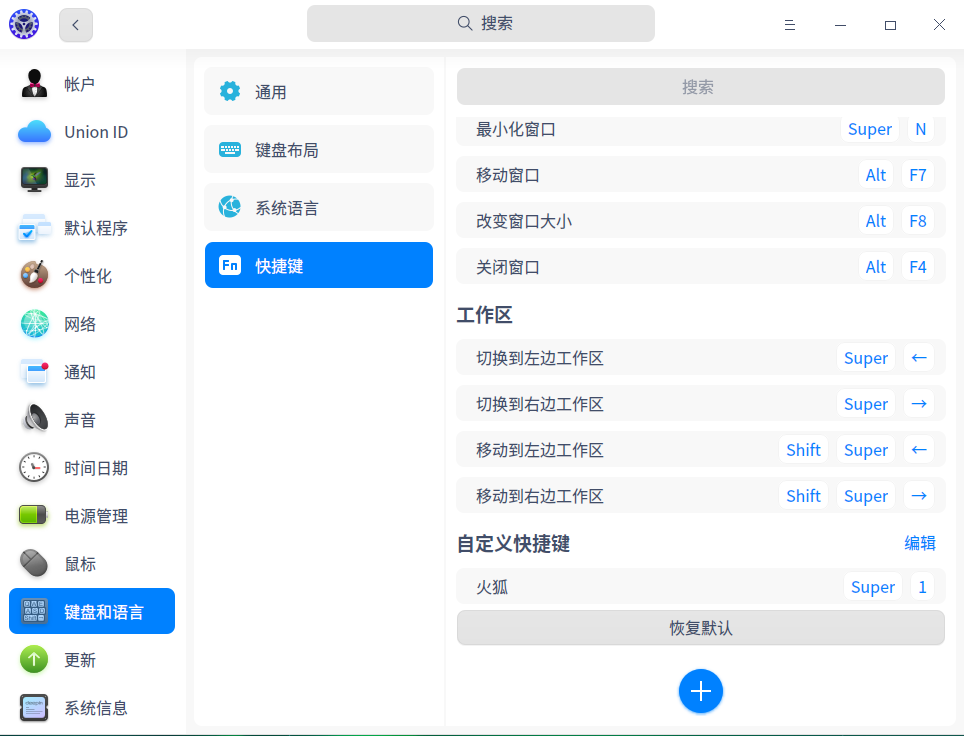
还有这事儿?
我从15. xx开始一直都是super+数字键,super+方向键也是可以的,数字键是快速切换到第几工作区,方向键是向左或右逐个切换。
Reply View the author