
The user is banned, and the content is hidden.
Tofloor
poster avatar
attention
deepin
2020-09-06 04:56
Author
The user is banned, and the content is hidden.
Reply Favorite View the author
All Replies
jin202008x
deepin
2020-09-06 05:07
#1
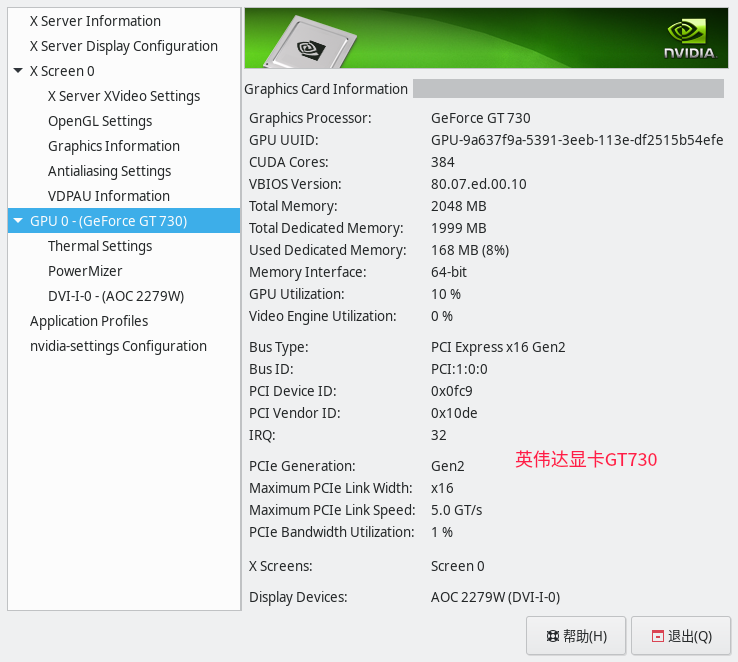
我这里是GTX1070的卡,可以正常显示分辨率。楼主是什么显卡?
Reply View the author
attention
deepin
2020-09-06 05:19
#2
https://bbs.deepin.org/post/201438
我这里是GTX1070的卡,可以正常显示分辨率。楼主是什么显卡?

NVIDIA Corporation GK208B [GeForce GT 730]

终端:
lspci -vnn | grep VGA -A 12
Reply View the author
wangzh
deepin
2020-09-06 05:20
#3
安装系统时不要选闭源显卡驱动,我第一次安装系统时勾选了进系统后分辨率只能是1024*768,所以又重新装了一次
Reply View the author
jin202008x
deepin
2020-09-06 05:37
#4
我这里是全盘安装的时候选择闭源显卡驱动,GTX1070一切正常。不过2014年上市的GT730的确是比较老的显卡了。老黄家的官网上面都找不到对应的驱动了,只能找到GT7系列的,不知道能不能用。N卡对linux可是不大友好。linux始祖法克鱿N卡不是没有道理。前些日子买了个RX550的矿卡配P45的老年机,流畅的一批。
Reply View the author
deepinuser17
deepin
2020-09-06 07:04
#5
本帖最后由 deepinuser17 于 2020-9-5 23:08 编辑

查看一下安装的闭源启动是哪个版本.GT730需要的版本是390.xxx

  1. dpkg -l | grep nvidia
Copy the Code
Reply View the author
attention
deepin
2020-09-06 07:26
#6
https://bbs.deepin.org/post/201438
查看一下安装的闭源启动是哪个版本.GT730需要的版本是390.xxx

代码,然后没有反映
Reply View the author
lcw0268
deepin
2020-09-06 07:29
#7
本帖最后由 lcw0268 于 2020-9-5 23:56 编辑

https://bbs.deepin.org/post/201438
NVIDIA Corporation GK208B [GeForce GT 730]

终端:
sudo dpkg --add-architecture i386
sudo apt update
sudo apt install xserver-xorg-video-nvidia

Reply View the author
舞天逸尘
deepin
2020-09-06 16:16
#8
到官网上下载440.85 好像也行,我几个月前用的也是GT730,我就从官网上下的,装上去了,
Reply View the author
Ziggy
deepin
2020-09-06 17:52
#9
看我帖子
Reply View the author
