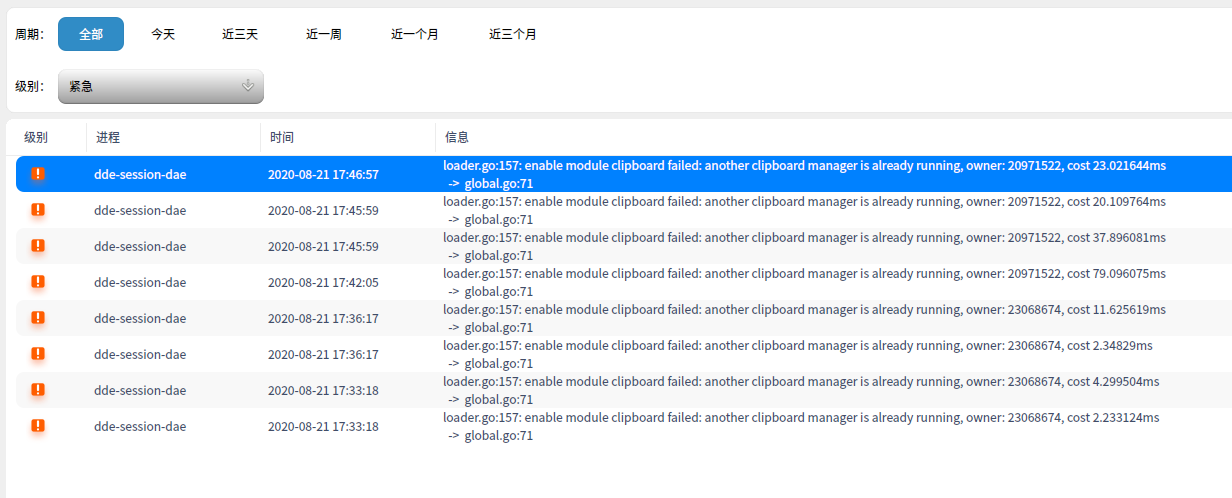
才安装使用两三天,系统的log却占了十几GB,怎么回事呢?
Tofloor
poster avatar
dororo2020
deepin
2020-08-21 19:44
Author

有人知道怎么处理吗?
Reply Favorite View the author
All Replies
1 / 2
To page
avatar
观摩
deepin
2020-08-21 20:23
#1
都安装什么了,怎么输出这么多日志。

可以截断日志文件

  1. > /var/log/messages
Copy the Code
Reply View the author
avatar
roy_lz
deepin
2020-08-21 20:31
#2
是当服务器24小时都在运行吗?
Reply View the author
avatar
dororo2020
deepin
2020-08-21 20:34
#3
roy_lz 发表于 2020-8-21 12:31
是当服务器24小时都在运行吗?

就不关机,不用的时候睡眠挂起啊。
Reply View the author
avatar
dororo2020
deepin
2020-08-21 20:48
#4
hope250 发表于 2020-8-21 12:23
都安装什么了,怎么输出这么多日志。

可以截断日志文件

截断是清空的意思吗
Reply View the author
avatar
^9星守辰^
Moderator
2020-08-21 21:01
#5
可以看看啥老写磁盘,我之前装15cpu一直响,后来看就是有进程一直写磁盘
Reply View the author
avatar
deepinuser17
deepin
2020-08-21 21:06
#6
日志这么大,一般是有重复的出错信息。 查看一下是什么出错信息。logrotate是专门用来周转日志的。 可以设定多大尺寸时,进行周转,以及保留多少个日志文件。 这是保证日志不会用尽文件系统的最好方法。
Reply View the author
avatar
dororo2020
deepin
2020-08-21 21:15
#7
deepinuser17 发表于 2020-8-21 13:06
日志这么大,一般是有重复的出错信息。 查看一下是什么出错信息。logrotate是专门用来周转日志的。 可以设 ...

看了一下尾部一千条的信息,感觉什么都往里面写,不知道是不是系统设置错了什么,本人是菜鸟,没有动过什么系统log的设置,莫名其妙的
Reply View the author
avatar
Viagra
deepin
2020-08-21 21:48
#8
试试
sudo rm -r /var/log
但我不知道会不会出问题
Reply View the author
avatar
观摩
deepin
2020-08-21 21:54
#9
https://bbs.deepin.org/post/200106
截断是清空的意思吗

是的,需要 sudo 申请权限才能执行

这类日志文件不要 使用  rm 删除,否则你必须重启一次才会真正删除
Reply View the author
avatar
dororo2020
deepin
2020-08-21 23:18
#10
hope250 发表于 2020-8-21 13:54
是的,需要 sudo 申请权限才能执行

这类日志文件不要 使用  rm 删除,否则你必须重启一次才会真正删除

请问怎么设置才能不产生那么多log?
Reply View the author
avatar
lsklxy
deepin
2020-08-21 23:32
#11
可以换个系统
Reply View the author
avatar
mcaoser
deepin
2020-08-21 23:32
#12
看看里面都有些什么,是文本文件,最好用tail之类的命令看,找找原因,rm是不建议的,找到原因后,用重定向去清空。
Reply View the author
avatar
mcaoser
deepin
2020-08-21 23:40
#13
本帖最后由 mcaoser 于 2020-8-21 15:45 编辑

deepin的日志配置文件是/etc/rsyslog.conf,需要看一下这个配置文件,
要全部关闭日志
sudo systemctl disable syslog.service (不知对不对,redhat系是这样的)
但不建议关闭

15楼是我现在的/etc/rsyslog.conf文件内容

Reply View the author
avatar
mcaoser
deepin
2020-08-21 23:44
#14
# /etc/rsyslog.conf configuration file for rsyslog
#
# For more information install rsyslog-doc and see
# /usr/share/doc/rsyslog-doc/html/configuration/index.html


#################
#### MODULES ####
#################

module(load="imuxsock") # provides support for local system logging
module(load="imklog")   # provides kernel logging support
#module(load="immark")  # provides --MARK-- message capability

# provides UDP syslog reception
#module(load="imudp")
#input(type="imudp" port="514")

# provides TCP syslog reception
#module(load="imtcp")
#input(type="imtcp" port="514")


###########################
#### GLOBAL DIRECTIVES ####
###########################

#
# Use traditional timestamp format.
# To enable high precision timestamps, comment out the following line.
#
$ActionFileDefaultTemplate RSYSLOG_TraditionalFileFormat

#
# Set the default permissions for all log files.
#
$FileOwner root
$FileGroup adm
$FileCreateMode 0640
$DirCreateMode 0755
$Umask 0022

#
# Where to place spool and state files
#
$WorkDirectory /var/spool/rsyslog

#
# Include all config files in /etc/rsyslog.d/
#
$IncludeConfig /etc/rsyslog.d/*.conf


###############
#### RULES ####
###############

#
# First some standard log files.  Log by facility.
#
auth,authpriv.*                        /var/log/auth.log
*.*;auth,authpriv.none                -/var/log/syslog
#cron.*                                /var/log/cron.log
daemon.*                        -/var/log/daemon.log
kern.*                                -/var/log/kern.log
lpr.*                                -/var/log/lpr.log
mail.*                                -/var/log/mail.log
user.*                                -/var/log/user.log

#
# Logging for the mail system.  Split it up so that
# it is easy to write scripts to parse these files.
#
mail.info                        -/var/log/mail.info
mail.warn                        -/var/log/mail.warn
mail.err                        /var/log/mail.err

#
# Some "catch-all" log files.
#
*.=debug;\
        auth,authpriv.none;\
        news.none;mail.none        -/var/log/debug
*.=info;*.=notice;*.=warn;\
        auth,authpriv.none;\
        cron,daemon.none;\
        mail,news.none                -/var/log/messages

#
# Emergencies are sent to everybody logged in.
#
*.emerg                                musrmsg:*
Reply View the author
avatar
dororo2020
deepin
2020-08-21 23:56
#15
https://bbs.deepin.org/post/200106
deepin的日志配置文件是/etc/rsyslog.conf,需要看一下这个配置文件,
要全部关闭日志
sudo systemctl disa ...

谢谢你哦,刚才看了一下你发的配置文件,跟你的是一模一样的,现在已经清空/var/log/messages,syslog,反正那三个4.7G的log都清空了,看看还会不会快速增大。
Reply View the author
avatar
xuey
deepin
2020-08-22 00:02
#16
本帖最后由 xuey 于 2020-8-21 16:39 编辑

我的昨天刚清理过,今天又1G大小了
https://bbs.deepin.org/user/48640
哦,可能和我用的内核有关
Reply View the author
avatar
mcaoser
deepin
2020-08-22 00:05
#17
本帖最后由 mcaoser 于 2020-8-21 16:07 编辑

日志是会自动删除的,只要不是很大或增大很快就不要紧,我的用了一个月不到吧

deepin@deepin-PC:/media/deepin$ sudo du -sh  /var/log
[sudo] deepin 的密码:
241M    /var/log


Reply View the author
avatar
dororo2020
deepin
2020-08-22 01:18
#18
mcaoser 发表于 2020-8-21 15:40
deepin的日志配置文件是/etc/rsyslog.conf,需要看一下这个配置文件,
要全部关闭日志
sudo systemctl disa ...

兄弟,我发现系统rsyslog和syslog 服务是同时打开的,是不是开一个就行了?
Reply View the author
avatar
mcaoser
deepin
2020-08-22 01:57
#19
https://bbs.deepin.org/post/200106
兄弟,我发现系统rsyslog和syslog 服务是同时打开的,是不是开一个就行了?

我看了一下,我的也是两个都启动了,但这两个的的配置文件对应的分别是哪个还不清楚呢
Reply View the author
avatar
dororo2020
deepin
2020-08-22 02:08
#20

看了一下最严重等级日志,我是开了一个剪贴板软件,似乎跟dde的剪贴板有冲突???是不是一个系统bug啊?如果是,麻烦老手反馈一下给深度的开发吧,谢谢。
Reply View the author
1 / 2
To page