[求助]博通无线网卡不能使用
Tofloor
poster avatar
yy390004766
deepin
2020-08-21 08:32
Author
本帖最后由 yy390004766 于 2020-8-21 00:47 编辑

刚装的系统,已经是第二台机器了,这台机器是惠普的,网卡识别为4352,之前WIN7的时候忘记查看硬件,不知道是不是这个型号,目前有线网卡可以正常使用,但是无线网卡没有网络,搜索不到任何网络,求大神指点~~刚才更新5.8.2内核之后,连无线功能都没有了。。。求助求助,平时办公根本没有有线场景 ,只有家里有,求助求助


Reply Favorite View the author
All Replies
2 / 2
To page
avatar
yy390004766
deepin
2020-08-24 05:53
#21
https://bbs.deepin.org/post/200088
直接用,我的插上就能识别

好的,谢谢啊~
Reply View the author
avatar
deepinuser17
deepin
2020-08-24 07:43
#22
https://bbs.deepin.org/post/200088
DKMS make.log for broadcom-sta-6.30.223.271 for kernel 5.3.0-3-amd64 (x86_64)
2020年 08月 22日 星期 ...

你的操作系统时间不准确,与正确时间差了7个多小时.当操作系统时间不准确时,编译软件会出现错误.

  1. make[1]: 警告:文件“/usr/src/linux-headers-5.3.0-3-common/Makefile”的修改时间在未来 26278 秒后
  2. make[2]: 警告:文件“scripts/Makefile.ubsan”的修改时间在未来 26039 秒后
  3. ....
  4. make[3]: 警告:文件“scripts/Makefile.lib”的修改时间在未来 26039 秒后
Copy the Code


保持操作系统时间准确至关重要.Linux上有时间校对软件,最常用有ntp, chrony. Chrony是很多最新版本使用的软件.

安装chrony方法如下:
  1. sudo apt-get install chrony
Copy the Code


Chrony安装后会自动运行,并且设置为在机器启动时初始运行.Chrony初始时间校对服务器为互联网上公共时间服务器镜像.自己可以修改只使用某个时间校对服务器.

查看系统时间校对的情况:
  1. chronyc tracking
Copy the Code


查看系统使用哪几个时间校对服务器:
  1. chrony sources
Copy the Code


当系统时间不准确尤其是系统时间快于当前准确时间,安装的软件无法正常运行.编译软件就会出现如上的错误.

修正系统时间以后,重新安装broadcom-sta-dkms. 在安装之前,要确认gcc, make, linux-headers已经安装好.最好的方法是,运行安装命令,进行确认.
  1. sudo apt-get install gcc make linux-headers
Copy the Code
Reply View the author
avatar
yy390004766
deepin
2020-08-25 05:53
#23
https://bbs.deepin.org/post/200088
你的操作系统时间不准确,与正确时间差了7个多小时.当操作系统时间不准确时,编译软件会出现错误.

好的,马上试试,如果还不行再给你反馈,感谢你大哥
Reply View the author
avatar
yy390004766
deepin
2020-08-25 06:19
#24
https://bbs.deepin.org/post/200088
你的操作系统时间不准确,与正确时间差了7个多小时.当操作系统时间不准确时,编译软件会出现错误.

DKMS make.log for broadcom-sta-6.30.223.271 for kernel 5.3.0-3-amd64 (x86_64)
2020年 08月 24日 星期一 14:15:09 GMT
/bin/sh: 1: [: Illegal number:
Wireless Extension is the only possible API for this kernel version
Using Wireless Extension API
KBUILD_NOPEDANTIC=1 make -C /lib/modules/5.3.0-3-amd64/build M=`pwd`
make[1]: 警告: jobserver 不可用: 正使用 -j1。添加 “+” 到父 make 的规则。
make[1]: 进入目录“/usr/src/linux-headers-5.3.0-3-amd64”
CFG80211 API is prefered for this kernel version
Using CFG80211 API
Kernel architecture is X86_64
  CC [M]  /var/lib/dkms/broadcom-sta/6.30.223.271/build/src/shared/linux_osl.o
  CC [M]  /var/lib/dkms/broadcom-sta/6.30.223.271/build/src/wl/sys/wl_linux.o
/var/lib/dkms/broadcom-sta/6.30.223.271/build/src/wl/sys/wl_linux.c: In function ‘wl_pci_probe’:
/var/lib/dkms/broadcom-sta/6.30.223.271/build/src/wl/sys/wl_linux.c:780:2: warning: this ‘if’ clause does not guard... [-Wmisleading-indentation]
  if ((val & 0x0000ff00) != 0)
  ^~
/var/lib/dkms/broadcom-sta/6.30.223.271/build/src/wl/sys/wl_linux.c:782:3: note: ...this statement, but the latter is misleadingly indented as if it were guarded by the ‘if’
   bar1_size = pci_resource_len(pdev, 2);
   ^~~~~~~~~
In file included from /usr/src/linux-headers-5.3.0-3-common/include/linux/bitmap.h:9,
                 from /usr/src/linux-headers-5.3.0-3-common/include/linux/cpumask.h:12,
                 from /usr/src/linux-headers-5.3.0-3-common/arch/x86/include/asm/cpumask.h:5,
                 from /usr/src/linux-headers-5.3.0-3-common/arch/x86/include/asm/msr.h:11,
                 from /usr/src/linux-headers-5.3.0-3-common/arch/x86/include/asm/processor.h:21,
                 from /usr/src/linux-headers-5.3.0-3-common/arch/x86/include/asm/cpufeature.h:5,
                 from /usr/src/linux-headers-5.3.0-3-common/arch/x86/include/asm/thread_info.h:53,
                 from /usr/src/linux-headers-5.3.0-3-common/include/linux/thread_info.h:38,
                 from /usr/src/linux-headers-5.3.0-3-common/arch/x86/include/asm/preempt.h:7,
                 from /usr/src/linux-headers-5.3.0-3-common/include/linux/preempt.h:78,
                 from /usr/src/linux-headers-5.3.0-3-common/include/linux/spinlock.h:51,
                 from /usr/src/linux-headers-5.3.0-3-common/include/linux/seqlock.h:36,
                 from /usr/src/linux-headers-5.3.0-3-common/include/linux/time.h:6,
                 from /usr/src/linux-headers-5.3.0-3-common/include/linux/stat.h:19,
                 from /usr/src/linux-headers-5.3.0-3-common/include/linux/module.h:10,
                 from /var/lib/dkms/broadcom-sta/6.30.223.271/build/src/include/linuxver.h:40,
                 from /var/lib/dkms/broadcom-sta/6.30.223.271/build/src/wl/sys/wl_linux.c:27:
In function ‘strncpy’,
    inlined from ‘_wl_add_monitor_if’ at /var/lib/dkms/broadcom-sta/6.30.223.271/build/src/wl/sys/wl_linux.c:2977:2:
/usr/src/linux-headers-5.3.0-3-common/include/linux/string.h:260:9: warning: ‘__builtin_strncpy’ specified bound depends on the length of the source argument [-Wstringop-overflow=]
  return __builtin_strncpy(p, q, size);
         ^~~~~~~~~~~~~~~~~~~~~~~~~~~~~
/var/lib/dkms/broadcom-sta/6.30.223.271/build/src/wl/sys/wl_linux.c: In function ‘_wl_add_monitor_if’:
/usr/src/linux-headers-5.3.0-3-common/include/linux/string.h:281:10: note: length computed here
   return __builtin_strlen(p);
          ^~~~~~~~~~~~~~~~~~~
  CC [M]  /var/lib/dkms/broadcom-sta/6.30.223.271/build/src/wl/sys/wl_iw.o
  CC [M]  /var/lib/dkms/broadcom-sta/6.30.223.271/build/src/wl/sys/wl_cfg80211_hybrid.o
/var/lib/dkms/broadcom-sta/6.30.223.271/build/src/wl/sys/wl_cfg80211_hybrid.c: In function ‘wl_dev_ioctl’:
/var/lib/dkms/broadcom-sta/6.30.223.271/build/src/wl/sys/wl_cfg80211_hybrid.c:460:9: error: implicit declaration of function ‘get_ds’; did you mean ‘get_fs’? [-Werror=implicit-function-declaration]
  set_fs(get_ds());
         ^~~~~~
         get_fs
/var/lib/dkms/broadcom-sta/6.30.223.271/build/src/wl/sys/wl_cfg80211_hybrid.c:460:9: error: incompatible type for argument 1 of ‘set_fs’
  set_fs(get_ds());
         ^~~~~~~~
In file included from /usr/src/linux-headers-5.3.0-3-common/include/linux/uaccess.h:11,
                 from /usr/src/linux-headers-5.3.0-3-common/arch/x86/include/asm/fpu/xstate.h:5,
                 from /usr/src/linux-headers-5.3.0-3-common/arch/x86/include/asm/pgtable.h:26,
                 from /usr/src/linux-headers-5.3.0-3-common/include/linux/mm.h:99,
                 from /var/lib/dkms/broadcom-sta/6.30.223.271/build/src/include/linuxver.h:65,
                 from /var/lib/dkms/broadcom-sta/6.30.223.271/build/src/wl/sys/wl_cfg80211_hybrid.c:26:
/usr/src/linux-headers-5.3.0-3-common/arch/x86/include/asm/uaccess.h:29:40: note: expected ‘mm_segment_t’ {aka ‘struct ’} but argument is of type ‘int’
static inline void set_fs(mm_segment_t fs)
                           ~~~~~~~~~~~~~^~
In file included from /var/lib/dkms/broadcom-sta/6.30.223.271/build/src/wl/sys/wl_cfg80211_hybrid.c:43:
/var/lib/dkms/broadcom-sta/6.30.223.271/build/src/wl/sys/wl_cfg80211_hybrid.c: In function ‘wl_set_auth_type’:
/var/lib/dkms/broadcom-sta/6.30.223.271/build/src/wl/sys/wl_cfg80211_hybrid.h:52:5: warning: this statement may fall through [-Wimplicit-fallthrough=]
  if (wl_dbg_level & WL_DBG_DBG) {   \
     ^
/var/lib/dkms/broadcom-sta/6.30.223.271/build/src/wl/sys/wl_cfg80211_hybrid.c:813:3: note: in expansion of macro ‘WL_DBG’
   WL_DBG(("network eap\n"));
   ^~~~~~
/var/lib/dkms/broadcom-sta/6.30.223.271/build/src/wl/sys/wl_cfg80211_hybrid.c:814:2: note: here
  default:
  ^~~~~~~
cc1: some warnings being treated as errors
make[3]: *** [/usr/src/linux-headers-5.3.0-3-common/scripts/Makefile.build:286:/var/lib/dkms/broadcom-sta/6.30.223.271/build/src/wl/sys/wl_cfg80211_hybrid.o] 错误 1
make[2]: *** [/usr/src/linux-headers-5.3.0-3-common/Makefile:1639:_module_/var/lib/dkms/broadcom-sta/6.30.223.271/build] 错误 2
make[1]: *** [/usr/src/linux-headers-5.3.0-3-common/Makefile:179:sub-make] 错误 2
make[1]: 离开目录“/usr/src/linux-headers-5.3.0-3-amd64”
make: *** [Makefile:177:all] 错误 2

那个时间同步软件我不会弄,老是不同步,于是我就把谁时区改了下,现在不显示时间错误了,又显示这个了,是不是我跟WIFI无缘啊
Reply View the author
avatar
deepinuser17
deepin
2020-08-25 08:18
#25
我在自己的机器上试了一下,出现同样的错误.深度V20的broadcom-sta-dkm来自Debian 10.
https://debian.pkgs.org/10/debia ... 271-10_all.deb.html

用Ubuntu 20.04的broadcom-sta-dkms没有问题.
https://ubuntu.pkgs.org/20.04/ub ... 271-12_all.deb.html

Ubuntu 20.04版的broadcom-sta-dkms与Debian 10版的差别不大.可以试试.

首先卸载通过深度V20源安装的broadcom-sta-dkms:
  1. sudo apt remove broadcom-sta-dkms
  2. sudo apt purge broadcom-sta-dkms
Copy the Code


然后下载Ubuntu 20.04版的broadcom-sta-dkms的deb文件,进行安装:
  1. wget http://archive.ubuntu.com/ubuntu/pool/multiverse/b/broadcom-sta/broadcom-sta-dkms_6.30.223.271-12_all.deb
  2. sudo dpkg -i broadcom-sta-dkms_6.30.223.271-12_all.deb
Copy the Code


手动加载wl内核组件,查看wifi,试试连接wifi:
  1. sudo modprobe wl
  2. lsmod | grep wl
  3. modinfo wl
  4. iwconfig
Copy the Code


设置系统启动时自动加载wl内核组件:
  1. echo "wl" | sudo tee -a /etc/modules
Copy the Code


重启机器.
Reply View the author
avatar
不做伸手党
deepin
2020-08-25 12:19
#26
本帖最后由 asimpleuser 于 2020-8-25 05:12 编辑

就是源里的包太老了。。用这个http://ftp.cn.debian.org/debian/pool/non-free/b/broadcom-sta/broadcom-sta-dkms_6.30.223.271-14_all.deb
安装后再你的/etc/modprobe.d/下新建一个文件就叫broadcom.conf好了,文件中写入
blacklist b44
blacklist b43
blacklist ssb
blacklist b43legacy
blacklist brcmsmac
blacklist bcma
在/etc/modules-load.d/新建wl.conf,写入以下内容wl
对就两字母,然后重启。

Reply View the author
avatar
yy390004766
deepin
2020-08-26 04:47
#27
https://bbs.deepin.org/post/200088
我在自己的机器上试了一下,出现同样的错误.深度V20的broadcom-sta-dkm来自Debian 10.
https://debian.pkg ...

大神,还是不行,不过这次没有错误提示了,但是无线依然是断开,搜索不到WIFI。。。。。。。这次不知道从哪里查看错误日志了,没有之前那个文件夹了
Reply View the author
avatar
yy390004766
deepin
2020-08-26 04:47
#28
https://bbs.deepin.org/post/200088
就是源里的包太老了。。用这个http://ftp.cn.debian.org/debian/pool/non-free/b/broadcom-sta/broadcom-st ...

大哥,我没有管理员权限没法复制粘贴文件,我有Root密码,但是不知道怎么设置管理员权限打开文件夹。。。。。
Reply View the author
avatar
deepinuser17
deepin
2020-08-26 06:25
#29
https://bbs.deepin.org/post/200088
大神,还是不行,不过这次没有错误提示了,但是无线依然是断开,搜索不到WIFI。。。。。。。这次不知道从 ...

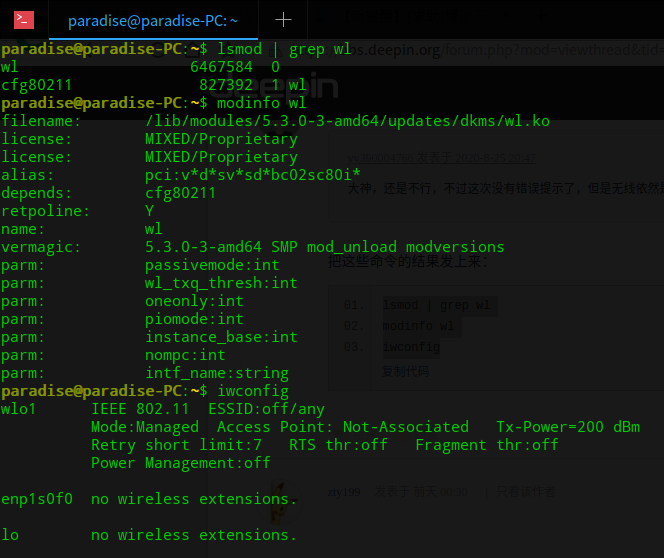
把这些命令的结果发上来:
  1. lsmod | grep wl
  2. modinfo wl
  3. iwconfig
Copy the Code
Reply View the author
avatar
忘记、过去
deepin
2020-08-26 08:30
#30
本帖最后由 zty199 于 2020-8-26 01:04 编辑

我搞定了......

今天更新了5.7内核,确实没有博通网卡驱动。我用的是BCM94360cs2.

sudo apt reinstall bcmwl-kernel-source broadcom-sta-common broadcom-sta-source 重新安装即可自动编译驱动放入新的内核文件夹。重启一下就好了。
Reply View the author
avatar
不做伸手党
deepin
2020-08-26 10:44
#31
本帖最后由 asimpleuser 于 2020-8-26 02:50 编辑
https://bbs.deepin.org/post/200088
大哥,我没有管理员权限没法复制粘贴文件,我有Root密码,但是不知道怎么设置管理员权限打开文件夹。。。 ...
  1. wget -O ~/broadcom-sta-dkms.deb http://ftp.cn.debian.org/debian/pool/non-free/b/broadcom-sta/broadcom-sta-dkms_6.30.223.271-14_all.deb
Copy the Code
  1. sudo dpkg -i ~/broadcom-sta-dkms.deb
Copy the Code
  1. echo "blacklist b44\nblacklist b43\nblacklist ssb\nblacklist b43legacy\nblacklist brcmsmac\nblacklist bcma" | sudo tee /etc/modprobe.d/broadcom.conf
Copy the Code
  1. echo "wl" | sudo tee /etc/modules-load.d/wl.conf
Copy the Code

Reply View the author
avatar
yy390004766
deepin
2020-08-29 04:15
#32
https://bbs.deepin.org/post/200088
把这些命令的结果发上来:


Reply View the author
avatar
deepinuser17
deepin
2020-08-29 07:31
#33

驱动器wl已经正常加载.Wifi装置名是wlo1. 现在可以连上wifi了吗?
Reply View the author
avatar
yy390004766
deepin
2020-08-29 07:34
#34
https://bbs.deepin.org/post/200088
驱动器wl已经正常加载.Wifi装置名是wlo1. 现在可以连上wifi了吗?

还是不能,搜索不到任何WIFI,我听其他朋友说的买了一个水星的USB无线网卡,插上就能用,本机的就是不行,大神给分析下到底怎么回事?
Reply View the author
avatar
deepinuser17
deepin
2020-08-29 07:45
#35
本帖最后由 deepinuser17 于 2020-8-28 23:53 编辑
https://bbs.deepin.org/post/200088
还是不能,搜索不到任何WIFI,我听其他朋友说的买了一个水星的USB无线网卡,插上就能用,本机的就是不行 ...

运行这些命令看看:
  1. sudo iwlist wlo1 scan
  2. sudo iwlist wlo1 freq
  3. sudo nmcli dev wifi list
Copy the Code
Reply View the author
avatar
yyz1314925
deepin
2020-08-29 07:45
#36
换uos试试,我的用deepin折腾大半天也没管用,现在换成uos可以了。
Reply View the author
avatar
yy390004766
deepin
2020-08-29 08:48
#37
https://bbs.deepin.org/post/200088
运行这些命令看看:

我重装系统了,没再折腾,现在就这样先用USB的用着吧,2.4G的网络,办公凑合,哎,折腾不起了,搞了快半个月了,感谢大神大哥一直不厌其烦的解答,万分感谢~~
Reply View the author
2 / 2
To page