UOS中安装星火微信无图标
Tofloor
poster avatar
和风
deepin
2020-08-12 00:06
Author
今天在DEEPIN社区版中安装星火微信,一切正常,但在UOS中安装星火微信2.9,在启动器就找不到图标,卸载微信2.6后安装,同样找不到图标,只好重新装回了微信2.6!
Reply Favorite View the author
All Replies
avatar
不会开车有驾照
deepin
2020-08-12 02:25
#1
看社区公告


深度社区商店应用安装指导
2020年6月10日 由 神末

若双击安装失败,请在下载目录右键在终端中打开,输入sudo apt install ./文件名      下面是示例

sudo apt install ./net.huangyuhui.hmcl_3.3.175_amd64.deb
Reply View the author
avatar
忘记、过去
deepin
2020-08-12 02:50
#2
启动器刷新可能没跟上,一般注销重新登录或者重启就好了。

如果实在找不到启动项,去 /opt/durapps/com.qq.weixin.dcs/entries/applications/ 底下把 .desktop 复制出来就好了。
Reply View the author
avatar
Ziggy
deepin
2020-08-12 03:08
#3
Reply View the author
avatar
和风
deepin
2020-08-12 23:29
#4
本帖最后由 zbx 于 2020-8-12 15:31 编辑

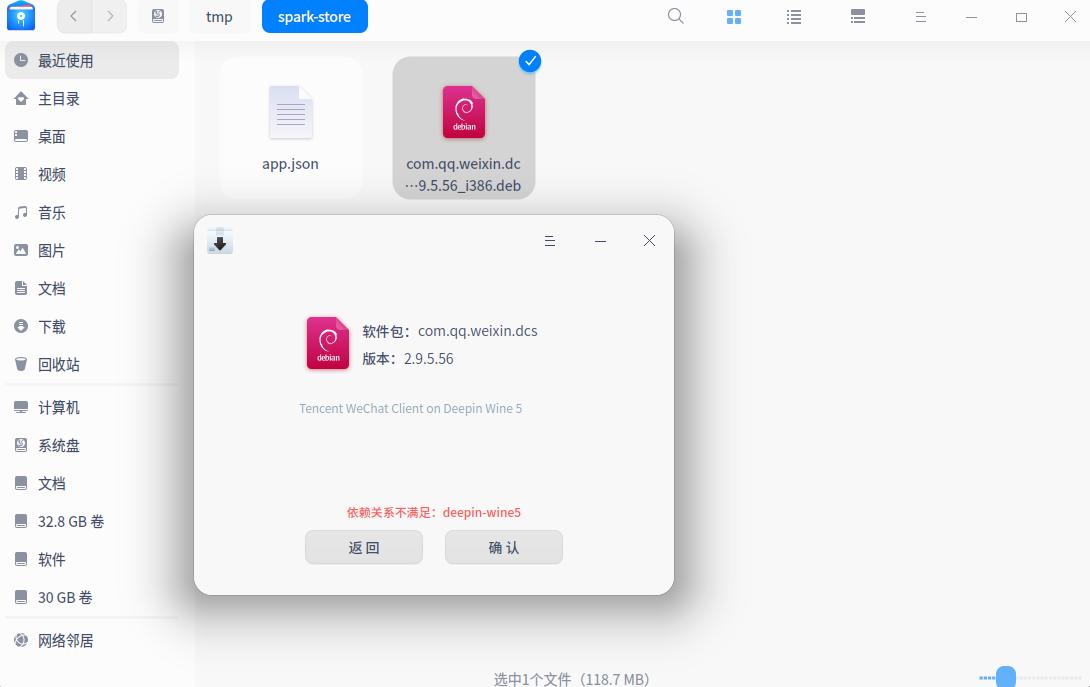
星火商店提示安装成功,按照zty199的提示,去 /opt/durapps/com.qq.weixin.dcs/entries/applications/ ,这个文件夹是空的。按照ccbshang的提示,在下载目录右键在终端中打开,输入sudo apt install ./文件名   这里的安装包提示,信赖关系不足。是否与我的UOS系统是测试版有关?因为我的deepin社区版也没有安装deepin-wind5。
Reply View the author
avatar
Emmmmmmmm
deepin
2020-08-12 23:44
#5
sudo apt install deepin-wine5
Reply View the author
avatar
Emmmmmmmm
deepin
2020-08-12 23:45
#6
不知道uos源里有没有deepin-wine5,试试呗
Reply View the author
avatar
liujy126
deepin
2020-08-13 00:42
#7
本帖最后由 liujy126 于 2020-8-12 16:44 编辑

我教你一招儿:

建立desktop文件
sudo touch /usr/share/applications/wechat-new.desktop
sudo dedit /usr/share/applications/wechat-new.desktop
弹出的界面里,复制以下内容,
#!/usr/bin/env xdg-open

[Desktop Entry]
Encoding=UTF-8
Type=Application
X-Created-By=Deepin WINE Team
Categories=chat;
Icon=com.qq.weixin.deepin
Exec=/home/你的登录名/Deepin-Wechat5/run.sh
Name=WeChat
Name[zh_CN]=微信
Comment=Tencent WeChat Client on Deepin Wine
StartupWMClass=WeChat.exe
MimeType=
X-Deepin-CreatedBy=com.deepin.dde.daemon.Launcher
X-Deepin-AppID=com.qq.weixin.deepin


把这弄完一准好使。
Reply View the author
avatar
不会开车有驾照
deepin
2020-08-13 01:29
#8
您这也不是终端模式啊
Reply View the author
avatar
神末shenmo
deepin
Spark-App
Q&A Team
2020-08-13 01:39
#9
UOS依赖不满足,太旧了
这几天星火后台管理处于瘫痪状态,暂时不会修复
Reply View the author
avatar
忘记、过去
deepin
2020-08-13 04:35
#10
https://bbs.deepin.org/post/198979
星火商店提示安装成功,按照zty199的提示,去 /opt/durapps/com.qq.weixin.dcs/entries/applications/ ,这 ...

是有关系......这个版本打包的时候按照deepin v20的依赖版本打包的,uos测试版的依赖版本太低,装不上......等下次微信更新我重新打包一下......
Reply View the author
avatar
WangZhongyun
deepin
2020-08-13 06:42
#11
我从Deepin20β升级成正式版后,用星火商店安装的微信和TIM成功却也都找不到启动图标
Reply View the author
avatar
神末shenmo
deepin
Spark-App
Q&A Team
2020-08-13 07:58
#12
WangZhongyun 发表于 2020-8-12 22:42
我从Deepin20β升级成正式版后,用星火商店安装的微信和TIM成功却也都找不到启动图标 ...

https://bbs.deepin.org/user/154730
Reply View the author
avatar
忘记、过去
deepin
2020-08-13 08:03
#13
https://bbs.deepin.org/post/198979
我从Deepin20β升级成正式版后,用星火商店安装的微信和TIM成功却也都找不到启动图标 ...

尝试一下 sudo apt reinstall com.qq.weixin.dcs 和 sudo apt reinstall com.qq.tim.dcs,看看安装有没有图标。
Reply View the author
avatar
WangZhongyun
deepin
2020-08-13 21:38
#14
https://bbs.deepin.org/post/198979
尝试一下 sudo apt reinstall com.qq.weixin.dcs 和 sudo apt reinstall com.qq.tim.dcs,看看安装有没有 ...

谢谢,这样就行了。应该找出原因能一次成功更好
Reply View the author