Home
Categories
WIKI
Topic
User
LANGUAGE:
中文
English
deepin15.11配置C++开发环境
Apps Section
1324
views ·
5
replies ·
To
floor
Go
一顾倾城
deepin
2020-08-10 21:50
Author
deepin15.11如何配置C++开发环境啊?
按照网上教材配置 codelite\codeblock\geany都不行,有没有配置成功的,推荐下
在win下使用都正常,deepin下出错不行啊
Reply
Like 0
Favorite
View the author
All Replies
走钢丝
deepin
2020-08-10 22:08
#1
出什么错了?
Reply
Like 0
View the author
ted2019
deepin
2020-08-10 22:16
#2
本帖最后由 ted2019 于 2020-8-10 14:22 编辑
1. 商店下载QtCreator
2. 命令窗口安装qt:sudo apt-get install qt5-default
3. 安装g++: sudo apt-get install g++
4. 安装cmake: sudo apt-get install cmake
5. IDE配置如下图:
Reply
Like 0
View the author
小明Hackintosh
deepin
2020-08-14 07:03
#3
感觉还是用Eclipse c/c++靠谱一点。
Reply
Like 0
View the author
北冥夜未央
deepin
Ecological co-builder
2020-08-15 01:37
#4
现在我只有Qt官方的QtCreator+Qt5成功了,Code::Blocks+wxWidgets不行,总出错。
Reply
Like 0
View the author
一顾倾城
deepin
2021-04-25 00:32
#5
用vscodium 这个也行
Reply
Like 0
View the author
Please
sign
in first
Featured Collection
Change
[Tutorial] deepin25 WSL Offline Installation Guide
UOS AI 2.8 Released! Three New Intelligent Agents & Major Evolution
Solid Q&A | deepin 25 Common Questions – The Immutable System Edition
New Thread
Popular Ranking
Change
Website????
Popular Events
More


 中文
中文 
 deepin deepin
  deepin
  deepin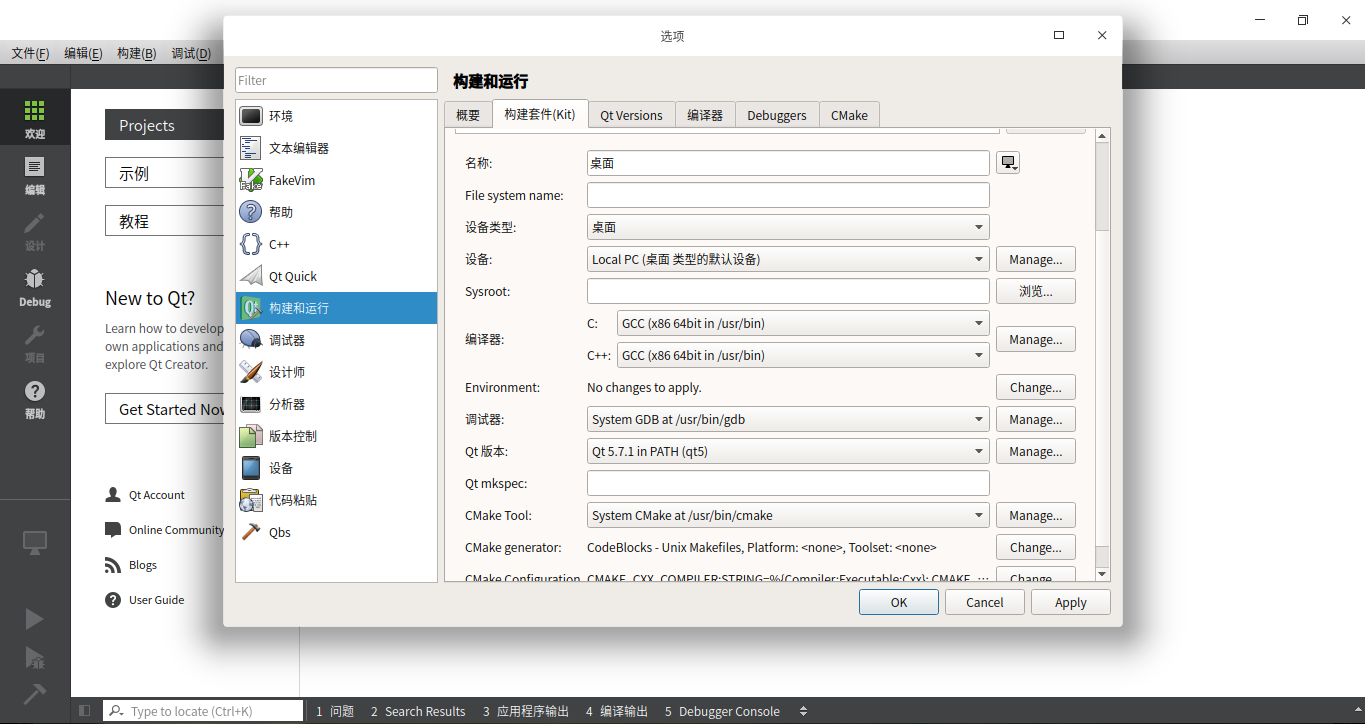

 deepin
 deepin
  deepin


 Website????
按照网上教材配置 codelite\codeblock\geany都不行,有没有配置成功的,推荐下
在win下使用都正常,deepin下出错不行啊