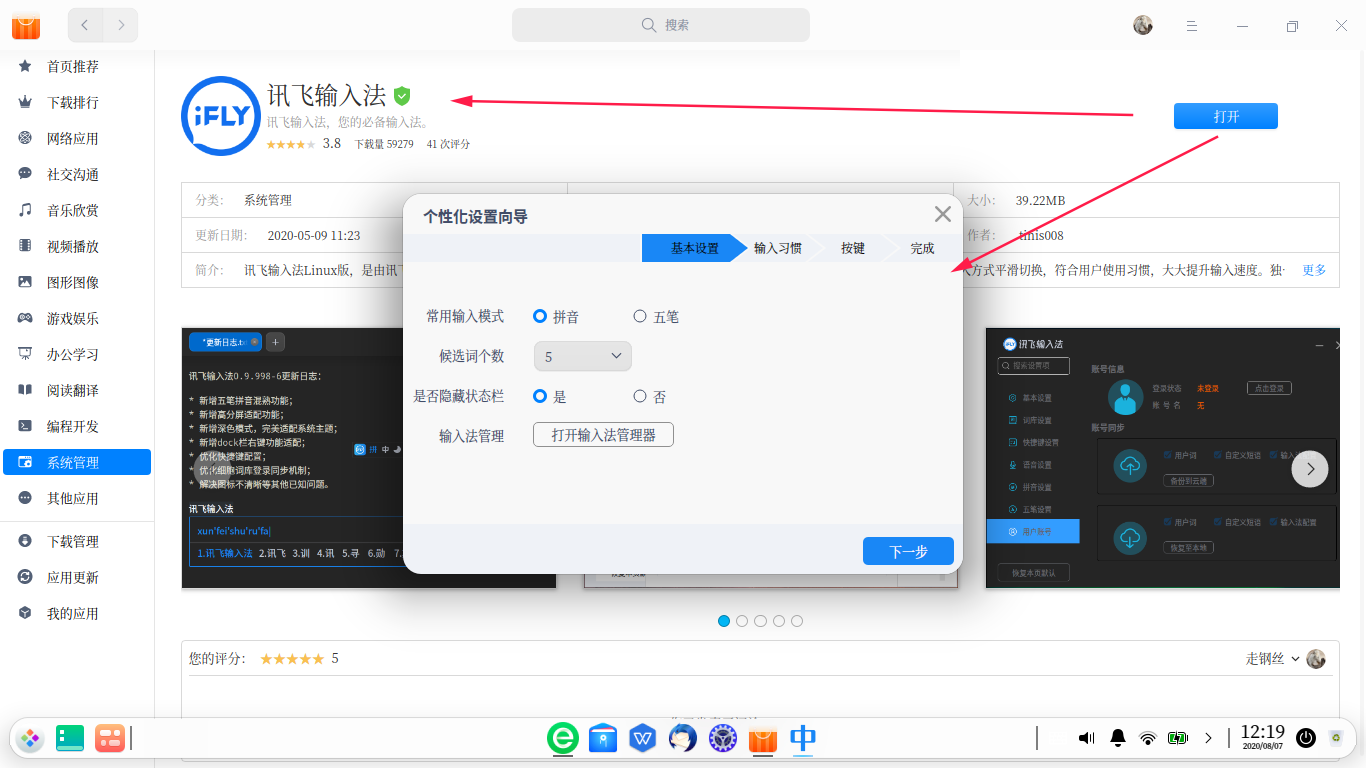
关于 输入法,我好像发现了什么不得了的东西……
Tofloor
poster avatar
SamLukeYes
deepin
2020-08-07 20:01
Author
  1. ┬─[root@Auriel:/]─[11时56分48秒]
  2. ╰─>$ apt show uos-chineseime
  3. Package: uos-chineseime
  4. Version: 1.0.1.1370
  5. Priority: optional
  6. Section: utils
  7. Source: sogouimebs
  8. Maintainer: Ubuntu Kylin Team
  9. Installed-Size: 123 MB
  10. Depends: fcitx (>= 1:4.2.8), fcitx-frontend-gtk2, fcitx-frontend-gtk3, fcitx-frontend-qt4, fcitx-frontend-qt5, fcitx-module-kimpanel, fcitx-module-x11, libxtst6, im-config, lsb-release, fcitx-libs | libfcitx-config4, fcitx-libs | libfcitx-qt0, fcitx-libs | libfcitx-utils0, libopencc2, fcitx-ui-classic, qml-module-qtquick2, libfcitx-qt5-1, libcurl4 (>= 7.64.0), libssl1.1 (>= 1.1.1c)
  11. Recommends: fonts-droid | fonts-droid-fallback
  12. Breaks: fcitx-ui-qimpanel, sogoupinyin
  13. Homepage: http://pinyin.sogou.com/linux
  14. Download-Size: 20.6 kB
  15. APT-Sources: https://community-packages.deepin.com/deepin apricot/non-free amd64 Packages
  16. Description: UOS Chinese Input Method
  17. Based on web search engine technology, Sogou Pinyin input method is
  18. the next-generation input method designed for Internet users. As it
  19. is backed with search engine technology, user input method can be
  20. extremely fast, and it is much more advanced than other input method
  21. engines in terms of the volume of the vocabulary database and its
  22. accuracy. Sogou input method is the most popular input methods in
  23. China, and Sogou promises it will always be free of charge.
Copy the Code
UOS 输入法竟然是基于搜狗拼音开发的?!甚至,似乎就是那个优麒麟社区版换个皮……
Reply Favorite View the author
All Replies
avatar
jerry79
deepin
2020-08-07 20:11
#1
不是说是讯飞改名了吗?
Reply View the author
avatar
2020-08-07 20:13
#2
话不要说的这么难听好吗?什么叫换皮呀,这明明是再创作。
Reply View the author
avatar
haohu1193
deepin
2020-08-07 20:16
#3
东一榔头西一锤子的,也不晓得在搞什么飞机啊...从搜狗,讯飞,再到UOS搜狗...WPS也在替换...一个稳妥点商业合作关系这么难建立吗...
Reply View the author
avatar
走钢丝
deepin
2020-08-07 20:18
#4
还有这种事儿啊,显然打包的没用心。
Reply View the author
avatar
走钢丝
deepin
2020-08-07 20:21
#5
就是讯飞啊。商店里都可以打开配置对话框


只能说打包的人就是复制了一份搜狗的文件,然后把关键信息改改,描述什么也没改。


https://bbs.deepin.org/user/48640


Reply View the author
avatar
jerry79
deepin
2020-08-07 20:31
#6
https://bbs.deepin.org/post/198498
就是讯飞啊。商店里都可以打开配置对话框

请问如何修改输入候选词面板的文字字号大小呢?论坛里面原来的方法不能用了
Reply View the author
avatar
xuey
deepin
2020-08-07 20:35
#7
还好吧,奇安信安全终端的托盘名字都是360没换
Reply View the author
avatar
haohu1193
deepin
2020-08-07 20:42
#8
https://bbs.deepin.org/post/198498
请问如何修改输入候选词面板的文字字号大小呢?论坛里面原来的方法不能用了 ...
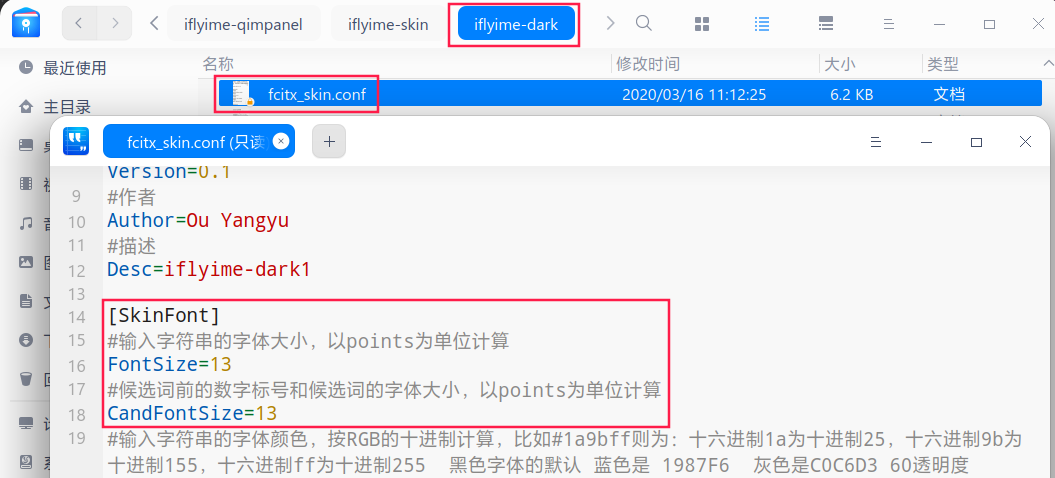
usr/share/iflyime-qimpanel/iflyime-skin/iflyime-dark


大胆点进去看看呀...不就是目录名字稍稍改了一下嘛...


Reply View the author
avatar
SamLukeYes
deepin
2020-08-07 22:28
#9
https://bbs.deepin.org/post/198498
话不要说的这么难听好吗?什么叫换皮呀,这明明是再创作。

好吧,6 楼的分析应该比较正确
Reply View the author
avatar
2020-08-07 22:42
#10
https://bbs.deepin.org/post/198498
好吧,6 楼的分析应该比较正确

还不如换皮呢。官方商店的应用打包都如此不正规,只能说明审核机制好像聋子的耳朵——摆设  说社区版是弃子还真不是空穴来风。
Reply View the author
avatar
jerry79
deepin
2020-08-07 22:54
#11
https://bbs.deepin.org/post/198498
usr/share/iflyime-qimpanel/iflyime-skin/iflyime-dark

我改了,没用啊,另外一个也改了,也没用
Reply View the author
avatar
jerry79
deepin
2020-08-07 22:57
#12
https://bbs.deepin.org/post/198498
usr/share/iflyime-qimpanel/iflyime-skin/iflyime-dark

好像变大了,我之前可能哪里没改对,谢谢
Reply View the author
avatar
jingle
deepin
2020-08-08 02:37
#13
这个包以前的历史遗留包。已删除。
Reply View the author