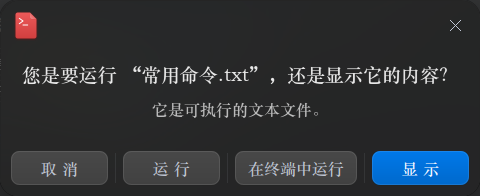
每次打开appimage文件会出现这个窗口,大家是不是也这样?
Tofloor
poster avatar
星罗秋旻
deepin
2020-07-27 18:56
Author
如图:
Reply Favorite View the author
All Replies
avatar
guaguale
deepin
2020-07-27 20:27
#1
在终端执行sudo dedit /etc/sysctl.conf 命令
在编辑器最后一行添加以下参数(建议重启系统生效)
kernel.unprivileged_userns_clone=1
Reply View the author
avatar
yalishanda
deepin
2020-07-27 20:45
#2
當然不會呀。
Reply View the author
avatar
haohu1193
deepin
2020-07-27 21:09
#3
开个文本文件都会有安全提示...这应该是个通用型的特性吧...


Reply View the author
avatar
SamLukeYes
deepin
2020-07-27 21:51
#4
这个应该是可以设置的,看看文管的设置里能不能调
Reply View the author
avatar
^9星守辰^
Moderator
2020-07-27 22:03
#5
appimage我都是弄个desktop文件
Reply View the author
avatar
haohu1193
deepin
2020-07-27 22:07
#6
https://bbs.deepin.org/post/197742
appimage我都是弄个desktop文件

有些比较负责的打包者会在第一次启动时询问是否添加一个desktop方便以后启动...

规范应该是有的...纯粹是看打包者的个人素质和习惯了...
Reply View the author
avatar
leafgreen
deepin
2020-07-27 22:33
#7
haohu1193 发表于 2020-7-27 14:07
有些比较负责的打包者会在第一次启动时询问是否添加一个desktop方便以后启动...

规范应该是有的... ...

自己装一个appimagelauncher 就可以整合任意appimage 了
Reply View the author
avatar
haohu1193
deepin
2020-07-27 23:06
#8
https://bbs.deepin.org/post/197742
自己装一个appimagelauncher 就可以整合任意appimage 了

我没有这方面的需求...
Reply View the author
avatar
星罗秋旻
deepin
2020-07-27 23:35
#9
https://bbs.deepin.org/post/197742
自己装一个appimagelauncher 就可以整合任意appimage 了

装过,用不起,最后原来的appimage文件也找不到了
Reply View the author
avatar
星罗秋旻
deepin
2020-07-28 00:17
#10
https://bbs.deepin.org/post/197742
在终端执行sudo dedit /etc/sysctl.conf 命令
在编辑器最后一行添加以下参数(建议重启系统生效)
kernel.u ...

加进去了,然后重启,但是仍然没有用。


Reply View the author
avatar
189******23
deepin
2020-07-28 00:31
#11
打#号能生效?不能吧。。
Reply View the author
avatar
xuey
deepin
2020-07-28 01:22
#12
创建一个桌面图标,好看又没权限确认
Reply View the author
avatar
Emmmmmmmm
deepin
2020-07-28 04:14
#13
这个窗口很有用的啊,有些需要用终端的程序你直接打开还用不了
Reply View the author
avatar
leafgreen
deepin
2020-07-29 17:13
#14
https://bbs.deepin.org/post/197742
自己装一个appimagelauncher 就可以整合任意appimage 了

是不是你的文件名有空格,我试过有空格的文件整合之后会打不开
Reply View the author