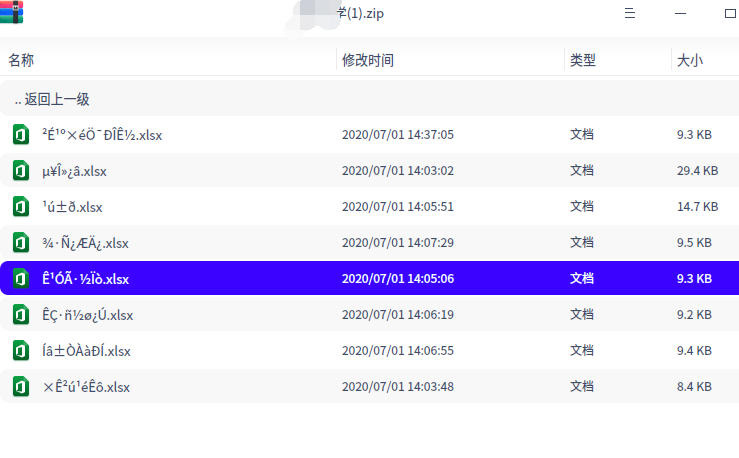
deepin20 解压缩软件解压后乱码
Tofloor
poster avatar
imic07
deepin
2020-07-23 22:41
Author

Reply Favorite View the author
All Replies
avatar
china9494520
deepin
2020-07-23 23:24
#1
我也碰到了这样的问题,好像是安装360压缩以后发生的。
Reply View the author
avatar
jingle
deepin
2020-07-24 00:28
#2
编码不一样 win liunx   
Reply View the author
avatar
安洛
deepin
2020-07-24 06:19
#3
用unzip命令。压缩包所在文件夹里面右键-》在终端中打开,然后
  1. unzip ./xxx.zip
Copy the Code

不过还是希望官方尽快处理一下。
Reply View the author
avatar
zanyrain
deepin
2020-07-24 06:29
#4
zip格式的缺陷,不能直接判断编码,命令行指定编码试试
Reply View the author
avatar
龙城大李
deepin
2020-07-24 16:53
#5
最直接的办法就是实用拖拽,我就是这样解决的
Reply View the author
avatar
山高谷深
deepin
2020-07-24 20:20
#6
https://bbs.deepin.org/post/197587
编码不一样 win liunx

希望支持下让程序自动判断编码。
Reply View the author
avatar
joah1
deepin
2020-07-24 22:07
#7
暂时用360压缩代替,虽然有点不方便
Reply View the author
avatar
deepin
2020-07-24 22:51
#8
换一个编码试试,编码不一样
Reply View the author
avatar
imic07
deepin
2020-07-24 23:26
#9
https://bbs.deepin.org/post/197587
换一个编码试试,编码不一样

不支持输入编码
Reply View the author
avatar
imic07
deepin
2020-07-24 23:27
#10
https://bbs.deepin.org/post/197587
最直接的办法就是实用拖拽,我就是这样解决的

我拖拽出来也乱码
Reply View the author
avatar
imic07
deepin
2020-07-24 23:28
#11
https://bbs.deepin.org/post/197587
zip格式的缺陷,不能直接判断编码,命令行指定编码试试

我同事macbook解压正常。说明不是zip的问题
Reply View the author
avatar
imic07
deepin
2020-07-24 23:29
#12
https://bbs.deepin.org/post/197587
编码不一样 win liunx

mac上面的工具可以解压,他们怎么办到的呢
Reply View the author
avatar
SamLukeYes
deepin
2020-07-24 23:34
#13
https://bbs.deepin.org/post/197587
我同事macbook解压正常。说明不是zip的问题

确实是zip的问题,可能是mac上的软件包含了自动修复编码的功能
Reply View the author
avatar
SamLukeYes
deepin
2020-07-24 23:39
#14
https://bbs.deepin.org/post/197587
mac上面的工具可以解压,他们怎么办到的呢

他是不是用了unarchiever?在linux下也有命令行版本,直接用unar命令解压
Reply View the author
Comments
gbwater
2020-07-31 05:23
正解!
avatar
绍贝格尔
deepin
2020-07-25 04:14
#15
试试B1解压
Reply View the author