

 中文
中文 

 deepin

haohu1193 deepin
2020-07-23 20:36 deepin - #!/bin/bash
- ORIGIN_DIR=$(dirname $(readlink -f "$0"))
- TARGET_DIR="/usr/share/deepin/dde-file-manager/oem-menuextensions"
- ORIGIN_FILE="root-file-manager.desktop"
- pkexec cp -f ${ORIGIN_DIR}/${ORIGIN_FILE} ${TARGET_DIR}
- if [[ -f "${TARGET_DIR}/${ORIGIN_FILE}" ]] ; then
- echo "安装成功"
- echo "即将打开一个新文件管理器窗口,请自行确认效果"
- dde-open /
- else
- echo "安装失败"
- fi
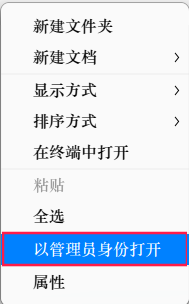
这是添加右键[用管理员方式打开] 的SH内容,找找灵感?
root-file-manager(右键管理员菜单sh).zip
Reply Like 0 View the author
 搜索[右键菜单]...有112个帖子...找找有没有你需要的...

 Website????

