Home
Categories
WIKI
Topic
User
LANGUAGE:
中文
English
在deepin社区版上使用语音助手的方法分享
Experiences and Insight
1417
views ·
2
replies ·
To
floor
Go
jalawov
deepin
2020-07-22 15:45
Author
本帖最后由 jiarun 于 2020-7-22 08:29 编辑
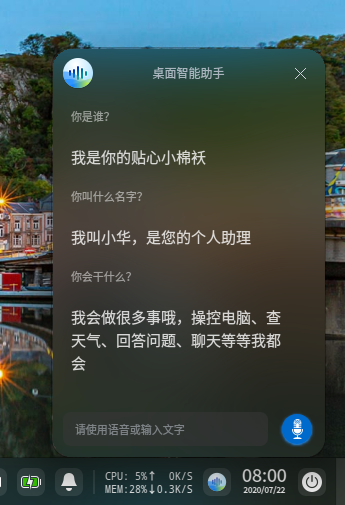
今天发现uos的激活模块也能在deepin上激活。。
首先安装deepin-license并用uos的激活码激活
然后安装deepin-aiassistant
Reply
Like 0
Favorite
View the author
All Replies
MeowVing
deepin
2020-07-22 15:48
#1
装上了,只不过:
“注意,选中 'deepin-license-activator' 而非 'deepin-license'”
这就把我的激活码翻出来试试~
Reply
Like 0
View the author
MeowVing
deepin
2020-07-22 16:03
#2
很不错!
就是不知道能否在升级或者重装后继续这么干
不过没关系,后期社区版应该也会用上语音助手的吧。
Reply
Like 0
View the author
Please
sign
in first
Featured Collection
Change
[Tutorial] deepin25 WSL Offline Installation Guide
UOS AI 2.8 Released! Three New Intelligent Agents & Major Evolution
Solid Q&A | deepin 25 Common Questions – The Immutable System Edition
New Thread
Popular Events
More
今天发现uos的激活模块也能在deepin上激活。。
首先安装deepin-license并用uos的激活码激活
然后安装deepin-aiassistant