deepin-Wine5 折腾微信2.9.5教程
Tofloor
poster avatar
mmlmonkey
deepin
2020-07-09 22:14
Author
本帖最后由 mmlmonkey 于 2020-7-9 14:18 编辑

首先,环境是V20,15.11的没试过步骤1.安装deepin-wine5
  1. sudo apt update
  2. sudo apt install deepin-wine5
Copy the Code
步骤2.安装微信
  1. env WINEPREFIX=~/Deepin-Wechat5 deepin-wine5 WeChatSetup.exe
Copy the Code
步骤3.配置riched20(如果不配置 输入框有问题)
  1. env WINEPREFIX=~/Deepin-Wechat5 deepin-wine5 winecfg
Copy the Code
        选择函数库,添加riched20,编辑为原装先于内建,然后copy老版deepin-wine wechat目录里的
  1. cp ~/.deepinwine/Deepin-WeChat/drive_c/windows/system32/riched20.dll ~/Deepin-Wechat5/drive_c/windows/system32/
Copy the Code
步骤4.配置一个desktop文件
         新建run.sh在~/Deepin-Wechat5 下并且给以执行权限
  1. touch ~/Deepin-Wechat5/run.sh
  2. chmod +x ~/Deepin-Wechat5/run.sh
Copy the Code
在run.sh里输入如下,这里路径的是我写的是绝对路径,建议绝对路径,到该目录下pwd一下即可
  1. #!/bin/bash
  2. env WINEPREFIX=/home/sdli/Deepin-Wechat5 deepin-wine5 '/home/sdli/Deepin-Wechat5/drive_c/Program Files/Tencent/WeChat/WeChat.exe'
Copy the Code
在下建立desktop文件
  1. sudo touch /usr/share/applications/wechat-new.desktop
  2. sudo dedit /usr/share/applications/wechat-new.desktop
Copy the Code

在文本中输入以下内容,路径也替换掉
  1. #!/usr/bin/env xdg-open

  2. [Desktop Entry]
  3. Encoding=UTF-8
  4. Type=Application
  5. X-Created-By=Deepin WINE Team
  6. Categories=chat;
  7. Icon=com.qq.weixin.deepin
  8. Exec=/home/sdli/Deepin-Wechat5/run.sh
  9. Name=WeChat
  10. Name[zh_CN]=微信
  11. Comment=Tencent WeChat Client on Deepin Wine
  12. StartupWMClass=WeChat.exe
  13. MimeType=
  14. X-Deepin-CreatedBy=com.deepin.dde.daemon.Launcher
  15. X-Deepin-AppID=com.qq.weixin.deepin
Copy the Code


enjoy吧 测试发图片和发文件没有 小程序也正常
Reply Favorite View the author
All Replies
2 / 3
To page
avatar
deepin-chinaren
deepin
2020-07-11 18:37
#21
https://bbs.deepin.org/post/196913
托盘什么问题 我这里OK啊

这是托盘里的微信来信息时不闪,也打不开呀?
Reply View the author
avatar
liujy126
deepin
2020-07-15 18:25
#22
按照楼主的操作了,怎么没有桌面图标,到运行不了,是不是要卸载掉旧版的?
到/usr/share/找到微信的图标,双击也没反映
Reply View the author
avatar
liujy126
deepin
2020-07-15 19:03
#23
貌似楼主漏了一条最关建的步骤,就是下载pc版微信,然后再下载目录里打开终端,env等等等等
Reply View the author
avatar
ltree
deepin
2020-07-15 20:02
#24
楼主能帮忙折腾下崩坏3桌面版吗?
Reply View the author
avatar
neko
deepin
Ecological co-builder
Q&A Team
2020-07-15 20:17
#25
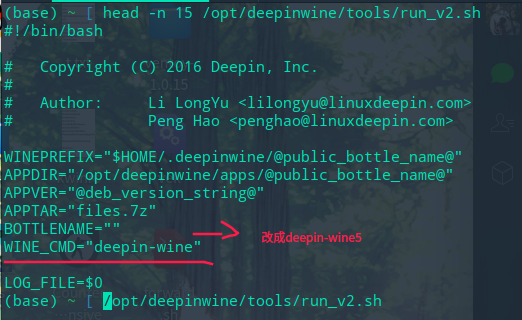
花里胡哨,直接安装完deepin-win5修改run_v2.sh里的WINE_CMD="deepin-wine"
参数为deepin-wine5就完事了
Reply View the author
avatar
落墨
deepin
2020-07-16 04:12
#26
https://bbs.deepin.org/post/196913
花里胡哨,直接安装完deepin-win5修改run_v2.sh里的WINE_CMD="deepin-wine"
参数为deepin-wine5就完事了 ...

run_v2.sh这个文件是在哪里啊
Reply View the author
avatar
neko
deepin
Ecological co-builder
Q&A Team
2020-07-16 05:41
#27
https://bbs.deepin.org/post/196913
run_v2.sh这个文件是在哪里啊


Reply View the author
avatar
liujy126
deepin
2020-07-16 23:19
#28
https://bbs.deepin.org/post/196913
花里胡哨,直接安装完deepin-win5修改run_v2.sh里的WINE_CMD="deepin-wine"
参数为deepin-wine5就完事了 ...

请问,新装好的deepin,还没有装任何微信,这个步骤在啥时候操作?
Reply View the author
avatar
neko
deepin
Ecological co-builder
Q&A Team
2020-07-17 15:00
#29
https://bbs.deepin.org/post/196913
请问,新装好的deepin,还没有装任何微信,这个步骤在啥时候操作?

安装完微信和deepin-wine5后
Reply View the author
avatar
云海泛舟
deepin
2020-07-17 16:18
#30
顶一个吧!!!!!!!!!!11
Reply View the author
avatar
maemolee
deepin
2020-07-17 16:50
#31
装完之后发现pc端打不开小程序啊。
Reply View the author
avatar
SamLukeYes
deepin
2020-07-17 17:03
#32
https://bbs.deepin.org/post/196913
装完之后发现pc端打不开小程序啊。

用winecfg调一下容器中的Windows版本,一般调成win7就行了
Reply View the author
avatar
maemolee
deepin
2020-07-17 17:10
#33
https://bbs.deepin.org/post/196913
用winecfg调一下容器中的Windows版本,一般调成win7就行了

谢谢,我试试
Reply View the author
avatar
maemolee
deepin
2020-07-17 17:13
#34
https://bbs.deepin.org/post/196913
用winecfg调一下容器中的Windows版本,一般调成win7就行了

试了试,好像不行。我是直接在原来的deepin-wine里装的2.9.5,跟这个有关系吗?
Reply View the author
avatar
liujy126
deepin
2020-07-17 17:32
#35
本帖最后由 liujy126 于 2020-7-17 09:33 编辑
https://bbs.deepin.org/post/196913
安装完微信和deepin-wine5后

是这样的,我现在电脑里已经有了deepin-wine5和官版wine5,装了deepin商店里的2.6.5的微信。
现在操作,是不是应该是

1、卸载掉2.65微信,安装最新的2.95的微信,然后,把按照您说的修改一下run_v2.sh呢?还是
2、直接改2.65的v2?然后更新微信到2.95?
查了下那个目录,里面有好几个run,分别是run、v2、v3
Reply View the author
avatar
SamLukeYes
deepin
2020-07-17 17:51
#36
https://bbs.deepin.org/post/196913
试了试,好像不行。我是直接在原来的deepin-wine里装的2.9.5,跟这个有关系吗? ...

旧版的deepin-wine确实无法运行小程序,要新版的才行
Reply View the author
avatar
maemolee
deepin
2020-07-17 17:55
#37
https://bbs.deepin.org/post/196913
旧版的deepin-wine确实无法运行小程序,要新版的才行

哦哦,明白了,谢谢
Reply View the author
avatar
neko
deepin
Ecological co-builder
Q&A Team
2020-07-17 18:03
#38
https://bbs.deepin.org/post/196913
是这样的,我现在电脑里已经有了deepin-wine5和官版wine5,装了deepin商店里的2.6.5的微信。
现在操作,是 ...

直接修改v2 其它都是多余
Reply View the author
avatar
maemolee
deepin
2020-07-17 18:16
#39
https://bbs.deepin.org/post/196913
旧版的deepin-wine确实无法运行小程序,要新版的才行

已经按照大佬的方法用wine5装了微信,已经可以用小程序了,非常感谢。
Reply View the author
avatar
maemolee
deepin
2020-07-17 18:21
#40
但是启动器里面出现了不好用的微信图标,还有一个卸载微信的图标,这就很难受了,跟我手动创建的那个图标撞车了。
解决方法,到这里删掉WeChat文件夹即可。

~/.local/share/applications/wine/Programs/
Reply View the author
2 / 3
To page