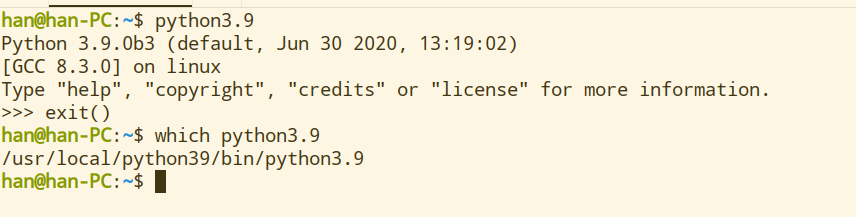
安装python3依赖版本过低怎么办
Tofloor
poster avatar
终南
deepin
2020-07-04 21:29
Author
如题,系统15.11
Reply Favorite View the author
All Replies
avatar
终南
deepin
2020-07-04 21:32
#1
顶一顶
Reply View the author
avatar
Hello
deepin
2020-07-04 21:36
#2

那你只有编译一条路了。。。。。。。。。
Reply View the author
avatar
Hello
deepin
2020-07-04 21:41
#3
下载完你要编译的python
解压进入目录
./configure --prefix=(你要放的目录)
(不要直接运行configure,会覆盖系统python,放到单独的文件夹中就好)
按照提示安装依赖(如果依赖冲突了那就没辙了)
完成没有报错
make&make install
alien python3.8=(python可执行文件)
Reply View the author
avatar
Hello
deepin
2020-07-04 21:46
#4
alien是要写在.bashr文件中,最后还要source ./bashr.rc刷新一下
Reply View the author
avatar
bjhjf007
deepin
2020-07-04 22:30
#5
本帖最后由 bjhjf007 于 2020-7-4 14:32 编辑

补充一个细节,终端输入 echo  PATH=$PATH;/usr/local/python3.9/bin  >> /etc/profile

这样就可以直接在任意终端目录下运行了。

Reply View the author
avatar
SamLukeYes
deepin
2020-07-04 22:59
#6
干嘛装3.8的tkinter啊,软件源里有3.5的tkinter啊,确定软件源里没有了再用野包啊
Reply View the author
avatar
bjhjf007
deepin
2020-07-04 23:23
#7
https://bbs.deepin.org/post/196701
干嘛装3.8的tkinter啊,软件源里有3.5的tkinter啊,确定软件源里没有了再用野包啊 ...

python 官网下载源码,编译安装,很简单的。
Reply View the author
avatar
SamLukeYes
deepin
2020-07-04 23:25
#8
https://bbs.deepin.org/post/196701
python 官网下载源码,编译安装,很简单的。

不是,直接从发行版的软件仓库安装不是更简单?
Reply View the author
avatar
终南
deepin
2020-07-05 00:34
#9
https://bbs.deepin.org/post/196701
下载完你要编译的python
解压进入目录
./configure --prefix=(你要放的目录)

不懂就问,安装完以后从哪里打开啊,第一次手动编译还不太熟悉。
软链接所在的目录/usr/local/python3/bin下有两个可执行文件,但点击运行之后就没反应了
Reply View the author
avatar
Hello
deepin
2020-07-05 00:43
#10
https://bbs.deepin.org/post/196701
不懂就问,安装完以后从哪里打开啊,第一次手动编译还不太熟悉。
软链接所在的目录/usr/local/python3/bi ...

你把python放在哪个目录了?图片贴上来
Reply View the author
avatar
Hello
deepin
2020-07-05 00:44
#11
https://bbs.deepin.org/post/196701
不懂就问,安装完以后从哪里打开啊,第一次手动编译还不太熟悉。
软链接所在的目录/usr/local/python3/bi ...

--prefix=(你要放的目录)你一开始预编译选择的地址是哪里?理论上编译完成在你选择的文件夹bin下面有个叫python的sh文件,终端运行即可
Reply View the author
avatar
Hello
deepin
2020-07-05 00:46
#12
https://bbs.deepin.org/post/196701
不懂就问,安装完以后从哪里打开啊,第一次手动编译还不太熟悉。
软链接所在的目录/usr/local/python3/bi ...

emmm。。。。。。。python要在终端运行的,直接运行没用
Reply View the author
avatar
Hello
deepin
2020-07-05 00:48
#13
本帖最后由 cht 于 2020-7-4 16:52 编辑

你看来是编译成功了
在home下面ctrl + h ,打开.bashrc文件,在最下面加上一行
alias python3.8='/usr/local/python3/bin/python(看你可执行文件是啥喽)'
然后保存
主目录终端,运行source .bashrc
Reply View the author
avatar
Hello
deepin
2020-07-05 00:50
#14
自定义快捷语言后终端就可以直接python3.8打开了。理论上编译的包里面tk应该是有的
Reply View the author
avatar
Hello
deepin
2020-07-05 00:51
#15
本帖最后由 cht 于 2020-7-4 16:54 编辑

等下,忽然想到pip3 install tk是不是更快。。。。。。。
Reply View the author
avatar
Hello
deepin
2020-07-05 00:57
#16
不对,你安装tk为什么要deb包?pip不是更方便嘛
Reply View the author
Comments
lanrizhen
2020-07-05 01:24
最开始发现我以前下载过一个deb文件,后面不是因为以来没安装成么,就上官网下源代码按你的方法编译了
avatar
Hello
deepin
2020-07-05 01:08
#17
草,我真是庸医,就但看到python3不合依赖了
正确解决方法如下
sudo apt install tk-dev python3-tk
然后进入pycharm
pip3 install tk
输入import tkinter,就不会报错了


嘛。。。。。。。楼主应该不会打死我
3.8就留给楼主自己探索吧。。。。
Reply View the author
avatar
Hello
deepin
2020-07-05 01:09
#18
另一个方法是安装anaconda
Reply View the author
avatar
终南
deepin
2020-07-05 01:36
#19
https://bbs.deepin.org/post/196701
草,我真是庸医,就但看到python3不合依赖了
正确解决方法如下
sudo apt install tk-dev python3-tk

额,这次耗的时间有点多,还得复习呢
还是放假了以后再来折腾吧
Reply View the author
avatar
neko
deepin
Ecological co-builder
Q&A Team
2020-07-05 17:05
#20
anaconda不香吗
Reply View the author