请问Typora怎么添加到默认程序啊
Tofloor
poster avatar
155******39
deepin
2020-06-22 01:39
Author
特别喜欢用typora这个软件,但是发现一个问题就是md后缀的文件没法用typora默认双击打开,
哪位大佬知道如何处理的吗?


Reply Favorite View the author
All Replies
avatar
叶落随风
deepin
2020-06-22 02:02
#1
我的行,你的不行我就不知道了
Reply View the author
avatar
Maicss
deepin
2020-06-22 02:04
#2
这是商店的问题,深度给重新打包了,但是可能是由于失误,到现在也没改。。
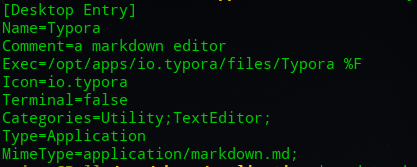
首先在终端运行sudo dedit /usr/share/applications/io.typora.desktop
在exec一项的最后加上一个“ %F“
再在末尾添加一行“MimeType=application/markdown.md;”
如图所示:

然后保存即可。此时就可以从md文件的打开方式中看到typora了
这个问题我很早就提过了,到现在也没改,希望重视一下https://bbs.deepin.org/user/48640

Reply View the author
avatar
158******91
deepin
2020-06-22 02:04
#3
支持下头像
Reply View the author
avatar
155******39
deepin
2020-06-22 02:09
#4
本帖最后由 ramboshen 于 2020-6-21 18:16 编辑
https://bbs.deepin.org/post/196211
这是商店的问题,深度给重新打包了,但是可能是由于失误,到现在也没改。。
首先在终端运行sudo dedit /usr ...

万分感谢,我试试哈。确实方法可以。
Reply View the author
avatar
155******39
deepin
2020-06-22 02:10
#5

大胆李鬼
Reply View the author
avatar
jingle
deepin
2020-06-22 17:27
#6
https://bbs.deepin.org/post/196211
这是商店的问题,深度给重新打包了,但是可能是由于失误,到现在也没改。。
首先在终端运行sudo dedit /usr ...

https://bbs.deepin.org/user/238373
Reply View the author
avatar
deepin-good
deepin
2020-07-03 18:17
#7
https://bbs.deepin.org/post/196211
这是商店的问题,深度给重新打包了,但是可能是由于失误,到现在也没改。。
首先在终端运行sudo dedit /usr ...

亲测有用,多谢
Reply View the author