萌新求助 有关于nvidia prime的问题
Tofloor
poster avatar
deepin
2020-06-19 10:48
Author
今天给我爸安利deepin20的时候遇到了这个问题
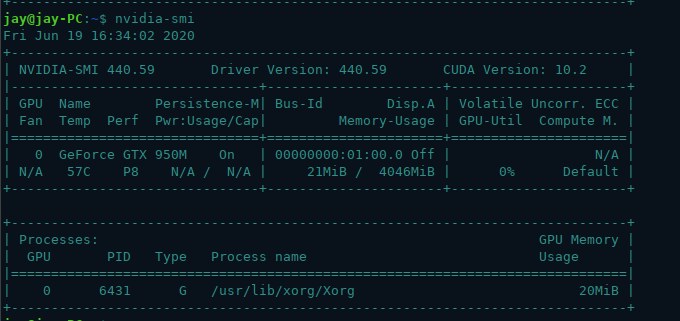
在安装了 nvidia-driver nvidia-settings 和 nvidia-smi之后 , 无法通过设置__NV_PRIME_RENDER_OFFLOAD=1和__GLX_VENDOR_LIBRARY_NAME=nvidia环境变量来让应用程序通过N卡运行, 但是nvidia-smi和nvidia-settings可以正常使用, 我想问问我要怎么解决这个问题


设备的简要信息:

Reply Favorite View the author
All Replies
avatar
jfy_99
deepin
2020-06-19 15:35
#1
参照这个帖子:https://bbs.deepin.org/post/191741
Xorg版本是否升级到了1.20.6及以上?以及nvidia-smi的输出有点怪,CUDA Version应该是10.2才对,不知道是不是驱动的问题。
Reply View the author
avatar
deepin
2020-06-19 22:53
#2
https://bbs.deepin.org/post/196110
参照这个帖子:https://bbs.deepin.org/post/191741
Xorg版本是否升级到了1.20.6 ...

cuda版本的问题是因为我没装libcuda,刚刚去装了下,解决了
参照了那个帖子去升级xorg,结果差点卸载整个dde
Reply View the author
avatar
忘记、过去
deepin
2020-06-19 23:35
#3
https://bbs.deepin.org/post/196110
cuda版本的问题是因为我没装libcuda,刚刚去装了下,解决了
参照了那个帖子去升级xorg,结果差点卸载整个 ...

那个大佬的帖子暂时用不了了,因为Debian-unstable更新太快,好多依赖又要更新了。暂时没啥好办法升级xorg-xserver......如果之前有人备份过的话可能可以?但可能性不大。
Reply View the author
avatar
风吹过的绿洲
deepin
2020-06-20 00:03
#4
https://bbs.deepin.org/post/196110
cuda版本的问题是因为我没装libcuda,刚刚去装了下,解决了
参照了那个帖子去升级xorg,结果差点卸载整个 ...

这个文件在哪配置呀?
有解决这个提示问题吗?
Reply View the author
avatar
deepin
2020-06-20 00:13
#5
https://bbs.deepin.org/post/196110
那个大佬的帖子暂时用不了了,因为Debian-unstable更新太快,好多依赖又要更新了。暂时没啥好办法升级xor ...

好吧,那就只能暂时放弃nvidia prime了
Reply View the author
avatar
deepin
2020-06-20 00:24
#6
https://bbs.deepin.org/post/196110
这个文件在哪配置呀?
有解决这个提示问题吗?

这个配置好像不用改,放在那就可以了
Reply View the author
avatar
风吹过的绿洲
deepin
2020-06-20 00:37
#7
https://bbs.deepin.org/post/196110
这个配置好像不用改,放在那就可以了

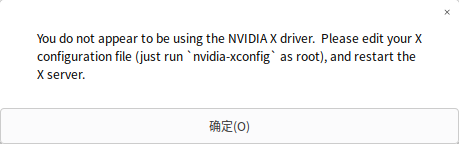
配置,我知道在哪里了。但是我的只有Xorg使用的是独立显卡,也安装了cuda
Reply View the author
avatar
jfy_99
deepin
2020-06-20 04:00
#8
可以试试Debian Testing软件源:
  1. deb https://mirrors.ustc.edu.cn/debian/ bullseye main contrib non-free
Copy the Code
或者使用时光机https://snapshot.debian.org/,添加指定日期的软件源,比如回到原帖日期:
  1. deb https://snapshot.debian.org/archive/debian/20200416T144937Z/ bullseye main contrib non-free
Copy the Code
不过这个站点没找到国内的镜像,直接使用可能会非常慢。
Reply View the author
avatar
deepin
2020-06-21 02:45
#9
https://bbs.deepin.org/post/196110
可以试试Debian Testing软件源:
或者使用时光机https://snapshot.debian.org/,添加指定日期的软件源,比 ...

依旧报错说libc6版本过低(需要版本>=2.29,然而v20的是2.28.7-1+deepin)
Reply View the author
avatar
jfy_99
deepin
2020-06-21 04:04
#10
https://bbs.deepin.org/post/196110
依旧报错说libc6版本过低(需要版本>=2.29,然而v20的是2.28.7-1+deepin)

指定从Testing软件源安装:
  1. sudo apt install -t testing xserver-xorg xserver-xorg-core
Copy the Code
应该会自动升级libc6等依赖,如果有冲突可以换成时光机里的软件源。不过绝大多数软件包都依赖它,升级需谨慎……
Reply View the author
avatar
ighack
deepin
2020-06-21 22:44
#11
https://bbs.deepin.org/post/196110
指定从Testing软件源安装:
应该会自动升级libc6等依赖,如果有冲突可以换成时光机里的软件源。不过绝大 ...

还是等稳定版的官方源更新吧。我现大都已经放弃了
Reply View the author
avatar
deepin
2020-06-21 23:23
#12
https://bbs.deepin.org/post/196110
还是等稳定版的官方源更新吧。我现大都已经放弃了

同感, 好不容易升了libc6和Xorg的版本之后发现还是不行
Reply View the author
avatar
ighack
deepin
2020-06-22 23:48
#13
本帖最后由 ighack 于 2020-6-22 15:49 编辑
https://bbs.deepin.org/post/196110
同感, 好不容易升了libc6和Xorg的版本之后发现还是不行

现在你有办法让程序运行在N卡上面吗?我就算改xorg.conf。虽然xorg-server运行在N卡上面。但玩steam根本就不调用N卡。不知道为什么玩游戏很卡。如果改配制让xorg-server运行在核显上,到是可以玩一下游戏。但也没办法调用N卡
Reply View the author
avatar
deepin
2020-06-23 23:12
#14
https://bbs.deepin.org/post/196110
现在你有办法让程序运行在N卡上面吗?我就算改xorg.conf。虽然xorg-server运行在N卡上面。但玩steam根本就 ...

没有,我现在连如何让xorg-xserver跑在N卡上都不会
Reply View the author