系统更新失败,怎么解决?
Tofloor
poster avatar
byang268
deepin
2020-06-09 00:09
Author
系统更新失败,怎么解决?
Reply Favorite View the author
All Replies
avatar
Maicss
deepin
2020-06-09 00:32
#1
更新失败的原因有很多
先尝试sudo apt update && sudo apt upgrade
这是更新缓存并更新系统
如果这个不成功把显示的内容放上来
Reply View the author
avatar
xxxos
deepin
2020-06-09 01:27
#2
如果是换源升级的v20,这次更新失败可以看看这里
https://bbs.deepin.org/post/195550#
Reply View the author
avatar
Guumi
deepin
2020-06-09 06:01
#3
本帖最后由 Guumi 于 2020-6-8 22:07 编辑
https://bbs.deepin.org/post/195705
更新失败的原因有很多
先尝试sudo apt update && sudo apt upgrade
这是更新缓存并更新系统

手动更新报错

还有什么时候能把chrome 默认安装的浏览器给换了,,,在20 beta 版中bbs.deepin.org 居然不能密码登入,什么mail.163 啊 mail.qq 啊,还要手机验证,截张图还要找u盘转移到V15版本电脑上来上传。
Reply View the author
avatar
haohu1193
deepin
2020-06-09 06:25
#4
卸载WPS,下载.deb包从新安装...

游览器换别的,或者在设置中--Cookie 及其他网站数据--允许所有Cookie---打开就可以登入了...

https://wdl1.cache.wps.cn/wps/do ... .1.0.9522_amd64.deb

下载后双击,先卸载,完成后再双击安装...不行就用命令卸载...

Reply View the author
avatar
jianguo922
deepin
2020-06-09 06:58
#5
Deepin  20bete版本检查更新,提示依赖错误,检查更新失败怎么办?
在终端输入:sudo apt-get install -f
-f参数的主要作用是是修复依赖关系,这条命令是修复依赖的.假如用户的系统上有某个package不满足依赖条件,这个命令就会自动修复,安装程序包所依赖的包。
系统检查更新之后,总说更新失败?
sudo apt update && sudo apt upgrade

Reply View the author
avatar
haohu1193
deepin
2020-06-09 07:38
#6
他这个不是,他这个是商店安装WPS出现的安装黑洞...最后的字体下载卡住了...无限循环...卸载WPS,安装.deb包就可以了...
Reply View the author
avatar
fang_kw
deepin
2020-06-09 19:24
#7
https://bbs.deepin.org/post/195705
更新失败的原因有很多
先尝试sudo apt update && sudo apt upgrade
这是更新缓存并更新系统

fkw@fkw-PC:~$ sudo apt update && sudo apt upgrade
命中:2 https://cdn-package-store6.deepin.com/appstore eagle InRelease
命中:1 https://uos.deepin.cn/printer eagle InRelease         
命中:3 http://dl.google.com/linux/chrome/deb stable InRelease
命中:4 https://community-packages.deepin.com/deepin apricot InRelease
正在读取软件包列表... 完成
正在分析软件包的依赖关系树      
正在读取状态信息... 完成      
有 1 个软件包可以升级。请执行 ‘apt list --upgradable’ 来查看它们。
正在读取软件包列表... 完成
正在分析软件包的依赖关系树      
正在读取状态信息... 完成      
正在计算更新... 完成
下列软件包的版本将保持不变:
  deepin-boot-maker
升级了 0 个软件包,新安装了 0 个软件包,要卸载 0 个软件包,有 1 个软件包未被升级。
Reply View the author
avatar
SamLukeYes
deepin
2020-06-09 19:40
#8
https://bbs.deepin.org/post/195705
fkw@fkw-PC:~$ sudo apt update && sudo apt upgrade
命中:2 https://cdn-package-store6.deepin.com/app ...

禁用UOS的源再试一试
Reply View the author
avatar
hyjokhyy
deepin
2020-06-09 19:56
#9
deepinv20已经解决 sudo apt update && sudo apt upgrade

Reply View the author
avatar
byang268
deepin
2020-06-11 17:36
#10
https://bbs.deepin.org/post/195705
deepinv20已经解决 sudo apt update && sudo apt upgrade

帮我看看
Reply View the author
avatar
jingle
deepin
2020-06-11 17:48
#11

cd  /etc/apt/sources.list.d/

把chrome的三方源删除或者屏蔽
Reply View the author
avatar
SamLukeYes
deepin
2020-06-11 17:52
#12
https://bbs.deepin.org/post/195705
cd  /etc/apt/sources.list.d/

把chrome的三方源删除或者屏蔽

仔细看了下错误信息,出问题的应该是deepin的软件源
Reply View the author
avatar
byang268
deepin
2020-06-11 17:59
#13
https://bbs.deepin.org/post/195705
仔细看了下错误信息,出问题的应该是deepin的软件源

我两台电脑,家里的和公司的都更新失败
Reply View the author
avatar
SamLukeYes
deepin
2020-06-11 18:02
#14
https://bbs.deepin.org/post/195705
我两台电脑,家里的和公司的都更新失败

可能是暂时性的网络问题,过两天再更新试试?
Reply View the author
avatar
jingle
deepin
2020-06-11 18:03
#15
https://bbs.deepin.org/post/195705
仔细看了下错误信息,出问题的应该是deepin的软件源

估计是网络的问题
Reply View the author
avatar
byang268
deepin
2020-06-11 18:05
#16
https://bbs.deepin.org/post/195705
可能是暂时性的网络问题,过两天再更新试试?

试了4-5天,家里和公司的电脑同样的问题
Reply View the author
avatar
SamLukeYes
deepin
2020-06-11 18:07
#17
https://bbs.deepin.org/post/195705
试了4-5天,家里和公司的电脑同样的问题

那我就不知道了
Reply View the author
avatar
haohu1193
deepin
2020-07-25 19:18
#18
https://bbs.deepin.org/post/195705
我的是这样,怎么办?
命中:1 http://store.jerrywang.top  InRelease
命中:2 https://community-packages. ...

teamviewer.com的源有问题...
到 etc/apt/sources.list.d 下,http://linux.teamviewer.com/deb stable InRelease 注解掉...
Reply View the author
avatar
haohu1193
deepin
2020-07-27 04:31
#19
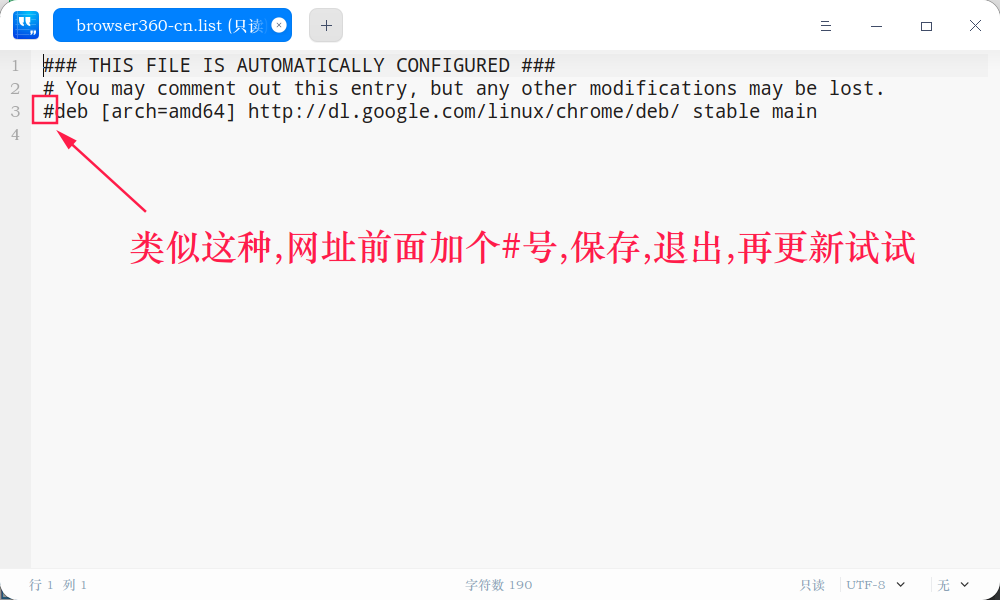
到 etc/apt/sources.list.d 下,查看XXXX.list文件,找到里面有 http://linux.teamviewer.com/deb stable 网址的文件...网址最前面加个#号,再更新试试...


随便附上一个右键管理员方式打开,方便修改...

下载...解压...双击安装...

dde-fm-root(以管理员身份打开deb).zip
Reply View the author
avatar
riotem
deepin
2020-07-27 22:58
#20
https://bbs.deepin.org/post/195705
更新失败的原因有很多
先尝试sudo apt update && sudo apt upgrade
这是更新缓存并更新系统

E: 软件源列表 /etc/apt/sources.list 第 6 行中的类别 ““deb” 无法识别
E: 无法读取源列表。
Reply View the author